80 Chapter 2 System Diagnostics and Statistics
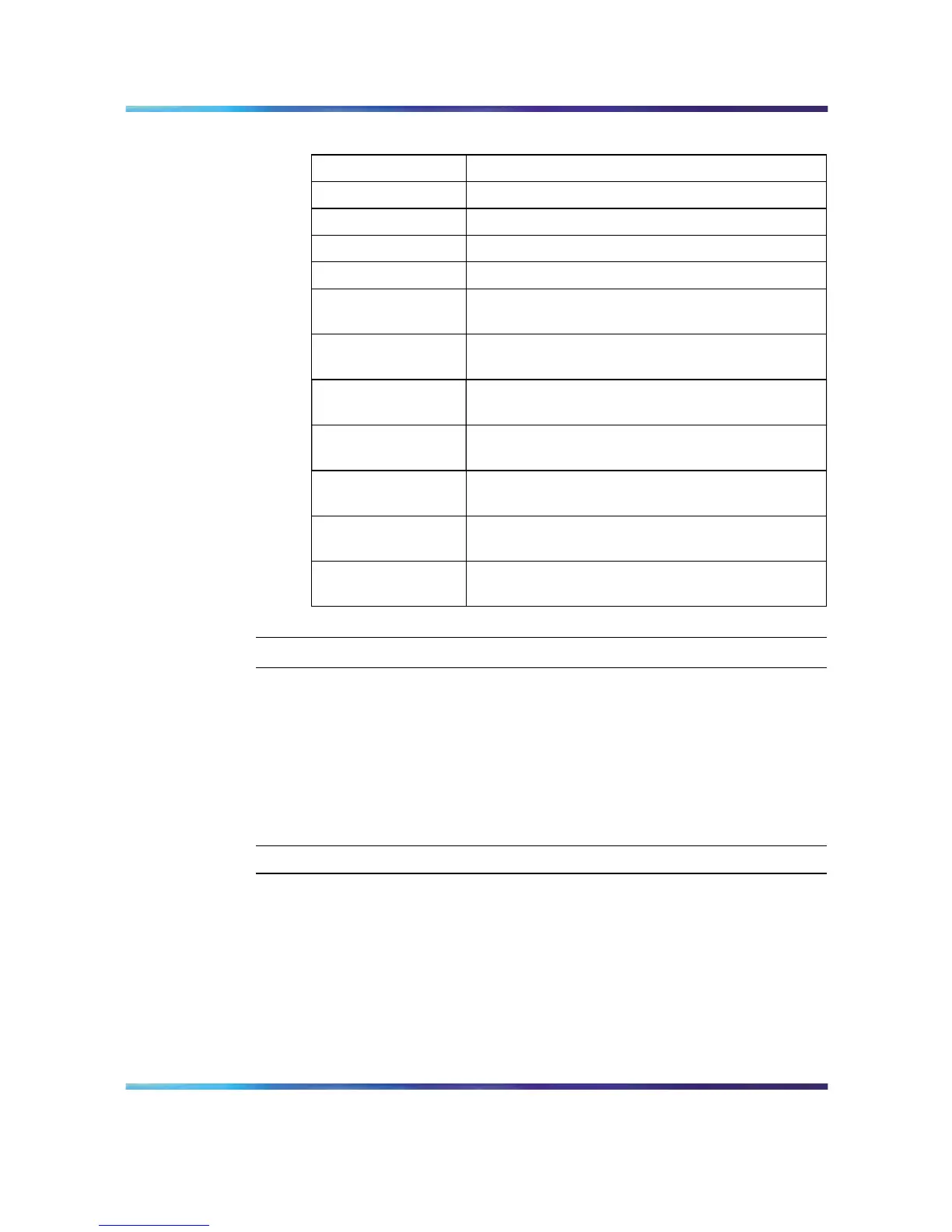
Port Error Summary fields
Field Description
Unit Displays the unit number in the stack.
Port Displays the port number of the unit.
Status Displays the status of the port (Enabled/Disabled).
Link Displays the link status of the port (Up/Down).
Speed/Duplex Displays the speed at which the port is operating,
as well as whether it is in half- or full-duplex mode.
FCS/Frame Errors Displays the number of frame check sequence
(FCS) and frame errors received on this port.
Collisions Displays the number of collisions errors received
on this port.
Single Collisions Displays the number of single collisions errors
received on this port.
Multiple Collisions Displays the number of multiple collisions errors
received on this port.
Excessive Collisions Displays the number of excessive collisions errors
received on this port.
Late Collisions Displays the number of late collisions errors
received on this port.
—End—
Click Update to refresh the statistical information.
Viewing interface statistics
To view statistical information for an interface, follow this procedure:
Step Action
1
Open the Interface Statistics screen by selecting Statistics >
Interface from the menu. This screen is illustrated in the following
table.
Nortel Ethernet Routing Switch 5500 Series
Configuration - System Monitor ing
NN47200-505 03.01 Standard
5.1 27 August 2007
Copyright © 2005 - 2007, Nortel Networks
.















 To Next Page