System logging 19
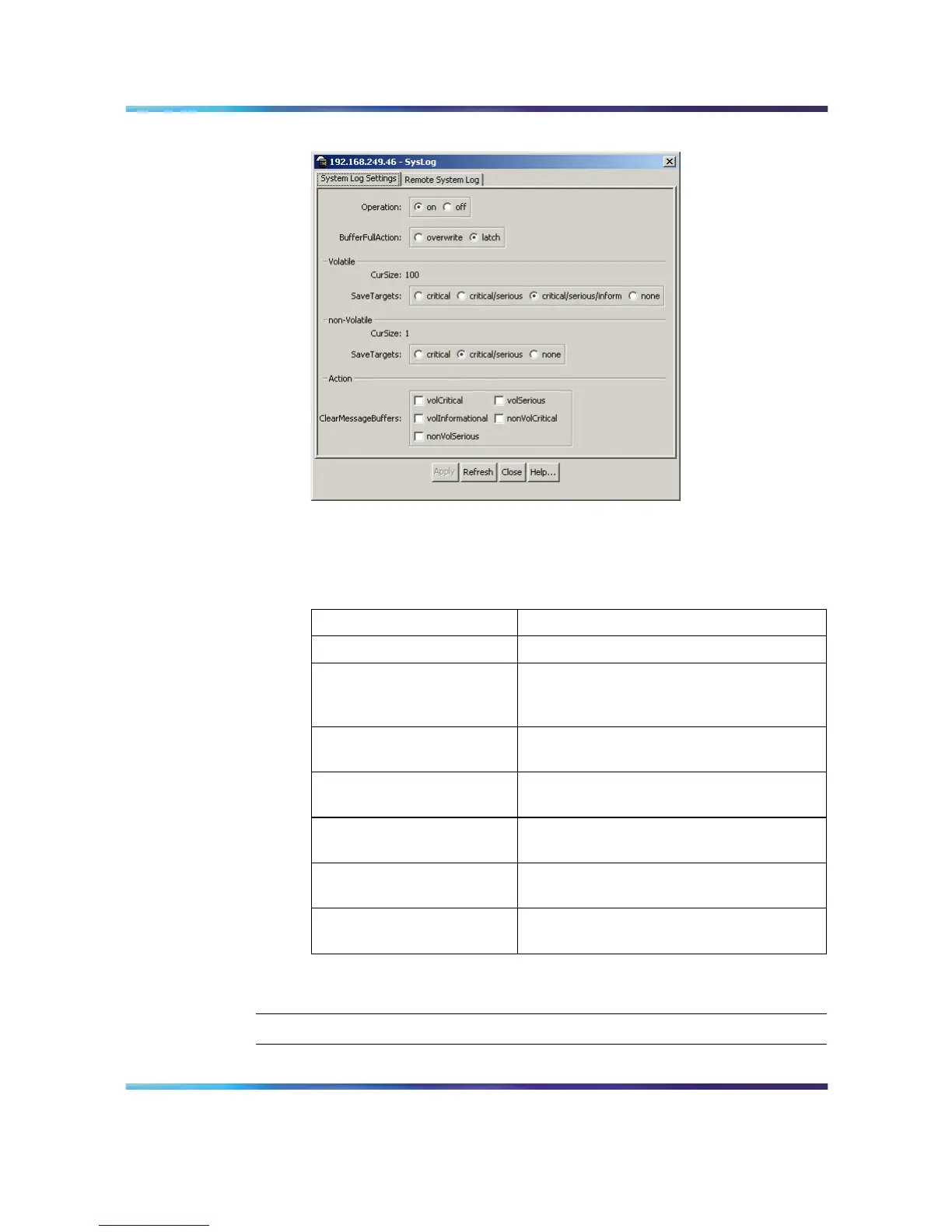
System Log dialog - System Log Settings tab
2
In the fields provided, configure the system log settings. The
following table outlines the fields on this screen.
System Log Settings fields
Field Description
Operation Turns the system log on or off.
BufferFullAction Specifies whether the system log
overwrites itself or discontinues the storage
of messages when the buffer is full.
Volatile - CurSize Shows the current number of messages
stored in volatile memory.
Volatile - SaveTargets Selects the severity of system messages
to save.
non-Volatile - CurSize Shows the current number of messages
stored in non-volatile memory.
non-Volatile - SaveTargets Selects the severity of system messages
to save.
ClearMessageBuffers Selects the sections of the system log to
delete.
3
Click Apply.
—End—
Nortel Ethernet Routing Switch 5500 Series
Configuration - System Monitor ing
NN47200-505 03.01 Standard
5.1 27 August 2007
Copyright © 2005 - 2007, Nortel Networks
.














 To Next Page