30 Chapter 1 General System Monitoring Considerations
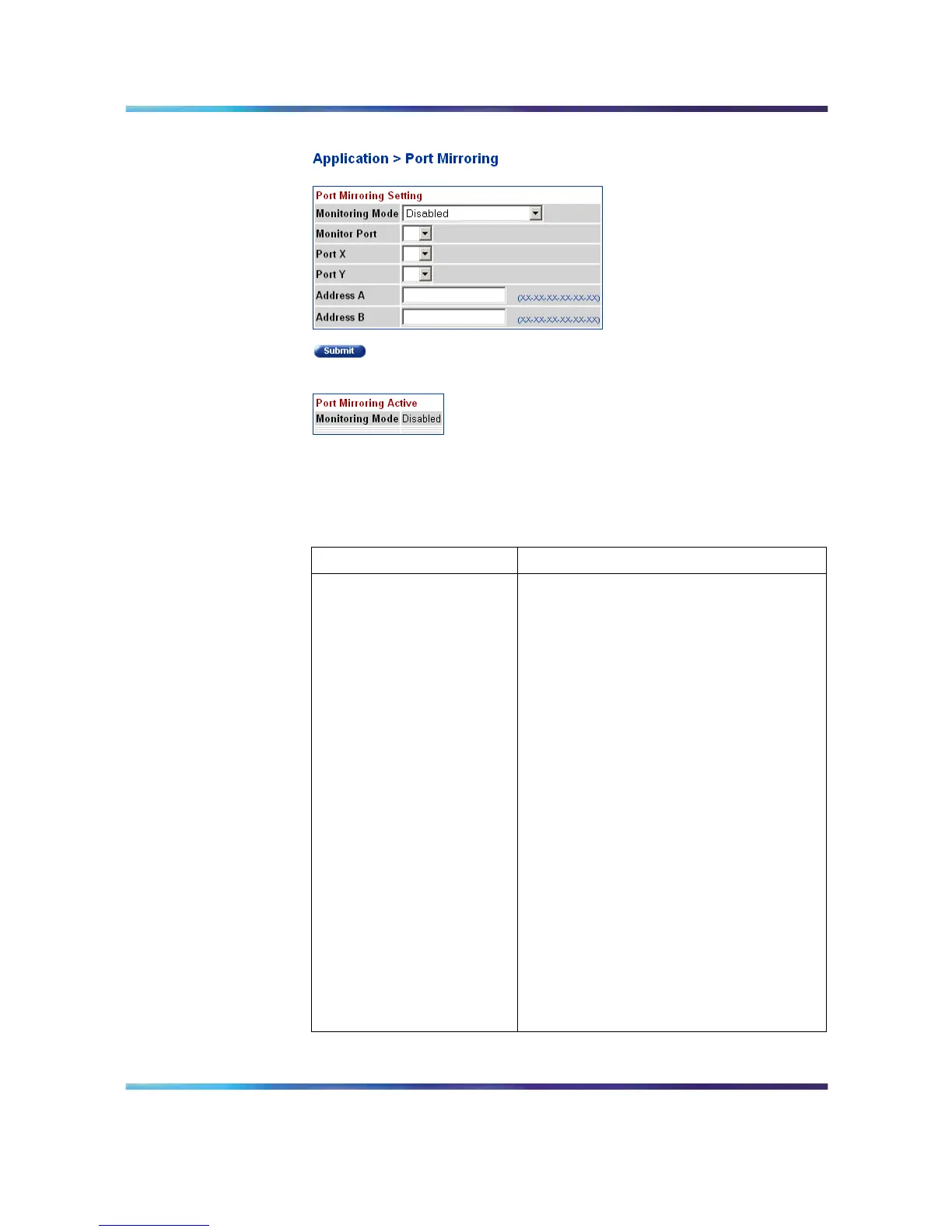
Port Mirroring screen
2
In the Port Mirroring Setting section, enter the new port mirroring
settings. The following table outlines the fields in this section.
Port Mirroring Setting fields
Field Description
Monitoring Mode Choose any one of the six port-based
monitoring modes or any one of the five
address-based monitor ing modes. The
following options are available:
•
Disabled
•
-> Port X
•
Port X ->
•
<-> Port X
•
-> Port X or Port Y ->
•
-> Port X and Port Y ->
• <-> Port X and Port Y <->
•
Address A -> any Address
•
any Address -> Address A
•
<-> Address A
• Address A -> Address B
•
Address A <-> Address B
The default value is Disabled.
Nortel Ethernet Routing Switch 5500 Series
Configuration - System Monitor ing
NN47200-505 03.01 Standard
5.1 27 August 2007
Copyright © 2005 - 2007, Nortel Networks
.














 To Next Page