APPENDIX A
PLC CONTROLLER
A - 3
Pre-Run Sequence:
1. Jog the material forward using the manual FWD JOG or MICRO buttons
on the Home screen or the JOG switch at the entry end of the machine.
The material must exit the shear and be detected by the panel detection
sensor.
2. Shear the material using the Shear Cycle button. At that point, the
machine will be fully loaded with material, the length counter will be reset
and the controller will be ready to run in automatic mode.
If the machine goes forward or reverse and the encoder does not detect movement, the
pre-run sequence will be reset and the controller will not run in automatic mode. This
would happen if the material was cut at the entry end of the machine at the end of a job or
at the end of a coil. This could also happen if the encoder did not have proper tension on
the material.
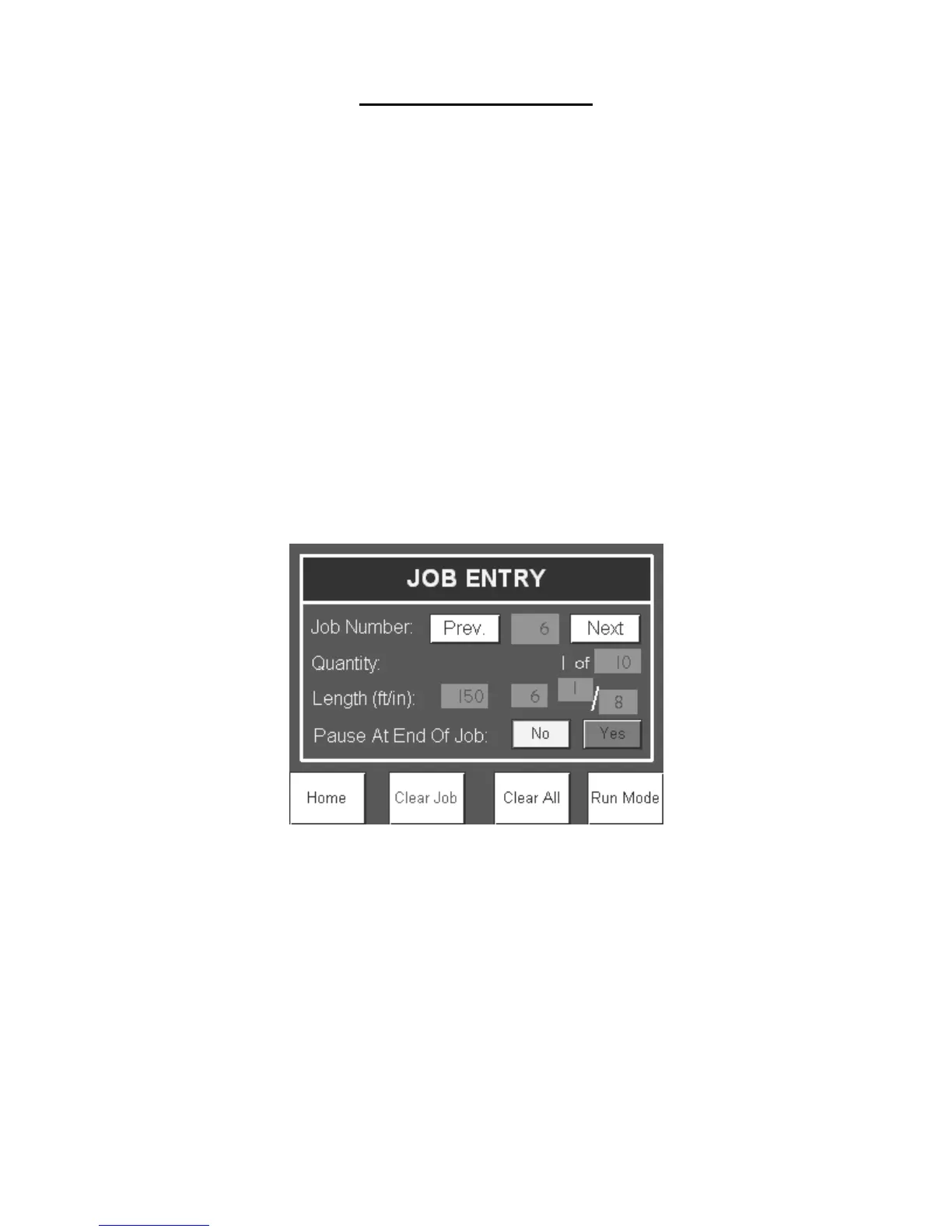
Job Entry
Jobs can be programmed to run automatically. From the Home screen, press the Job
Entry button to enter the Job Entry Screen.
Figure 88: Job Entry Screen
Programming Jobs
The controller can store up to ninety nine jobs or lengths, called: Job Numbers. Press the
Previous and the Next buttons to change the Job Number. The Job Number display is
also an input in order to skip many jobs at a time. Press the Job Number display and
enter the desired job number to program or run.
Enter in the quantity of parts to run and the length of the part.
Specify if the machine will pause at the end of job. If Yes is selected, the machine will
stop after the job is done running. The user can then press Start to run the next job or
return to the Job Entry. If No is selected, the machine will run the current job and
automatically start running the next job. If yes is selected and there is no job


 To Next Page