APPENDIX A
PLC CONTROLLER
A - 2
Home
When the controller is turned on, it will automatically go to the home screen.
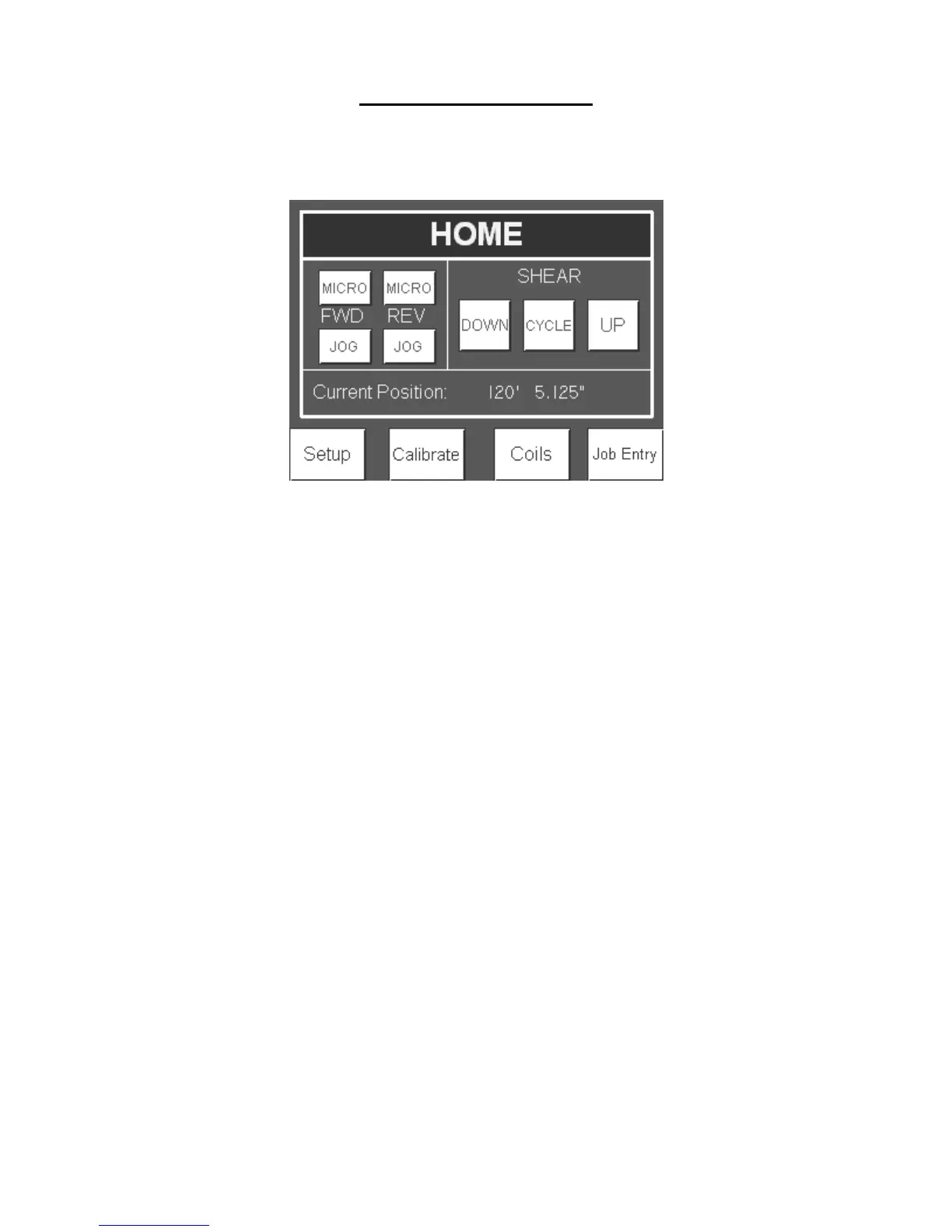
Figure 87: Home Screen
Manual Operation
The machine can be manually operated from the home screen by pressing the Jog and
Shear buttons.
JOG:
FWD and REV JOG buttons will jog the machine forward and reverse as long as the
button is depressed. When the JOG buttons are released, the action will stop. The FWD
and REV MICRO buttons will jog the material approximately ¼" each time the button is
pressed.
SHEAR:
The shear UP and DOWN buttons are momentary and will act in a similar manner as the
jog buttons. The SHEAR CYCLE button only needs to be pressed once and the shear
will go to the bottom of the stroke and back up to the top. At any time during the
shearing cycle, the UP button on the display or red stop button next to the screen can be
pressed to return the shear to the top. CAUTION: The shear will stop without returning
to the top if the E-Stop pushbutton on the manual control box below the PLC is pressed.
This button shuts off all power to the machine and machine controls. Upon start-up, the
shear will return to the top.
Automatic Operation
The pre-run sequence must be completed in the correct order before automatic operation
can be utilized.


 To Next Page