APPENDIX A
PLC CONTROLLER
A - 9
Coil Tracking:
From the Home screen, press the Coils button to change the coil of material to track. If
the security is turned on, a password must be entered if changes to the stored coils are
necessary. If security is turned off, the controller will display the current coil screen and
changes can be made without the password.
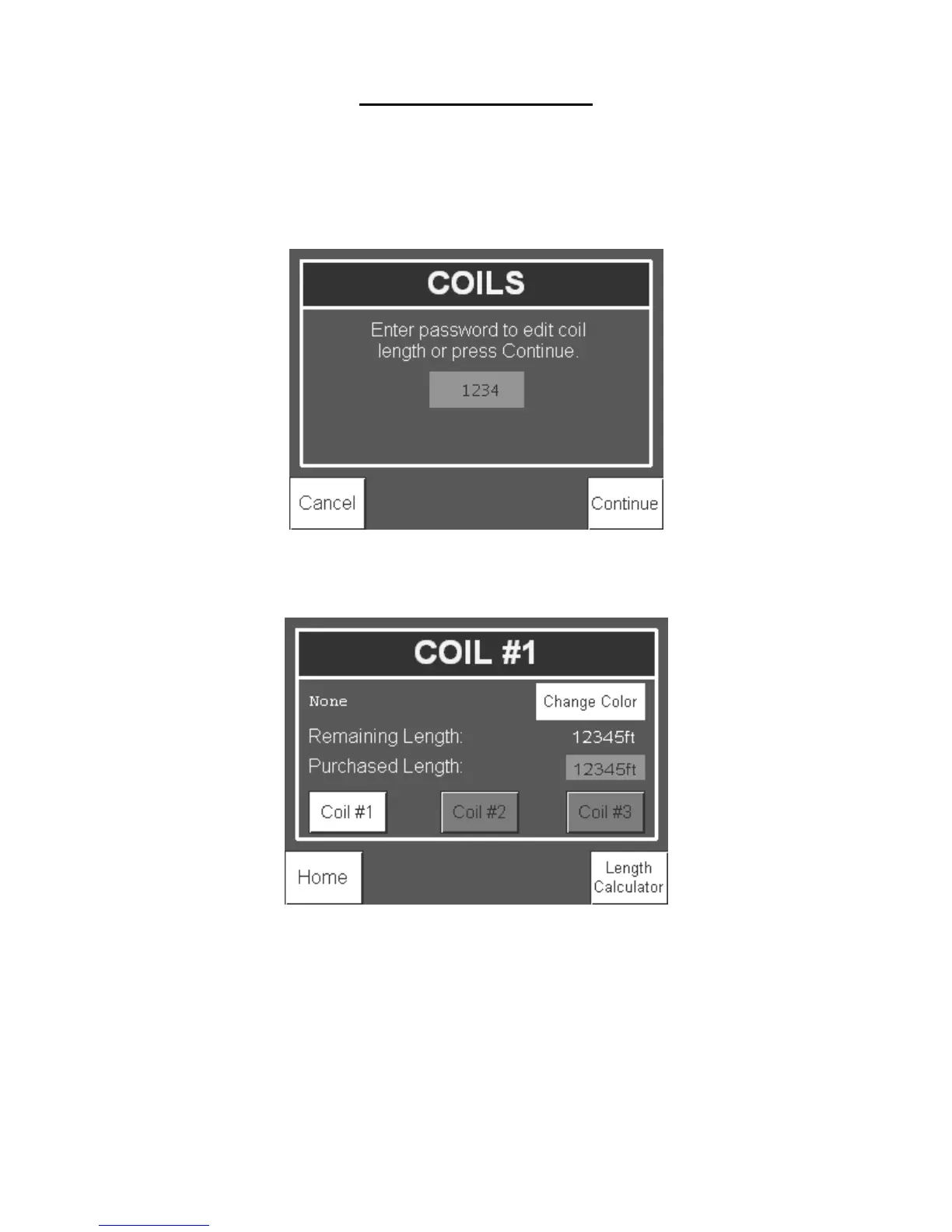
Figure 97: Coils Password Access Screen
Without the password, press Continue to view the Coils screen.
Figure 98: Coils Screen
The controller has the ability to track the length of three different coils of material. Press
Coil #1, 2 or 3 to change the coil to be run through the machine. When a new coil is
purchased, press the Purchased Length numerical display to input the length of the coil
into the controller. The Remaining Length will reset to the new purchased length. As
material is run through the machine, the controller will subtract material from the
remaining length. The coil (#1, 2 or 3) that is displayed when the Home button is pressed
will be the coil that the controller subtracts material from as the machine is run.


 To Next Page