87
While the NORM DIVE MAIN screen is displayed, press/
release the A button (< 2 sec) to view NORM DIVE ALT 1.
While the NORM DIVE ALT 1 screen is displayed, press/
release the A button (< 2 sec) to view NORM DIVE ALT 2.
While the NORM DIVE ALT 2 screen is displayed, press/
release the A button (< 2 sec) to view NORM DIVE ALT 3.
HINT:
ALT 1 is always Temperature, Tim e
ALT 2 displays EDT, Max Depth, TMT #, and A TR
ALT 3 displays selected GAS #, PO2, and FO2
While the NORM DIVE MAIN screen is displayed, press the
M button for 2 seconds to access the TMT 2-3 USE screen
to enter the Gas Switch menu or Buddy Pressure Check.
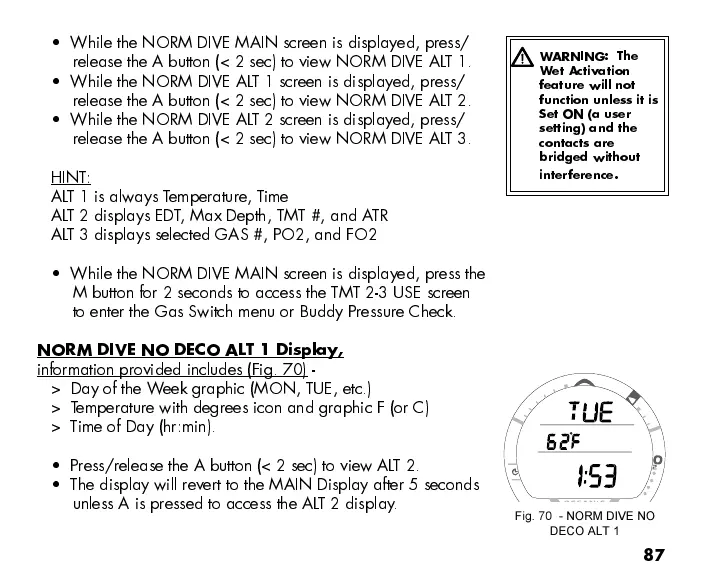
NORM DIVE NO DECO ALT 1 Display,
information provided includes (Fig. 70) -
> Day of the Week graphic (MON, TUE, etc.)
> Temperature with degrees icon and graphic F (or C)
> Time of Day (hr:min).
Press/release the A button (< 2 sec) to view ALT 2.
The display will revert to the MAIN Display after 5 seconds
unless A is pressed to access the ALT 2 display.
Fig. 70 - NORM DIVE NO
DECO ALT 1
WARNING: The
Wet Activation
feature will not
function unless it is
Set ON (a user
setting) and the
contacts are
bridged without
interference.



 To Next Page