8 Pulse Outputs
8-16
CJ2M CPU Unit Pulse I/O Module User’s Manual
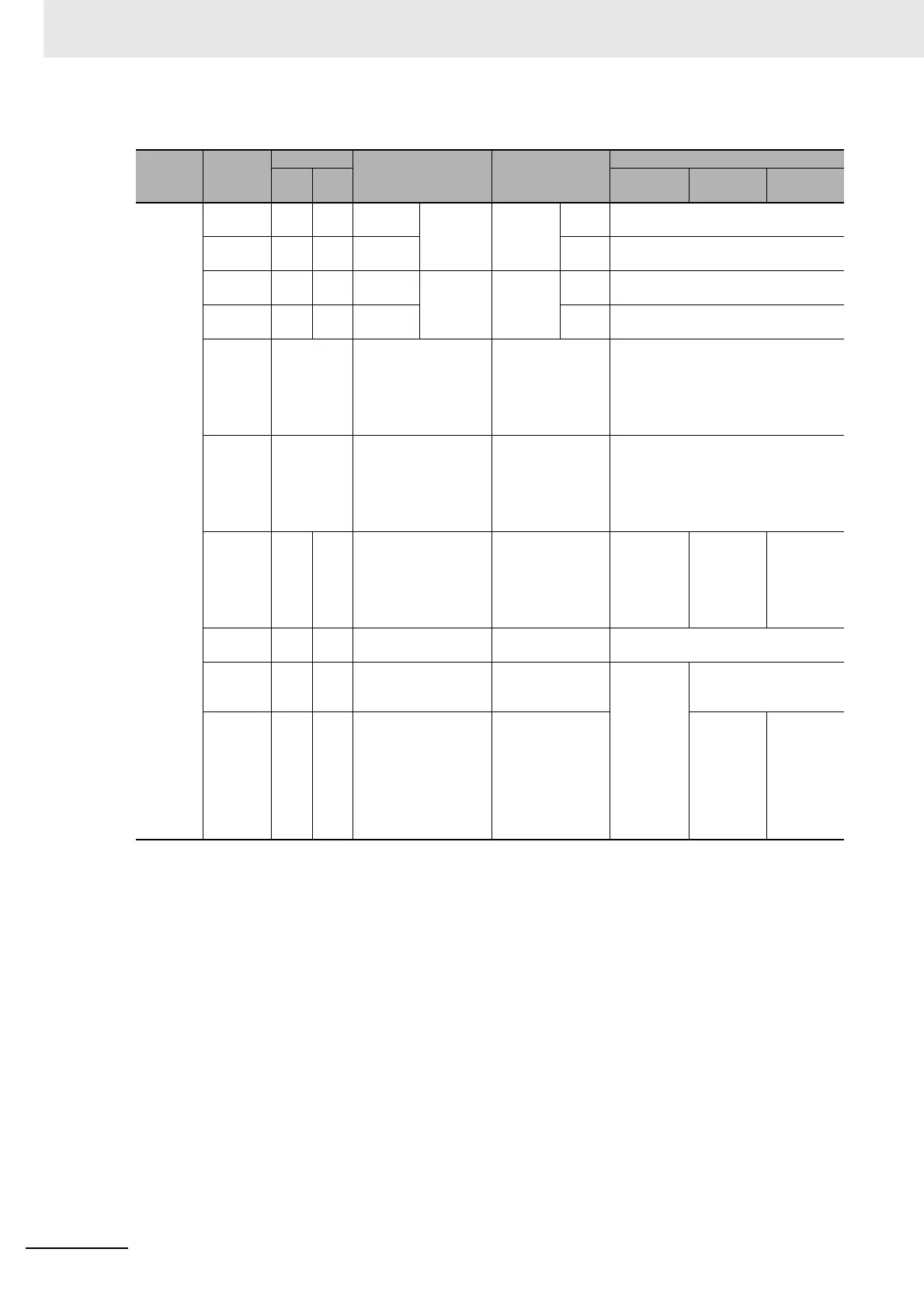
z Connections for Pulse Output 3
* Terminals numbers on the XW2D-@@G@ Connector-Terminal Block Conversion Unit.
Pulse I/O
Module
No.
Terminal
symbol
Terminals
Bit Signal
Origin search
Pin (*)
Operation
mode 0
Operation
mode 1
Operation
mode 2
1 (on the
left)
OUT12 33 A17 CIO
2963.02
PV stored
in A324
and A325.
CW/CCW CW Connect to Servo Drive's pulse input
(CW).
OUT13 34 B17 CIO
2963.03
CCW Connect to Servo Drive's pulse input
(CCW).
OUT11 32 B16 CIO
2963.01
PV stored
in A324
and A325.
Pulse and
Direction
Outputs
Pulse Connect to Servo Drive's pulse input
(PULS(886)).
OUT13 34 B17 CIO
2963.03
Direc-
tion
Connect to Servo Drive's pulse input
(SIGN).
--- Normal
inputs
The external signal
must be received as
an input and the input
status must be written
to A543.08 in the lad-
der program.
CW limit sensor Connect sensor to a normal input termi-
nal.
--- Normal
inputs
The external signal
must be received as
an input and the input
status must be written
to A543.09 in the lad-
der program.
CCW limit sensor Connect sensor to a normal input termi-
nal.
IN12 7 A4 CIO 2962.02 Origin input Connect to
sensor.
Connect to
the phase-
Z signal
from the
Servo
Drive.
Connect to
the phase-
Z signal
from the
Servo
Drive.
IN13 8 B14 CIO 2962.03 Origin proximity
input
Connect to sensor.
OUT15 36 B18 CIO 2963.05 Error counter reset
output
Not used. Connect to error counter
reset (ECRST) of the
Servo Drive.
IN15 14 B7 CIO 2962.05 Positioning com-
pleted signal (INP)
Not used. Connect to
the posi-
tioning
completed
signal (INP)
from the
Servo
Drive.






 To Next Page