87
Allocated CIO Area Words
Section 4-2
4-2-1 Software Switches 1 (Word n)
All the switches of Software Switch 1 execute a function when turned ON by
the user (in any PLC mode). The Unit will turn the switch to OFF, after the
command has been executed. All flags are set to OFF at Power-ON/Reset.
The Unit state is not restored after a Power-Down of the Unit.
Note If multiple bits in the range of Bit 00 to 03 are set simultaneously, the com-
mand is ignored, the bits are set to OFF again and the Mode command error
flag in Master status 2 word is set, see
4-2-5 Master Status 2 (Word n+6)
.
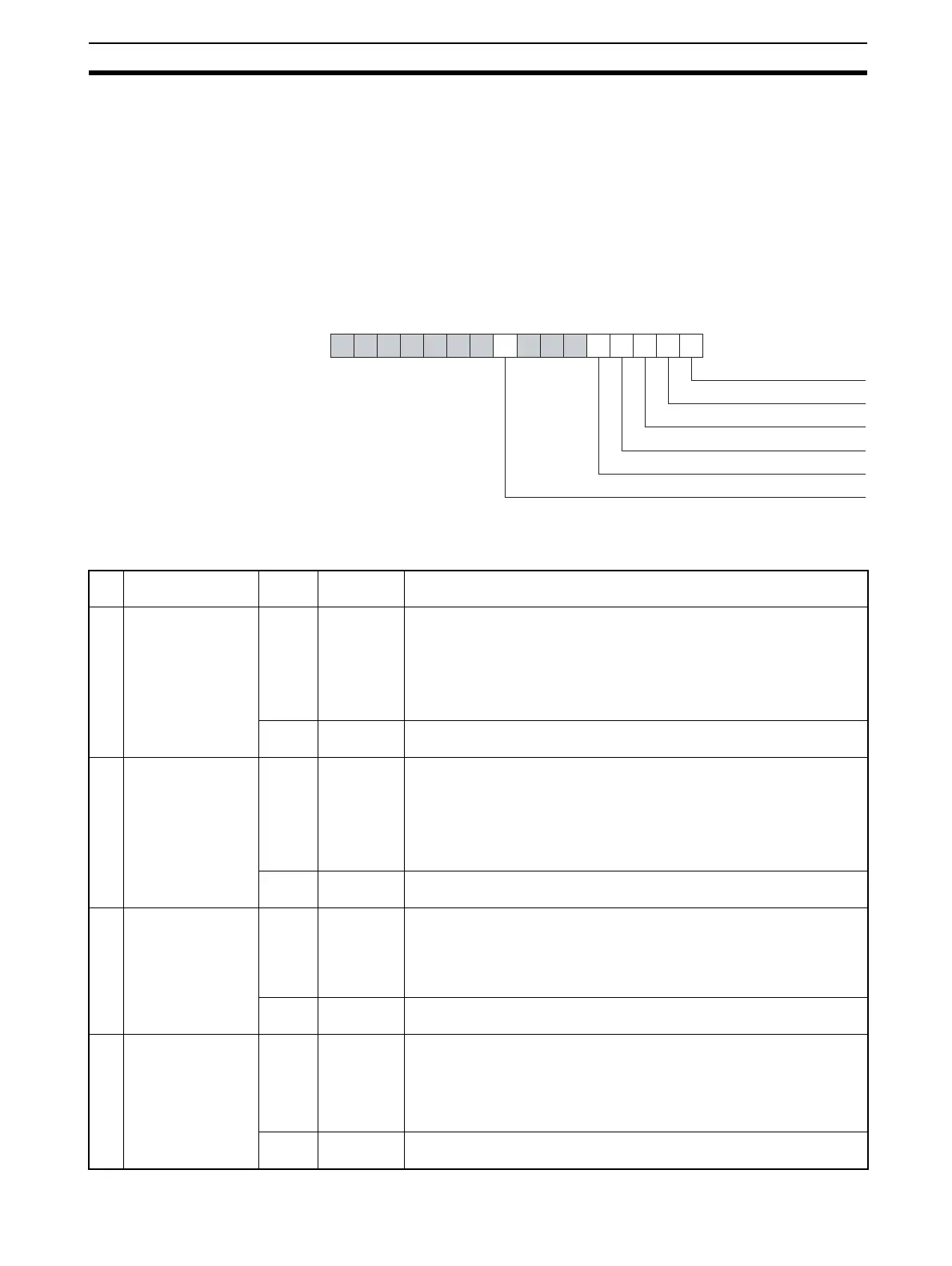
Word n [n = CIO 1,500 + (25 x unit number)]]
Word n
15 14 13 12 11 10 9 8 7 6 5 4 3 2 1 0
OPERATE mode
STOP mode
CLEAR mode
OFFLINE mode
Transmit Global-Control message
Clear new-diagnostics flags
Bit Name Status Controlled
by
Unit operation
00 Switch Master to
OPERATE mode
OFF→
ON
User Switches the Unit to the OPERATE mode. If the Unit is already in this
mode, no action will be taken.
In OPERATE mode the PROFIBUS-DP Master Unit will parameterize
all allocated slave stations, and commence I/O Data-Exchange.
Note Internal transition to the OPERATE mode will be performed from
or via the CLEAR mode.
OFF Unit If the PROFIBUS-DP Master Unit has entered the OPERATE mode, the
Unit will set this bit to OFF again.
01 Switch Master to
STOP mode
OFF→
ON
User Switches the Unit to the STOP mode. If the Unit is already in this mode,
no action will be taken.
In STOP mode, the Unit will be ONLINE, connected to the network, but
not communicate with its slave stations.
Note Internal transition to the STOP mode from the OPERATE mode
will be performed via the CLEAR mode.
OFF Unit If the PROFIBUS-DP Master Unit has entered the STOP mode, the Unit
will set this bit to OFF again.
02 Switch Master to
CLEAR mode
OFF→
ON
User Switches the Unit to the CLEAR mode. If the Unit is already in this
mode, no action will be taken.
In CLEAR mode the PROFIBUS-DP Master Unit will parameterize all
allocated slave stations, and it will read the input data of the slave sta-
tions, but it will send zeros or empty output messages to slave stations.
OFF Unit If the PROFIBUS-DP Master Unit has entered the CLEAR mode, the
Unit will set this bit to OFF again.
03 Switch Master to
OFF-LINE mode
OFF→
ON
User Switches the Unit to the OFF-LINE mode. If the Unit is already in this
mode, no action will be taken.
In the OFF-LlNE mode the Unit will be disconnected from the network.
Note Internal transition to the OFFLINE mode from the OPERATE
mode will be performed via the CLEAR and STOP mode.
OFF Unit If the PROFIBUS-DP Master Unit has entered the OFF-LINE mode, the
Unit will set this bit to OFF again.








 To Next Page