115
Configuring the Slave Stations
Section 6-3
After changing the address in the slave DTM Configuration User Interface, the
updated address will be shown in the Network View, next to the device name.
6-3 Configuring the Slave Stations
After adding each of the slave DTMs to the network, configurations have to be
selected for each of them. Setting up a configuration involves
• Selecting the proper I/O modules, which define the I/O data to be
exchanged when operational.
• Setting up the device parameters, which will be send to the device to
make or verify its settings.
• Selecting the group assignment, which defines the group of slave devices
each slave belongs to and to allow sending Global_Control messages to
this particular group.
All these settings will be downloaded to the Master Unit, which will send the
data to the individual slave devices over the PROFIBUS network.
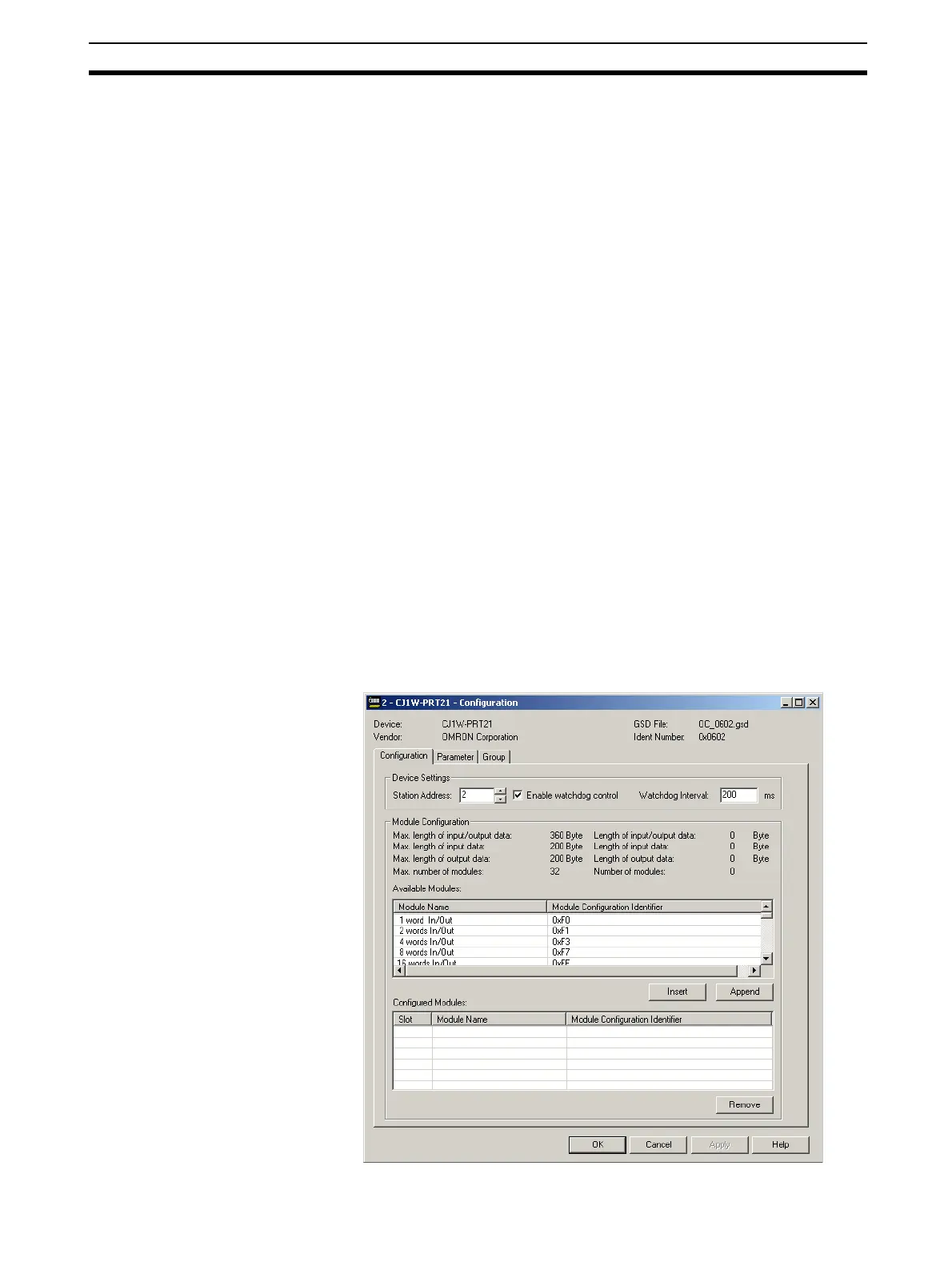
6-3-1 Defining the I/O Configuration
In order to define the I/O Configuration, the DTM Configuration User Interface
must be opened. To do this, either
• select the device in the Network Window and double-click the left mouse
button.
• select the device in the Network Window, right click the mouse and select
Configuration from the context menu.
Example The figure below, shows the DTM User Interface for the CJ1W-PRM21, the
first slave device in the example network.








 To Next Page