48
CX-Profibus
Section 3-2
3-2-2 CX-Profibus Main Window
The main application window of CX-Profibus will open with a New Project.
After the first start up, the Device Catalogue will be opened automatically. If
not, the Device Catalogue may be opened from the menu.
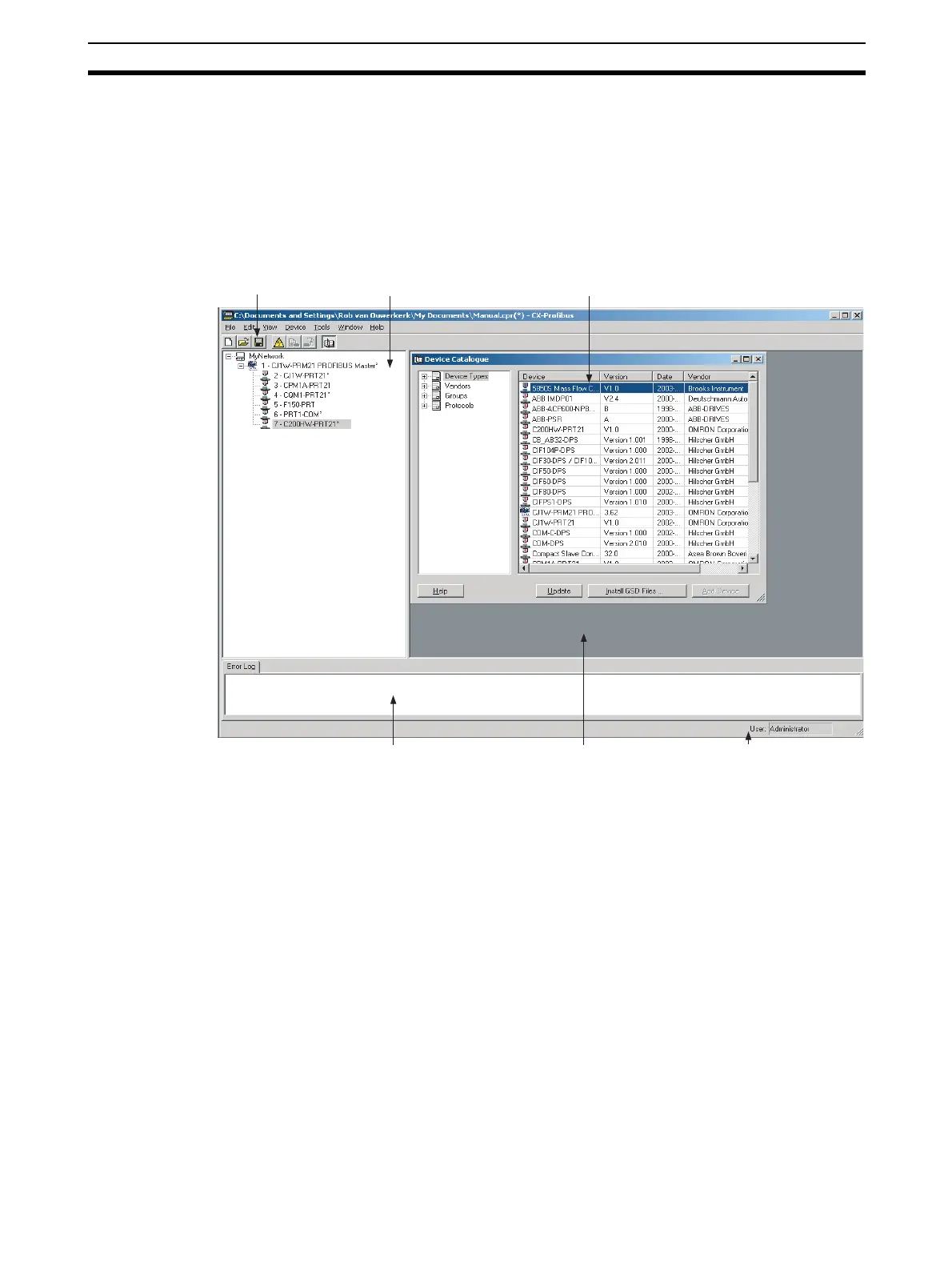
The figure below shows the opened CX-Profibus application window with a
Project already containing a network, and the Device Catalogue window
opened.
The main components in this window are
• The Network Window.
• The DTM / Catalogue Window.
• The Error Log Window.
• The FDT Monitoring Window (not shown in the figure above).
• The Main menu.
• The Tool Bar and the Status Bar.
Network Window The Network Window displays the structure of the PROFIBUS network in a
tree view format. The tree has at least three levels:
• The Project Level.
• The master level.
• The slave level.
Network Window Device Catalogue
Error Log and FDT Monitoring Windows DTM / Catalogue Window
Status Bar
Tool Bar








 To Next Page