131
Troubleshooting Using LED Indicators
Section 7-2
7-2-3 Unit Operational Errors
Unit Operational errors are errors which can occur during normal operation,
i.e. after normal startup.
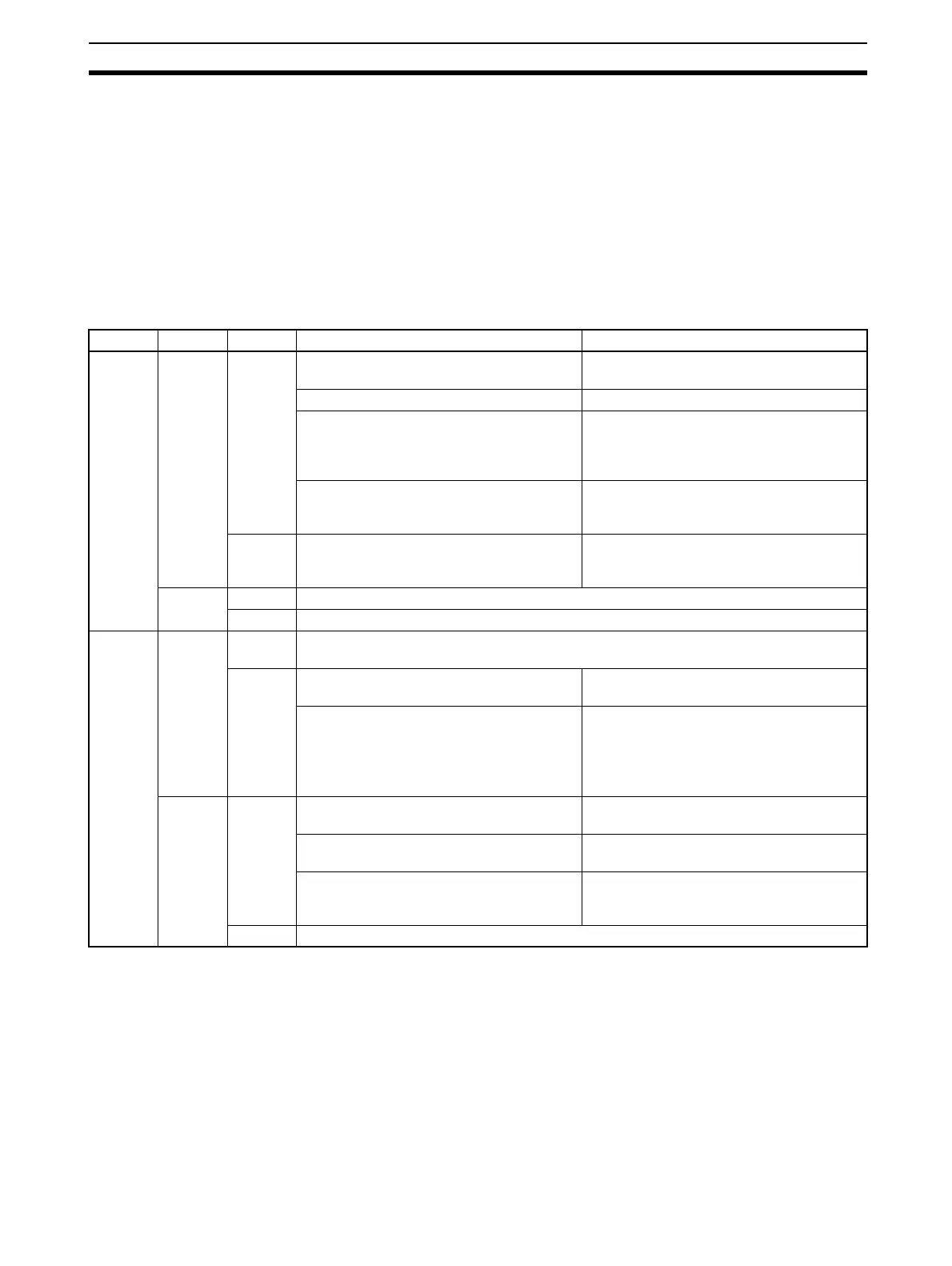
The error determination procedure uses the table below. To determine the
error, first find the status of the RUN LED indicator (left column). Then move
one column to the right and find the status of the ERH LED indicator. Then
move again one column to the right and find the status of the ERC LED indi-
cator. The probable error causes are listed to the right of the third column.
Unit Operational Errors.
Note If operational errors prevent the Unit from functioning correctly, the PRM, BST,
COMM and BF LED indicators will remain OFF.
RUN ERH ERC Probable cause Correction
Not lit Not lit Not lit Power is not being supplied to the CPU Unit
or the power supply voltage is too low.
Supply power. Make sure that the correct
voltage is being supplied.
The CPU Unit or Backplane is faulty. Replace the CPU Unit or the Backplane.
The mounting screws on the PROFIBUS-
DP Master Unit are loose (CS Series) or
the sliders are not properly locked into
place (CJ Series).
Tighten the mounting screws to the speci-
fied torque (CS Series) or lock the sliders
into place (CJ Series).
A fatal error has occurred in the Unit, pre-
venting it from running any program.
Restart the CPU Unit. If the problem per-
sists, replace the PROFIBUS-DP Master
Unit.
Lit A fatal error has occurred in the Unit’s pro-
gram. The appropriate error code is stored
in the error log.error
Restart the CPU Unit. If the problem per-
sists, replace the PROFIBUS-DP Master
Unit.
Lit Not lit Not a valid combination during operation.
Lit Not a valid combination during operation.
Lit Not lit Not lit Unit is functionally correct. If there are still problems, proceed to check on the other LED
indicators.
Lit A write-verify check failed, while writing the
error log to the non-volatile memory.
Send a ERROR LOG CLEAR FINS com-
mand to the Unit. Restart the Unit.
A write-verify check failed, while writing the
(new) configuration to the non-volatile
memory.
Check the Parameter set in CX-Profibus
and re-download the Parameter sets from
CX-Profibus.
If the problem persists, replace the PROFI-
BUS-DP Master Unit.
Lit Not Lit Memory in the CPU Unit is faulty. Restart the CPU Unit. If the problem per-
sists, replace the CPU Unit.
The CPU Unit is faulty. Restart the CPU Unit. If the problem per-
sists, replace the CPU Unit.
A cyclic Monitor time out has occurred, i.e a
timeout on exchange of data between the
Unit and the PLC CPU.
Restart the CPU Unit. If the problem per-
sists, replace the PROFIBUS-DP Master
Unit.
Lit Not a valid combination during operation.








 To Next Page