10
OMRON SCIENTIFIC TECHNOLOGIES INC.
Fremont CA USA
Tel: 1/888/510-4357 in USA and Canada
© OSTI 1209 PN99584-0050 Rev. E
Original Instructions
44
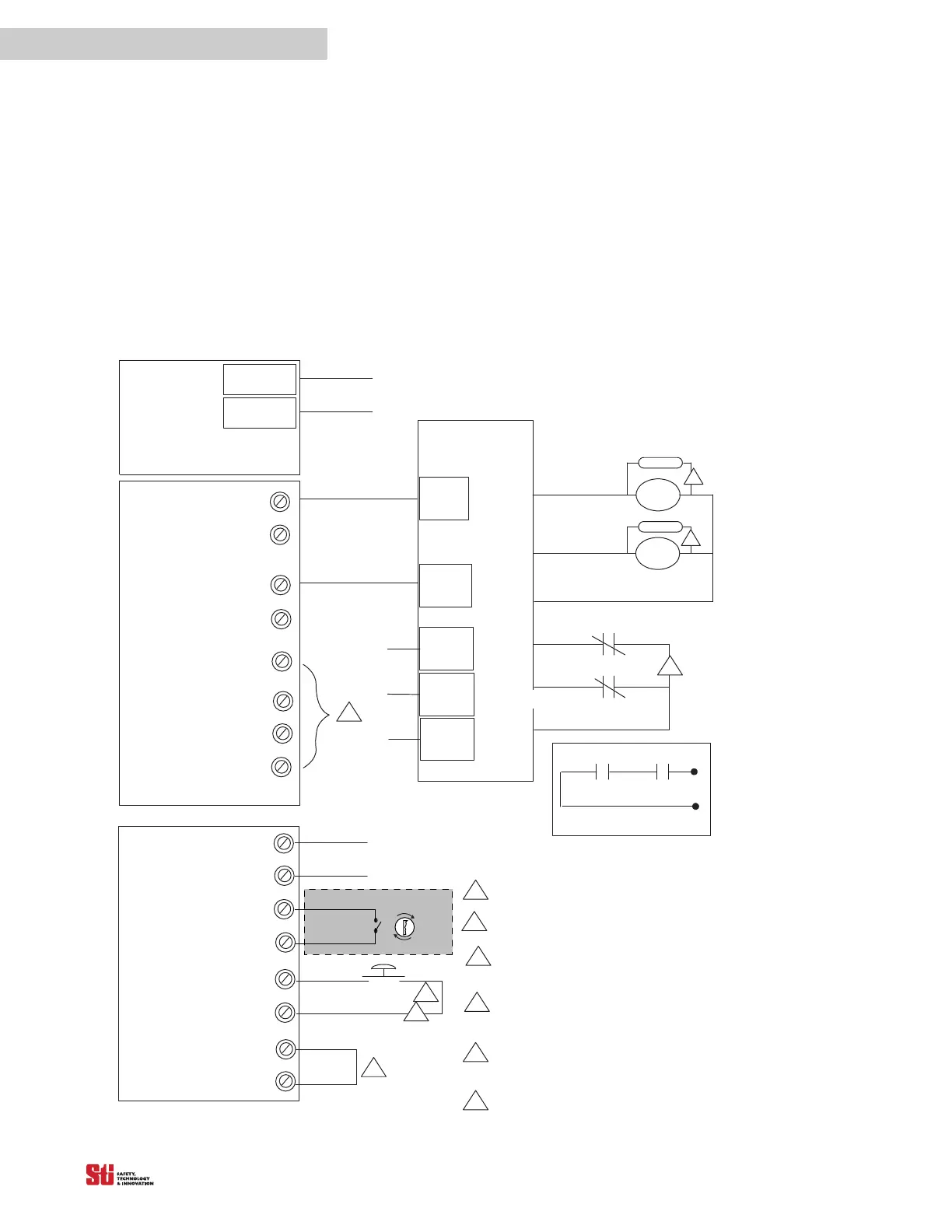
10.2.4 CONNECTING VIA A SAFETY MONITORING DEVICE
See Figure 10-7 for preferred connection diagram when connecting via a safety monitoring device.
Note that all safety devices are inputs to the Safety Monitoring
Device, which performs the MPCE
monitoring function.
NOTE: Normally PLCs are not control reliable, however Safety rated PLCs and monitoring devices
are now available.
TB1
Terminals on Main Board
+24 VDC
0 VDC
TB4
OSSD 1
Preferred Connection Diagram when Connecting Via a S afety Monitoring Device
Notes:
Auxilary outputs may also connect to PLC (optional).
No external power i s to be appl ied to terminal s on TB 7 & 8.
The relay contacts on the MPCE1and MPCE2 must be forced
guilded contacts. The S afety Monitoring Devi ce Must Monitor
the MPCE's Normally Closed Contacts.
Suppression devices should be installed across the coils of the
machine control relays. Two diode type devices are supplied in
the Documentation Kit.
A N. C. or N.O. Remote Start input is selectable; a momentary
N.O contact is shown. The Selection jumper, Jumper1, is located
on the User control board.
When MPCE is Inactive, a jumper is needed.
24VDC Supply Voltage
Machine control contacts
MPCE 1 MPCE 2
1
2
3
4
OSSD 2
Return
Return
NPN Aux. 1
Aux. +24V
PNP Aux. 2
Return
SAFETY
MONITORING
DEVICE
OSSD 1
OSSD 2
Safety
Interlocks
input
MPCE1
Suppressor
Suppressor
4
4
Safety
Mats
input
Other
Safety
Devi ces
Output 2
Output 1
MPCE 1
MPCE 2
MPCE
6
5
MPCE2
MONITORING
3
1
TB7
Terminals on Main Board
1
START
2
5
2
MPCE
1
2
1
2
Program
Sel 1
Sel 2
Mus t be accessibl e only by key.
MCS
6
Figure 10-7 Connecting with Safety Monitoring Device


 To Next Page