. . . . .
OMRON SCIENTIFIC TECHNOLOGIES INC.
Fremont CA USA
Tel: 1/888/510-4357 in USA and Canada
© OSTI 1209 PN99584-0050 Rev. E
Original Instructions
97
C.4.3 LCM-2 , MC4700 DIN CONTROLLER EXTERNAL DEVICE-NET CONNECTION
OMRON STI provides a 5-pin Phoenix-style connector for the LCM-2 controller.
The MC4700 includes a reference to this connection in its manual in section 3, figure
3-4. The
connections are also shown in figures 10-2 and 10-3.
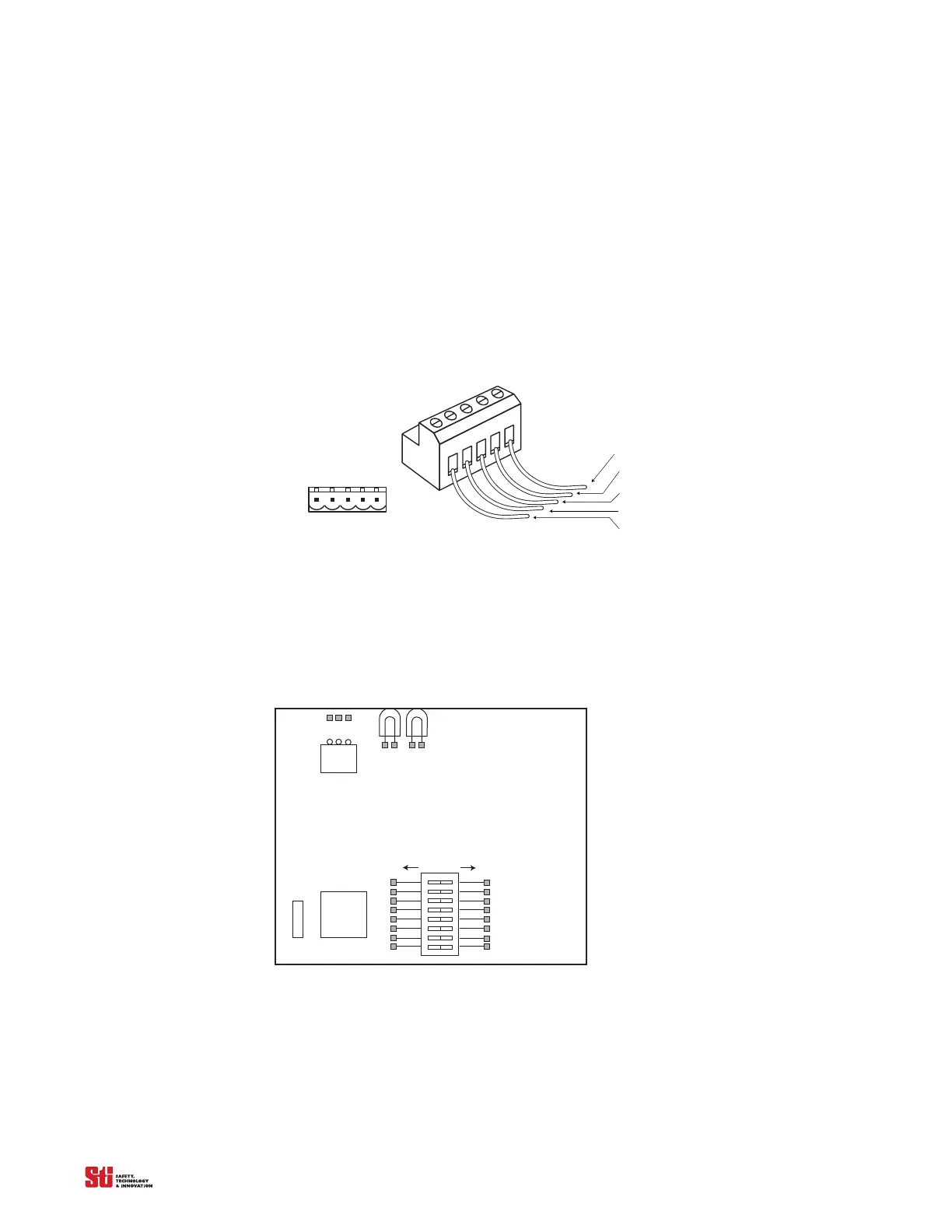
The following figure illustrates the wire insulation colors and pin outs for the screw connectors on the
LCM-2 Din module.
Note:
The DeviceNet wiring pin out for the LCM-2 is the opposite or mirror image of the DeviceNet
standard so, a standa
rd network connection may have to be re-wired for this controller.
Network Connector
(Female Contacts)
17 – V- (Black)
16 – CAN-L (Blue)
15 – Drain (Bare)
14 – CAN-H (White)
13 V+ (Red)
Device Connector
(Male Contacts)
1716151413
Figure C-4 Pin Outs for Phoenix-style connectors used in the STI MC4700, LCM-2 interface
C.5 DEVICENET CONFIGURATION SWITCHES
To accommodate DeviceNet configuration switches the LCM-2 (DIN version only) has DIP switches
located near the bottom of the Power/Device-Net board. This board is located on the top side of the
DIN module and looks similar to figure 1.
1
2
3
4
5
6
7
8
9
10
11
12
13
14
15
16
SW1
OFF = 0
ON = 1
JMP 1
123
Figure C-5 LCM-2 Power/DeviceNet board
These DIP switches can be used to set the Device-Net Baud Rate and Node number on the LCM-2
controller. When all of the switches are set to “1” or “ON” the LCM-2 is programmable via software
using a dedicated Device-Net configuration tool. When the DIP switches are used to set the Device-Net
configuration, use the following table to define the Baud Rate and the Node number. Note: The Node
number setting is a binary number from 0 to 63.


 To Next Page