29716AF 29
SYSTEM
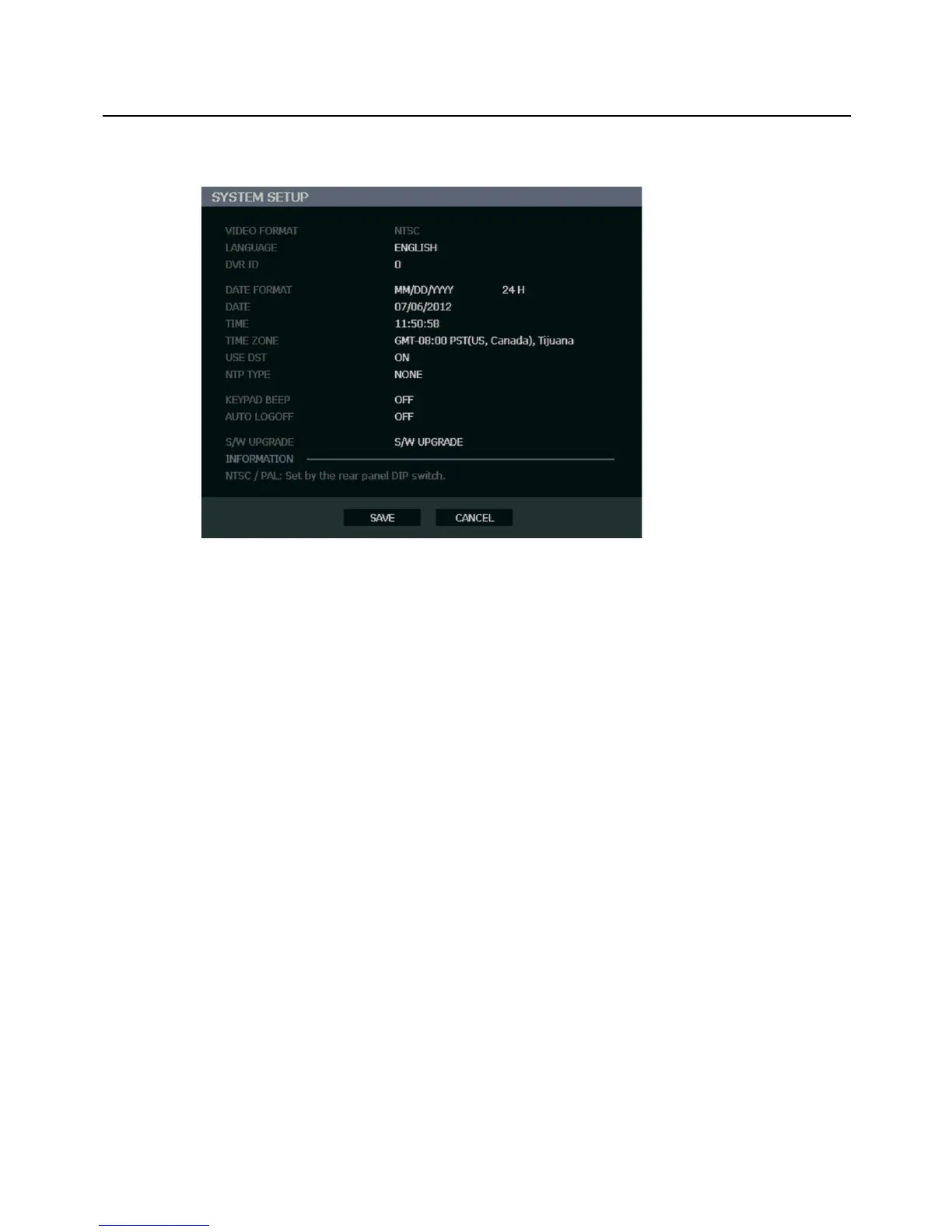
System Setup
To enter System Setup, press the SETUP key on the front of the recorder and press ENTER
to select SYSTEM SETUP. Use the arrow buttons on the front panel of the recorder or the
remote control to navigate the display. Select SAVE and press ENTER to update settings.
Video Format - NTSC / PAL, Display only.
Tip Use the PAL/NTSC switch on the back of the recorder to change the setting.
Language - ENGLISH / SPANISH / FRENCH [User Selectable].
DVR ID - Required for the operation of multiple units using the supplied IR remote control.
Each system must have a unique ID to function properly.
Date Format - US (MM-DD-YYYY) / EURO (DD-MM-YYYY) / ASIA (YYYY-MM-DD) – [User
Selectable].
Date - Press ENTER to select the DATE and use the number keys and/or arrow buttons to
set the date. Press ENTER again to deselect.
Time - Press ENTER to select the TIME and use the number keys and/or arrow buttons to
set the time. Press ENTER again to deselect.
Time Zone - Press ENTER to open the TIME ZONE window. Use the arrow keys to navigate
the list and press ENTER to make selection. Select EXIT and press ENTER to close the
window.
Note The date and time must be set manually; changing the time zone will not
automatically change the Time/Date display.



 To Next Page