Opticon
H15
User Manual
2-23
0
Number key “0”
.
Dot key
Enter
This key confirms data entry
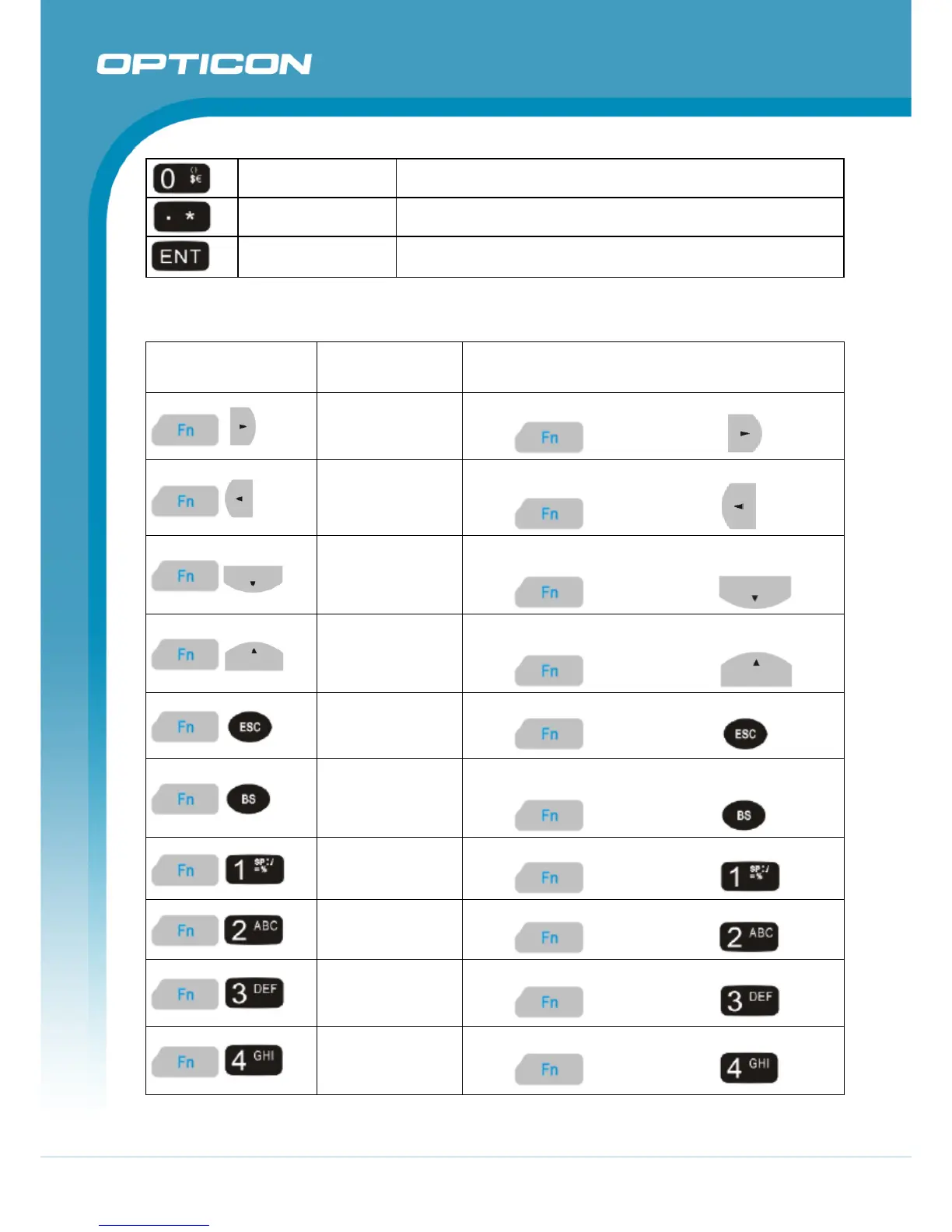
Table 2-6. Special Function key define
Key Sequence
Fn + Main
Function
Definition
Backlight
Increase
Increase the LCD backlight brightness (lighten):
press
key, followed by key.
Backlight
Decrease
Decrease the LCD backlight brightness (darken):
press
key, followed by key.
Page Down
Move the cursor down one page. (The cursor will
move continuously if button remains pressed):
press
key, followed by key.
Page Up
Move the cursor up one page. (The cursor will move
continuously if button remains pressed):
press
key, followed by key.
Audio Mute
Toggle the audio mute/on:
press
key, followed by key.
TAB (Tabulation)
Move the cursor to the next tab stop or the next
control (on a form):
press
key, followed by key.
@ (at)
Enter an {@, at}:
press
key, followed by key.
’
Enter a { ’ }:
press
key, followed by key.
+ (Plus Sign)
Enter a plus sign:
press
key, followed by key.
Paste
Use the “Paste” function:
press
key, followed by key.



 To Next Page