EasyManua.ls Logo

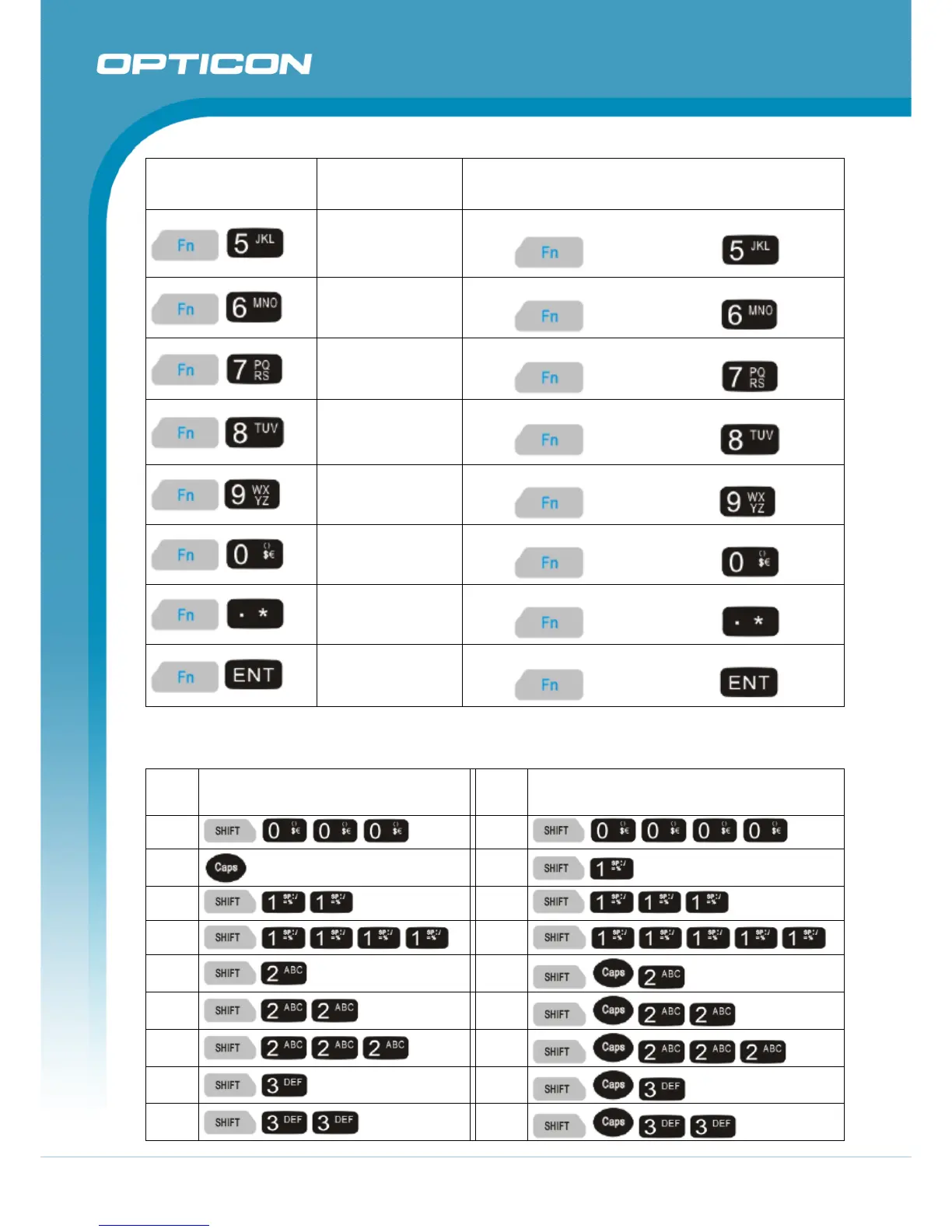
Opticon H15 - Table 2-7. Shift + Numeric Keys Define

Opticon H15
101 pages
Print Icon
To Next Page IconTo Next Page
To Previous Page IconTo Previous Page
Loading...
Opticon
H15
User Manual
2-24
Key Sequence
Fn + Main
Function
Definition
Del (Delete)
Use the “Delete” function:
press
key, followed by key.
(Minus Sign)
Enter a minus sign:
press
key, followed by key.
Copy
Use the “Copy” function:
press
key, followed by key.
(AND)
Enter an AND sign:
press
key, followed by key.
(Asterisk)
Enter an asterisk sign:
press
key, followed by key.
€ (euro)
Enter a Euro sign:
press
key, followed by key.
Start Menu
Display the Start menu:
press
key, followed by key.
(Backslash)
Enter a backslash:
press
key, followed by key.
Table 2-7. Shift + Numeric keys define
To
enter
Press the Keys
To
enter
Press the Keys
Caps
space

Table of Contents