Opticon
H15
User Manual
3-28
3.2.18. Power
ICON ITEM & FUNCTION
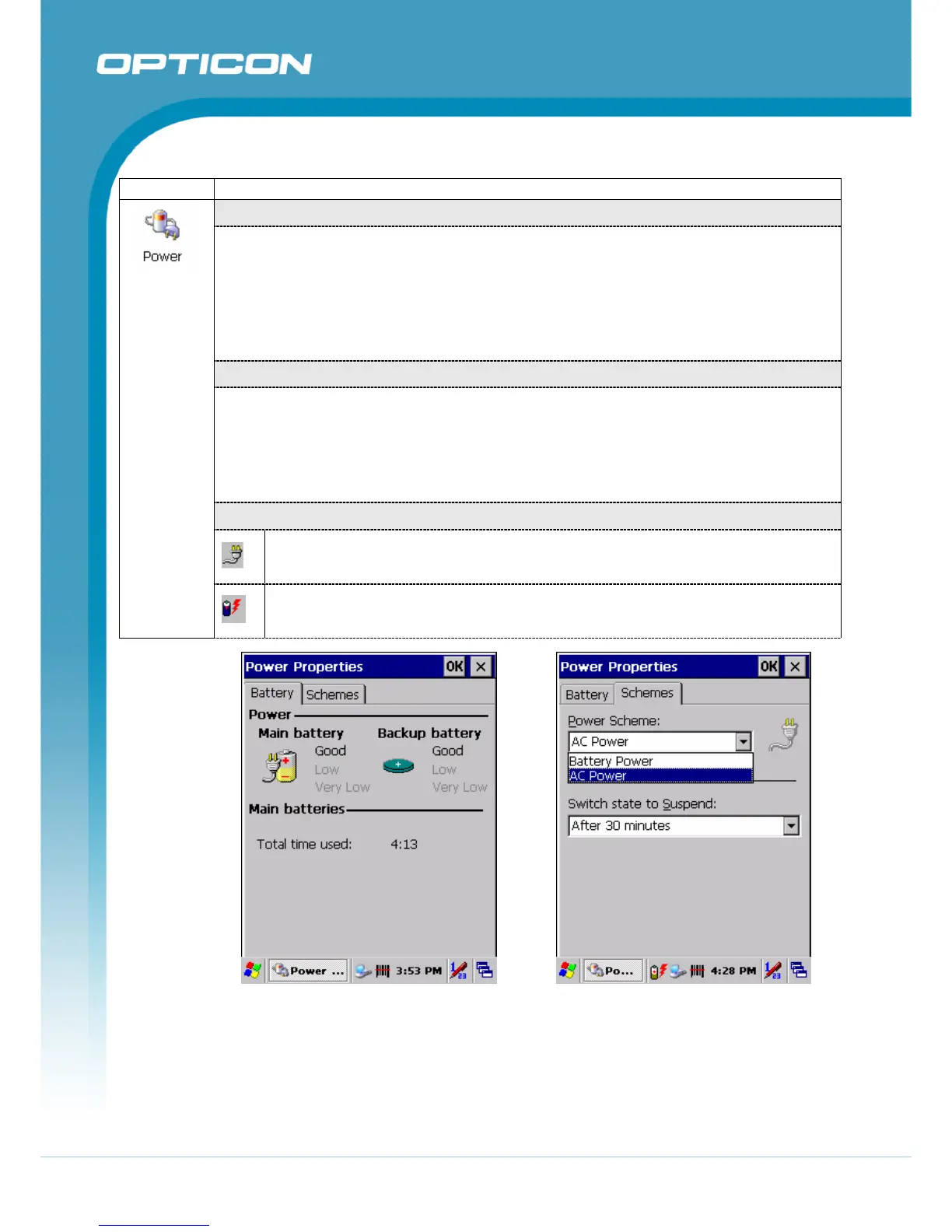
“Battery” Tab
(Figure 3-62)
• Provide change level indicators for Main battery and Backup battery.
• Provide remaining power capacity of main battery.
• If a “Main Batteries very Low” warning message shows, the remaining battery life
is around 30 minutes before Terminal shuts down (Figure 3-63).
• To exit Battery control panel, press “OK” from the command bar, or press <Enter>
key on keypad.
“Schemes” Tab
• The Scheme Tab allows you to determine the time to switch state to Suspend
mode when using either Battery Power or AC Power.
• Select Battery Power or AC Power as the power scheme from the pull-down list
(Figure 3-64).
• Select the time to suspend mode from the pull-down list.
(Figure 3-65, Figure 3-66)
Power Indicators
This ICON inside the Task Bar shows that AC adapter provides the power to
the Terminal and the Main Battery Charging Fully.
The ICON inside the Task Bar shows that AC adapter provides the power to the
Terminal and charging the main battery
Figure 3-62. Power Battery Figure 3-63. Power Schemes



 To Next Page