REF : M18-SM-001 Rev 02
9. REPARING
MYTHIC 18 Copyright© Orphée SA. All Rights Reserved. Page 63/68
9.5.3 Main board
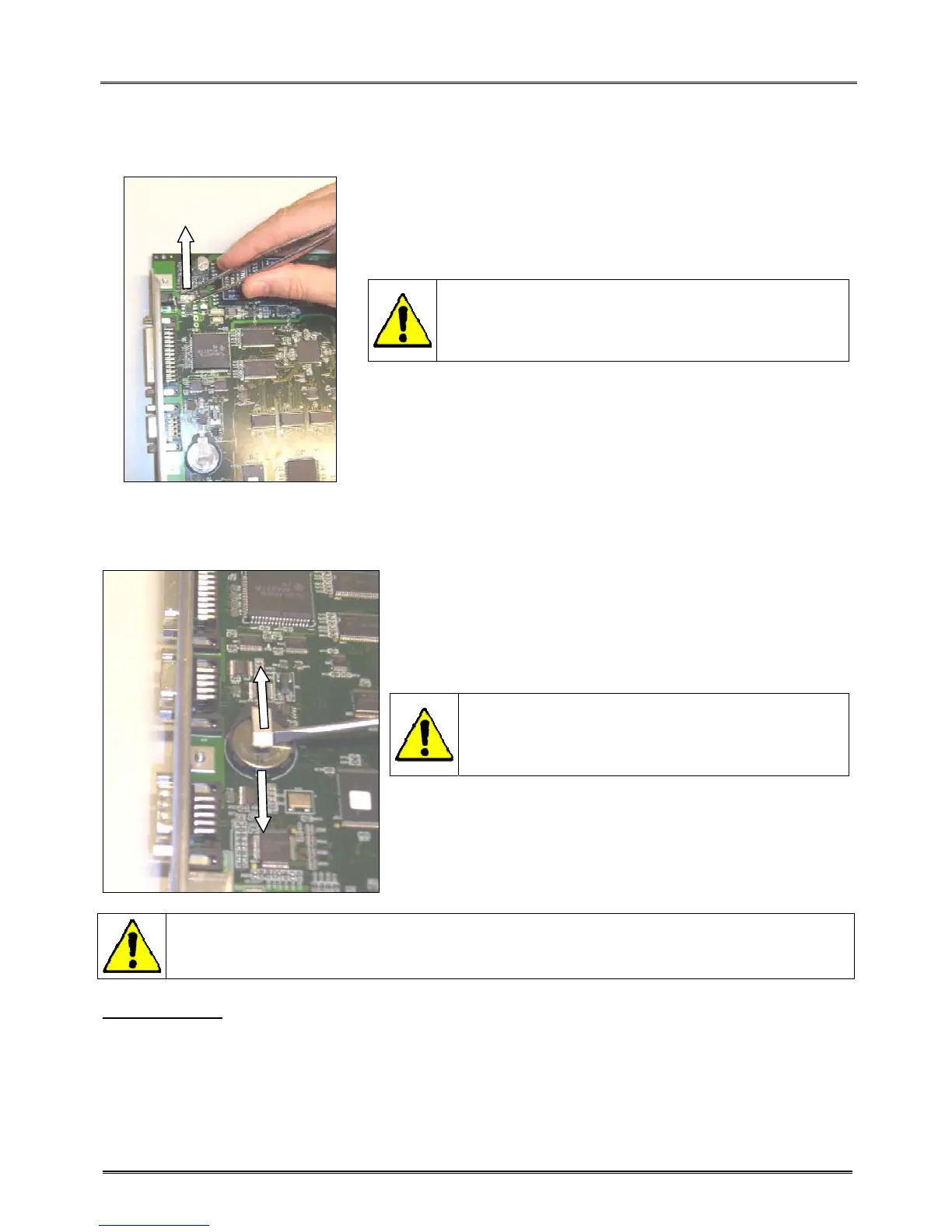
9.5.3.1 Fuse replacement
- This fuse protects the 24v circuit.
- Remove the fuse with a thin pliers and replace it by a new one.
- Use a Littelfuse NANO² Slo-Blo fuse model 0454
004 to replace the old one.
- It’s strictly forbidden to use an another type of
fuse.
9.5.3.2 Battery replacement
- This battery is only used to supply the real time clock.
- With a screwdriver lift the clips maintaining the battery.
- Slip down the battery to remove it and replace it by a new one.
- Use a Maxell battery model CR2016 to replace
the old one.
- It’s strictly forbidden to use an another type of
battery.
READ CAREFULLY THE FOLLOWING RECOMMENDATIONS.
Handling/storage
Never expose the battery to ultrasonic sound.
Exposing the battery to ultrasonic sound may cause short-circuiting because the inside material is broken
into pieces, leading to distortion, leakage, overheating, explosion, or fire.
Never subject the battery to severe shock.
Dropping, throwing or stomping on the battery may cause distortion, leakage, overheating, explosion, or fire.



 To Next Page