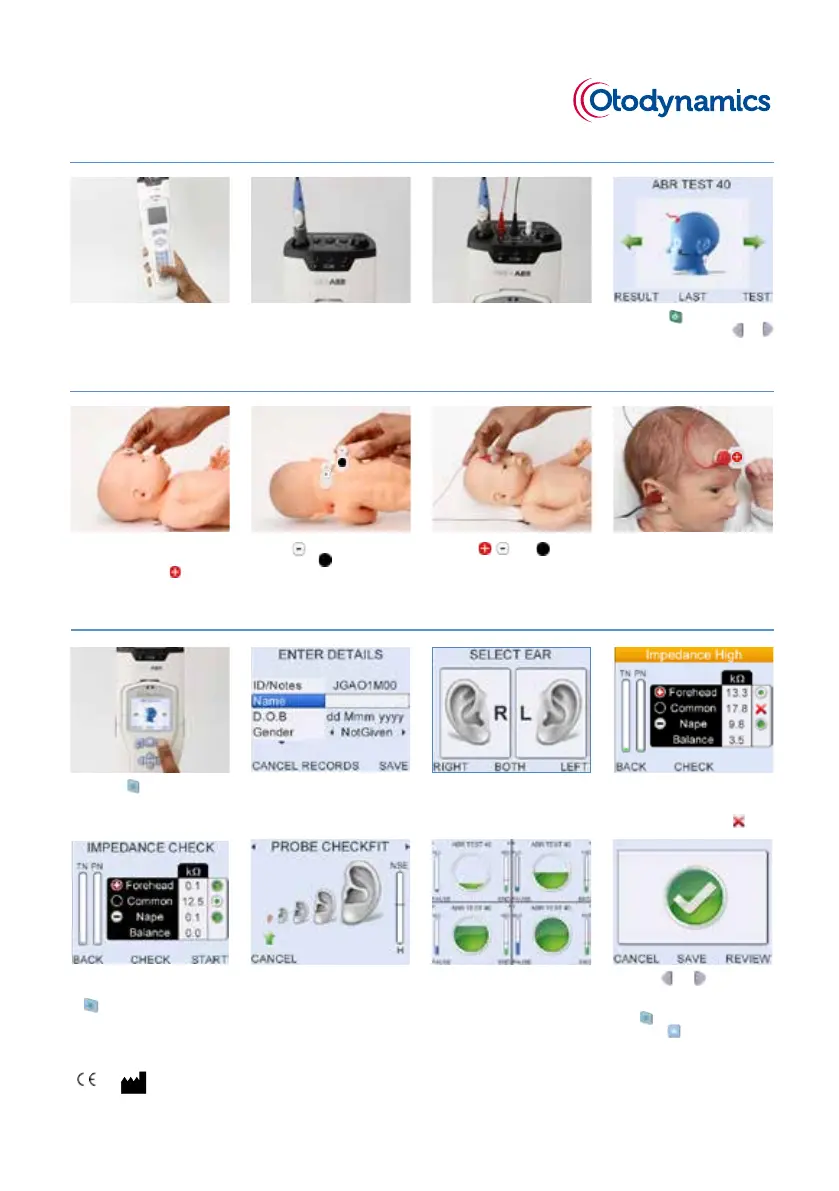
Otoport ABR QUICKSTART
1 Press the button to proceed
to the Patient menu.
4 Check impedances, total noise
(TN) and powerline noise (PN) are
acceptable. Reapply electrode if
an impedance is marked
.
Step 3. Performing the test
1 Ensure that the Otoport and the
ABR module are tightly secured
together.
Step 1. Setting up your device
2 Connect the OAE probe to the
probe socket, aligning the ‘key’
and ‘keyway.’ Screw up the
knurled sleeve until nger tight.
3 Plug the electrode connector
leads into the appropriate
sockets, following the colour
coding. Push in rmly.
4 Press the button to switch
on the Otoport. Use the and
arrow buttons to navigate to the
ABR screen.
3 Choose the ear to be tested, or
Both for a bilateral test.
2 Enter patient and test details
using the keypad and arrow
buttons.
3 Attach , , and
(common) electrodes.
4 Fit an appropriate sized tip
to the probe and insert the
probe in the ear to be tested.
Ensure electrodes are attached
correctly.
1 Prepare and clean the skin at
the electrode sites to ensure low
impedances. Apply electrode
to high forehead.
2 Apply electrode to the nape
of neck and (common)
electrode to the back of the
shoulder.
Step 2. Getting ready to test
5 The test will autostart if
conditions are good. Press the
button to manually start the
test.
6 The checkt screen shows t size
of the probe and acoustic noise
(NSE). ABR will start automatically
if conditions are acceptable.
7 The lling green circle
represents the progress of the
test towards a pass and the
rising NLO bar represents the
amount of data collected.
8 Use the and arrow buttons
to switch between data viewing
screens. To end the test, press
the button.
To save the test,
press the button.
Otodynamics Ltd. 30-38 Beaconseld Rd Hateld Herts AL10 8BB UK
www.otodynamics.com, International: +44 (0)1707 267667, Email: support@otodynamics.com © Otodynamics Ref: MOABRQ.7 May 2017
0120



 To Next Page