Otoport OAE+ABR
User Manual for Otoport DP+TE model
41
Getting started
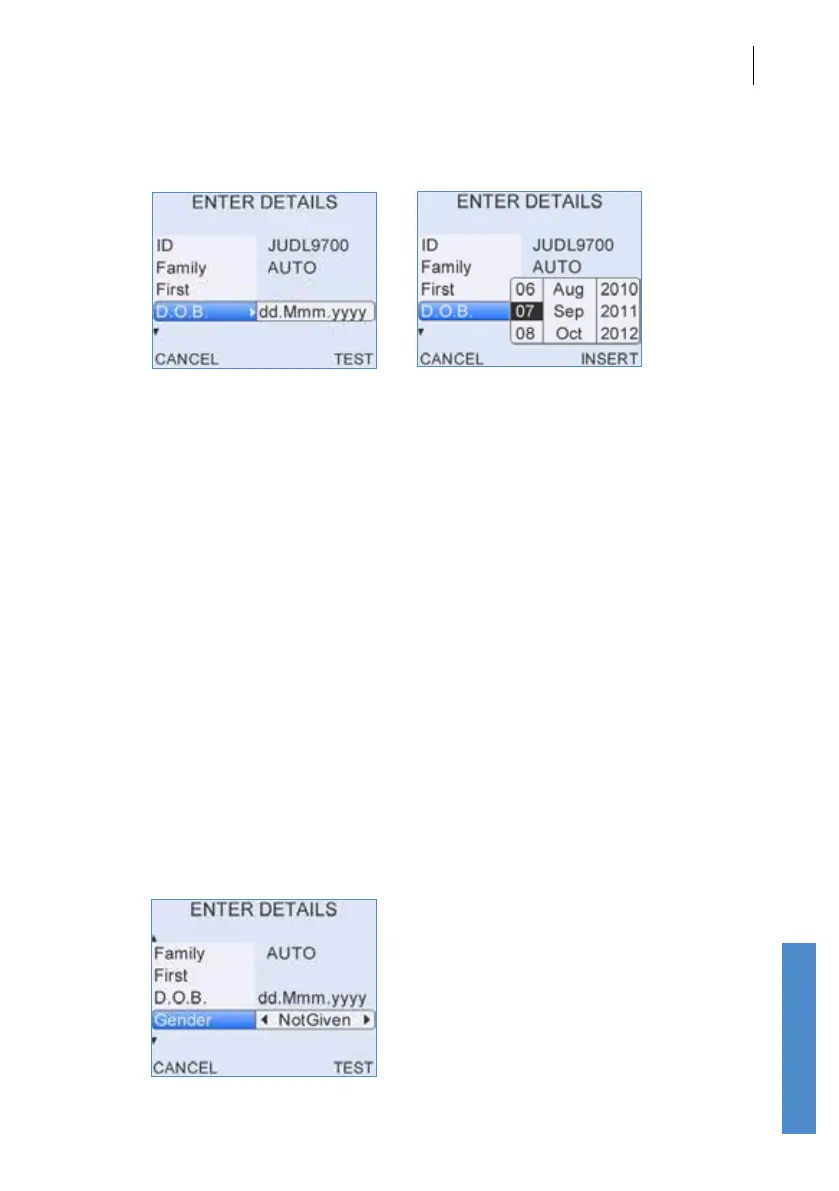
3.7.5 Entering dates
A right arrow symbol is shown at the end of a date eld.
When the eld is highlighted, press the right arrow key to access the
calendar pop-up table. The day will be highlighted rst and can be altered
using the up and down arrow keys. Continue to use the left and right arrow
keys to jump between the Day/Month/Year and the up and down arrow
keys to select the required date.
Select Insert to accept the date displayed or Cancel to ignore the changes.
If the date has not been edited, it will remain as dd.Mmm.yyy by default.
For Date of Birth entry (D.O.B) the Otoport will not permit entry of a future
date. Invalid D.O.B. will be displayed briey at the top of the screen then
the date of birth will revert to today’s date. Re-edit and conrm the D.O.B.
if necessary.
3.7.6 Choice bars
Left and right arrow keys are used to move through choice bar options.
For example when entering patient details in the Gender eld, pressing
the right arrow key will rotate the selected option between Not Given,
Male, Female and Unknown. Choice bars options are enclosed by arrow
graphics.



 To Next Page