Chapter 4. Trunks and Lines
Section
3004nstallation
2.
Install the loop-start trunk in a trunk slot.
3.
Use a standard 50-pin cable to connect the trunks from the MDF to the
main trunk connector
CNl.
Insta lla tio n with C a lle r ID
1.
Remove the cover from the L-TRK card (VB-435
11A).
This cover should
be set aside since it cannot be reinstalled with a Caller ID Board installed.
2.
Cut strap
Jl
on the L-TRK card as shown in Figure 4-2.
3.
Set switches SW1 through SW8 on the L-‘IRK card (VB-43511A) to
OFF.
A
IMPORTANT: When caller ID is used, you must correctly set the switches to prevent possible
I
damage to the
L-TRK
card.
4.
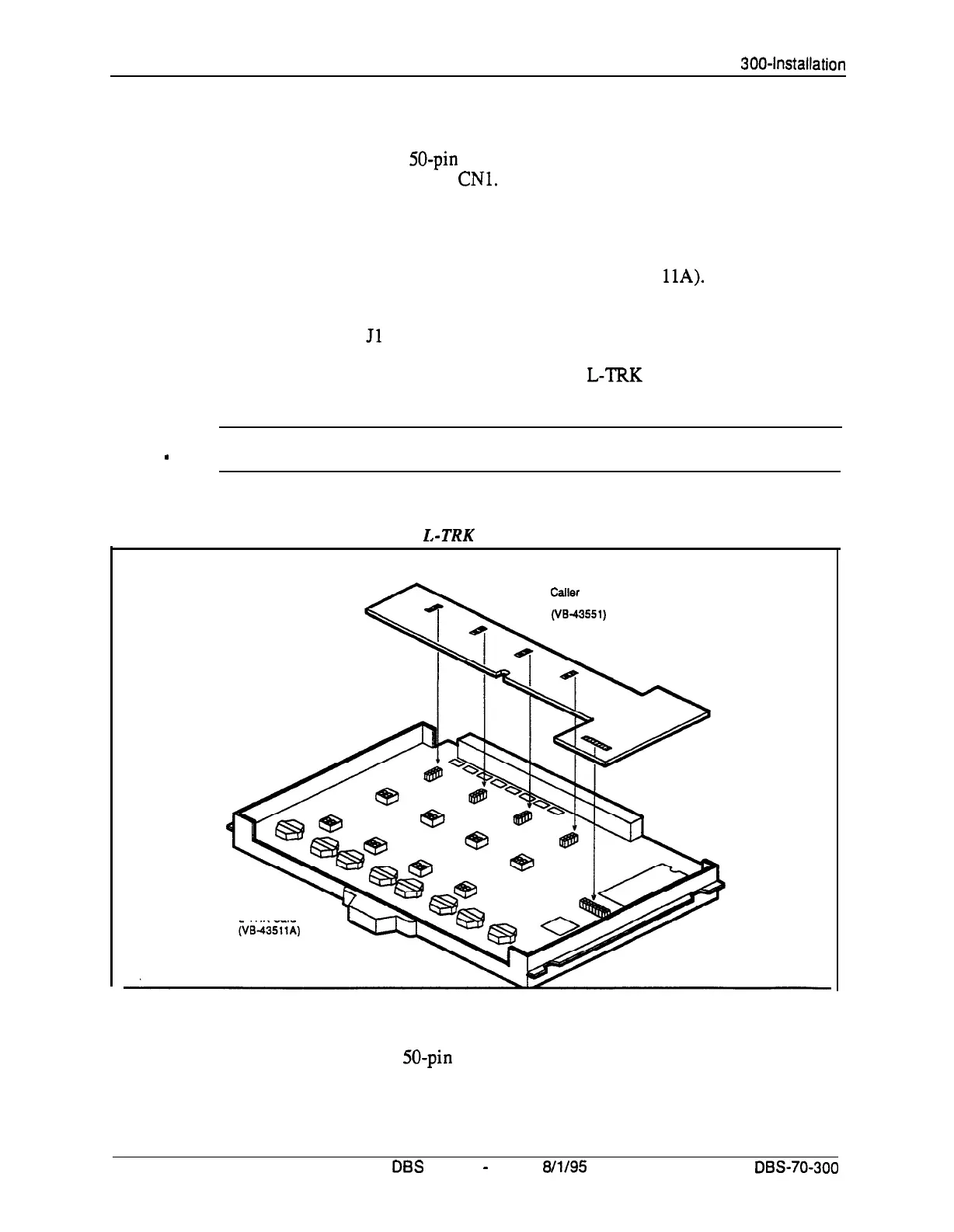
Attach the Caller ID card to the L-TRK card.
Figure 4-3. Attaching Caller ID Card to the I,-TRK Card
Caller
ID Board
L-TRK Card
5.
Install the L-TRK card in a trunk slot.
6.
Use a standard 50-pin cable to connect the trunks from the MDF to the
main trunk connector CN 1.
4-8
DES
Manual
-
issued
8/l/95
DBS-70-300
Technical Manuals Online! - http://www.tech-man.com















 To Next Page