Chapter 5. Peripheral Equipment
Section
300~Installation
Re m o te Adm inistra tio n Inte rfa c e (RAI)
Guidelines
l
The RAT is a modem card that installs on the
XC
card. The card is used to
remotely administer the system through a trunk line.
l
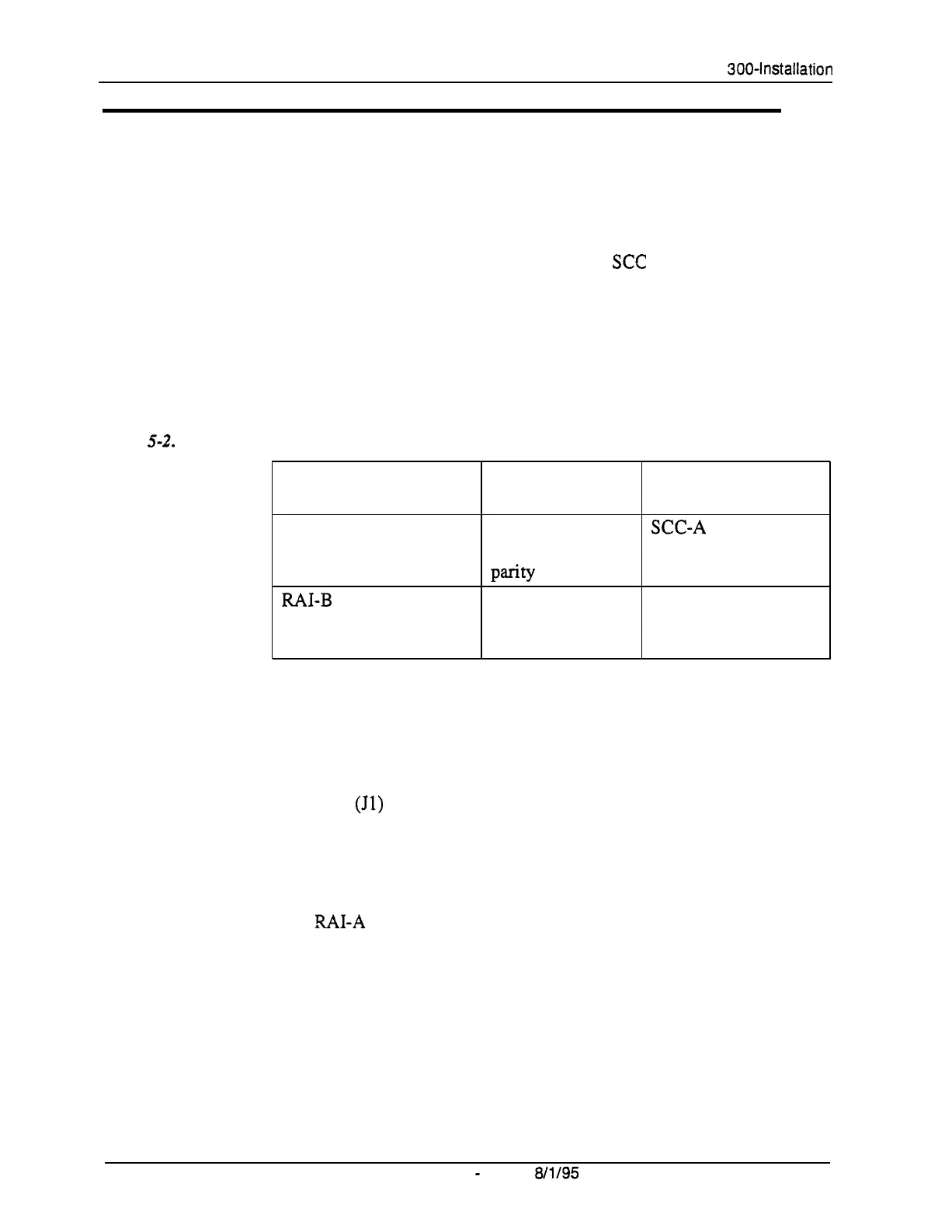
Two versions of the RAI card are available. Both versions use 1 Stop bit, 8
data bits, and no parity. The RAI-A card has a fixed baud rate of 300. The
RAI-B card supports both 300 and 1200 baud operation. The following
table shows the transmission rate of each card along with the SCC version
compatibility.
Table
5-2.
RAI compatibility
RAI Version/Part No.
RAI-A (VB-43706)
MI-B
(VB-43707)
Transmission
SCC Compatibility
Parameters
300 bps, 1 stop bit,
XC-A
or SCC-B
8 data bits, no
Parity
300 bps/1200 bps,
SCC-B only
1 stop bit, 8 data
bits, no parity
.
Installation
l
Remove the upper cover of the SCC card.
Jumper 1
(Jl)
on the RAI-B controls the transmission rate. When closed,
the transmission rate is switchable from 300 bps to 1200 bps through
system programming. When open, the rate is fixed at 300 bps.
l
Connect the RAI card to the connector on the SCC card.
The
%41-A
connects to CN3. RAI-B connects to CN2 and CN3.
l
Replace the upper cover of the SCC.
Note:
To adjust the output level of the RAI, set switch 4 as shown in Figure
5-3.
5-6 DBS Manual
-
Issued
8/l/95
DBS-70-300
Technical Manuals Online! - http://www.tech-man.com















 To Next Page