Section
300~Installation
Chapter 5. Peripheral Equipment
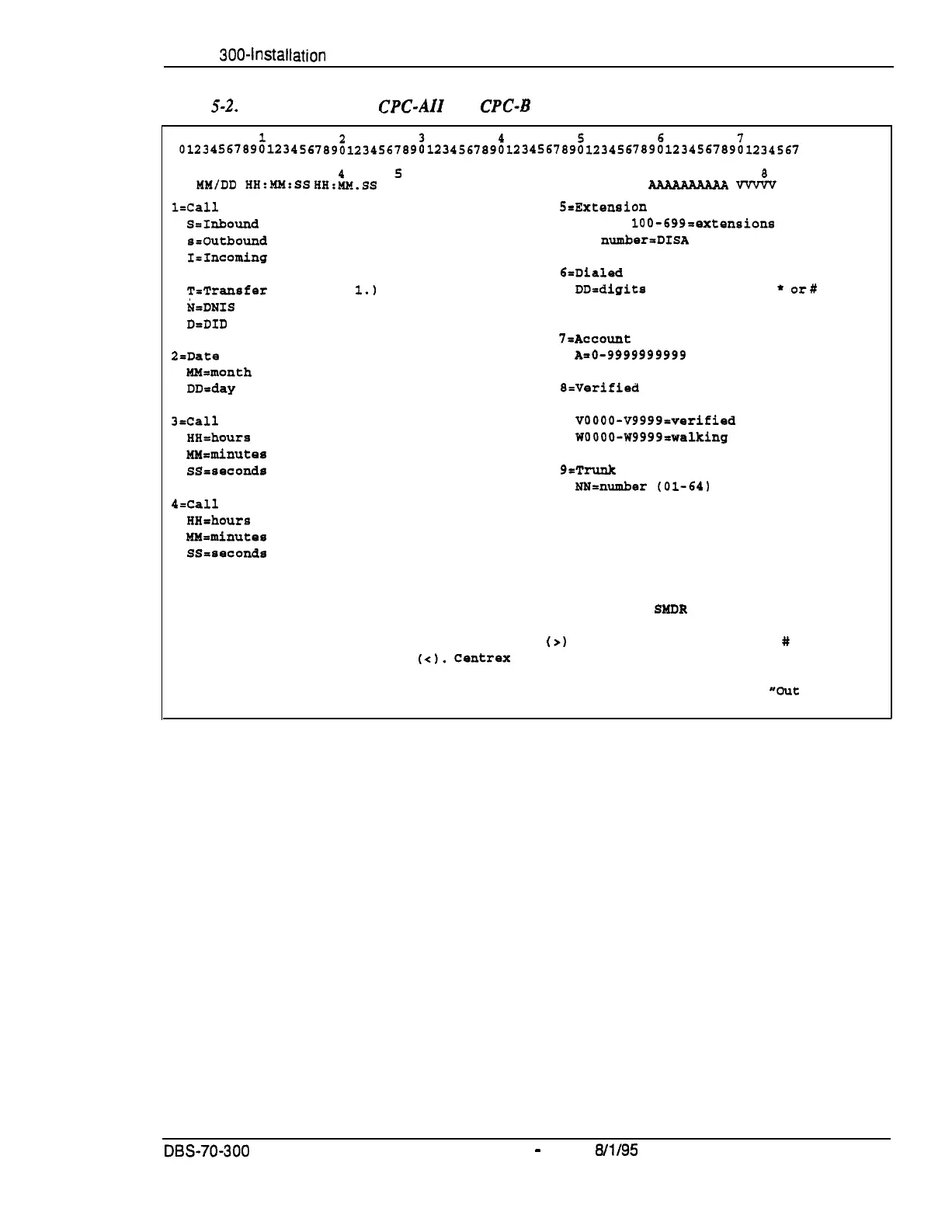
Figure
S-2.
SMDR Format for CPC-AII and
CPC-B
Version 3.1 or higher
12
3
5
6
7
T
MM/DD
HH:MM:SS
HH:&!.SS
NNN DDDDDDDDDDDDDDDDDDDDDDDDDDDD
B
9
V-V&V NN
ldall
type
S=Extension number
S=Inbound
DISA
10-69,
lOO-699nextensions
sroutbound
DISA
CO
number=DISA
I=Incoming
O-Outgoing
B=Dialed
digits or Caller ID
T=Transfer (See Note
1.1
DD=digits
O-9 or symbols
*
or#
N=DNIS
(See Note 2.)
D=DID
.
‘I=Ac c o unt
code
O=Date
An0- 9999999999
RR=month
DD=day
8=Verified
account code or walking
COS code
)&all
start time
VOOOO-V9999=verified account codes
HH-hours
WOOOO-W9999nwalking
COS codes
MYrminutes
SS=seconds
9rTrunk
Number
NN=number
(01-64)
4=Call
duration
HH=hours
MMrminutes
SSsseconds
Notes :
1. Transferred calls include direct and group call pickups and conference calls.
If a station call is transferred to an outside number, an SRDR record is
also created for the station that is transferred.
2. The
l
symbol appears as a greater-than sign
(a)
on the SMDR printout; the
#
symbol
appears as a less-than sign
(<I.
Centrex
and PBX codes,
as well as LCR access codes, do
not appear as dialed digits.
If the Caller ID Feature is installed and enabled,
*Private"
appears with calls that have restricted Caller ID display and
*Cut
of Area"
with long distance calls that do not provide Caller ID information.
DES-70-300
DBS Manual
-
issued
8/l/95
5-5
Technical Manuals Online! - http://www.tech-man.com















 To Next Page