briaprer
4. I
run6
am
LIII~S
4.
Set SW1 on the
Tl
card according to the following table.
These switch settings correspond to the distance between the DBS and the
CSU. To turn a switch on, fiip it to the “up” position.
Table 4-18. Switch
settings for
SWZ on the
Tl
card
Fil
SW
Distance from the DBS to the CSU
0
to
150
ft.
1
150-450 ft,
1
450-655
ft.
SW1
On
Off
Off
SW2
Off
On
Off
SW3
off
Off
On
SW4
Off
On
Off
SW5
Off
Off
On
SW6
Off
On
Off
I
off
I
on
1
Not used
1
Not used
I
1
Not used
a
5.
install
the
Tl
card in the “EQTRK” slot
6.
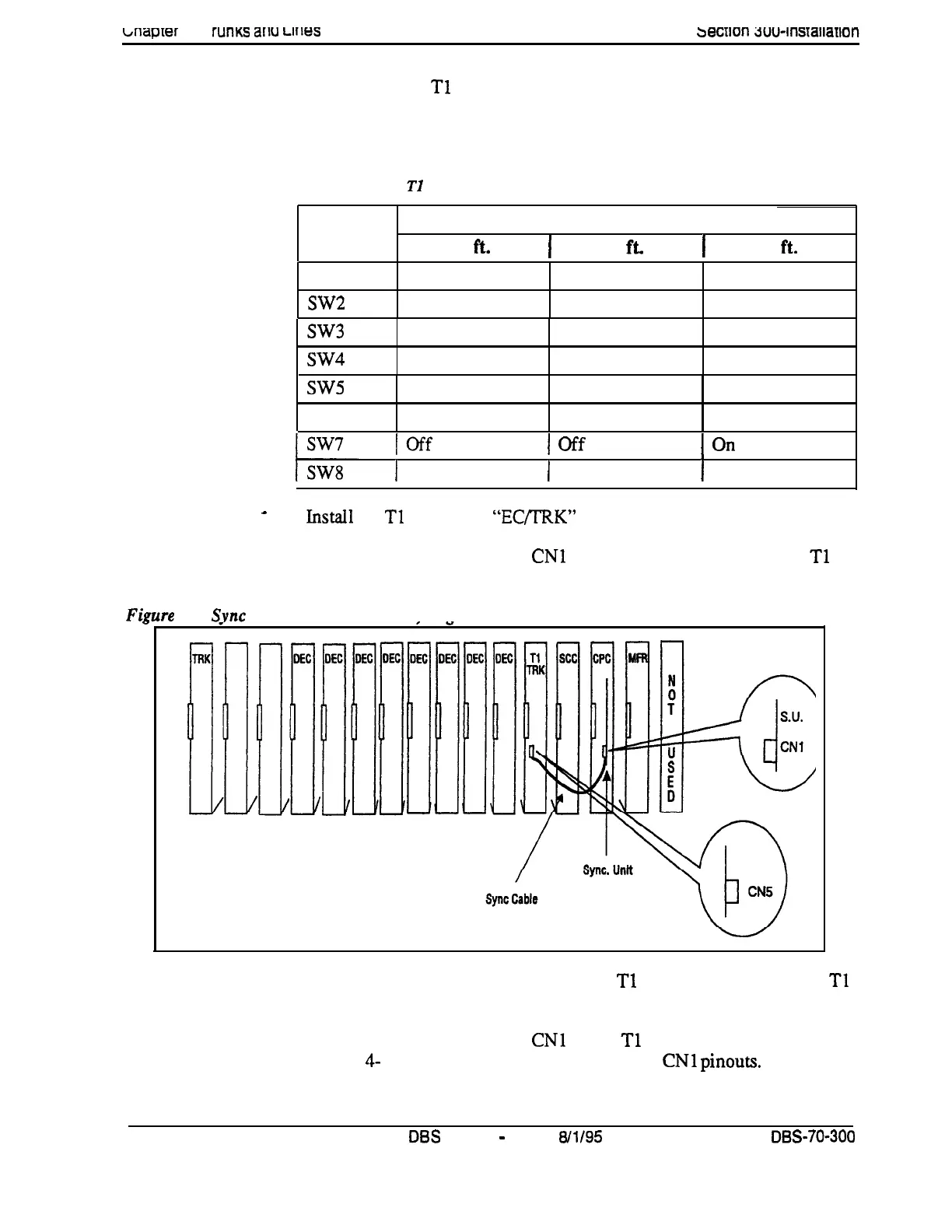
Connect the Sync Cable from
CNl
on the Sync Unit to CN5 on the
Tl
card.
pre
4-8.
Svnc
Unit and Tl
connection. sin&-cabinet installation
7.
Connect the cable attached to CN3 on the
Tl
MDF card to CN3 on the
Tl
card (Figure 4-10).
8.
Using an RJ48 cable, connect
CNl
on the
Tl
MDF card to the CSU
(Figure
4-
10). The following illustration shows
CNl
pinouts.
4-24
DE3
Manual
-
Issued
8/l/95
DBS-70-300
Technical Manuals Online! - http://www.tech-man.com





 To Next Page