54
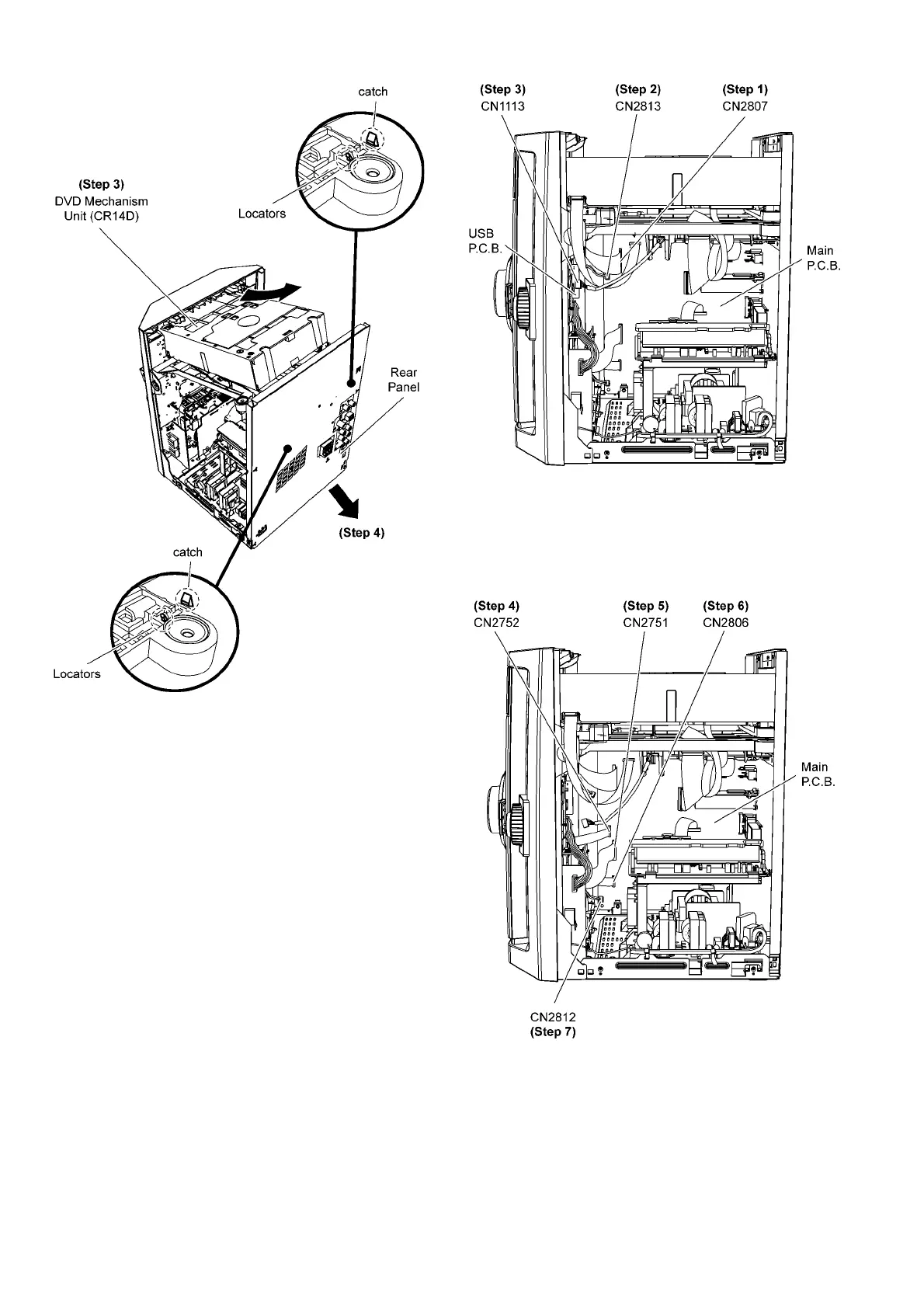
Step 3 Slightly lift up the DVD Mechanism Unit (CR14D) to
release from the two locators.
Step 4 Remove rear panel in the direction of arrow.
9.7. Disassembly of Front Panel
Assembly
• Follow the (Step 1) to (Step 5) of Item 9.3
Step 1 Detach 27P FFC at the connector (CN2807) on Main
P.C .B ..
Step 2 Detach 2P cable at the connector (CN2813) on Main
P.C .B ..
Step 3 Detach 5P cable at the connector (CN1113) on USB
P.C .B ..
Step 4 Detach 10P FFC at the connector (CN2752) on Main
P.C .B ..
Step 5 Detach 12P FFC at the connector (CN2751) on Main
P.C .B ..
Step 6 Detach 10P FFC at the connector (CN2806) on Main
P.C .B ..
Step 7 Detach 2P cable at the connector (CN2812) on Main
P.C .B .



 To Next Page