59
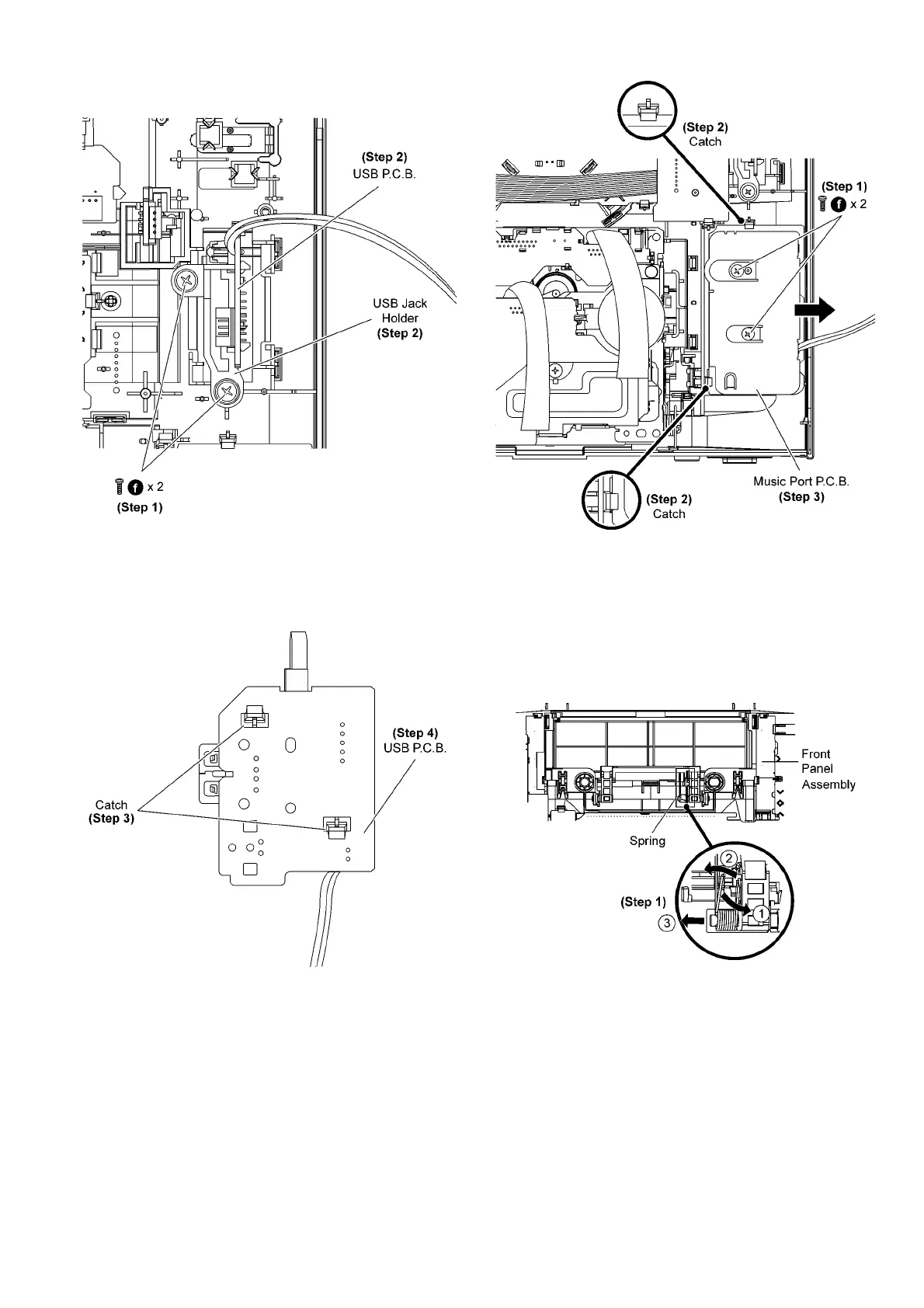
• Disassembly of USB Jack holder.
Step 1 Remove 2 screws at USB Jack holder.
Step 2 Remove the USB Jack Holder together with USB
P.C .B ..
• Disassembly of USB P.C.B..
Step 3 Release the catches at USB P.C.B..
Step 4 Remove the USB P.C.B..
9.11. Disassembly of Music Port
P. C. B .
• Follow the (Step 1) to (Step 5) of Item 9.3
• Follow the (Step 1) to (Step 12) of Item 9.7
Step 1 Remove 2 screws at Music Port P.C.B..
Step 2 Release 2 catches.
Step 3 Lift up to remove Music Port P.C.B..
9.12. Disassembly of CD Lid
• Follow the (Step 1) to (Step 5) of Item 9.3
• Follow the (Step 1) to (Step 12) of Item 9.7
Step 1 Remove the spring as arrow shown in order of
sequences (1) to (3).











 To Next Page