DHCP-server configuration tasks 297
SmartWare Software Configuration Guide 27 • DHCP configuration
Example: Define a DHCP-server profile
This example shows how to configure a standard DHCP-server profile for a LAN with a private IP address
range.
node(cfg)#profile dhcp-server LAN
node(pf-dhcps)[lan]#network 192.168.1.0 255.255.255.0
node(pf-dhcps)[lan]#include 192.168.1.32 192.168.1.63
node(pf-dhcps)[lan]#lease 2 days
node(pf-dhcps)[lan]#default-router 192.168.1.1
node(pf-dhcps)[lan]#domain-name-server 80.254.161.125
node(pf-dhcps)[lan]#domain-name-server 80.254.161.126
Use DHCP-server profiles and enable the DHCP-server
If you have specified at least one profile, you can assign it to the DHCP-server and start the DHCP-server.
This procedure describes how to assign one or more DHCP-server profiles and enable the DHCP-server
Mode: Context IP
Example: Start the DHCP-server
This example shows how to assign a profile to the DHCP-server and to start the DHCP-server.
node(ctx-ip)[router]#dhcp-server use LAN
node(ctx-ip)[router]#dhcp-server
10
(optional)
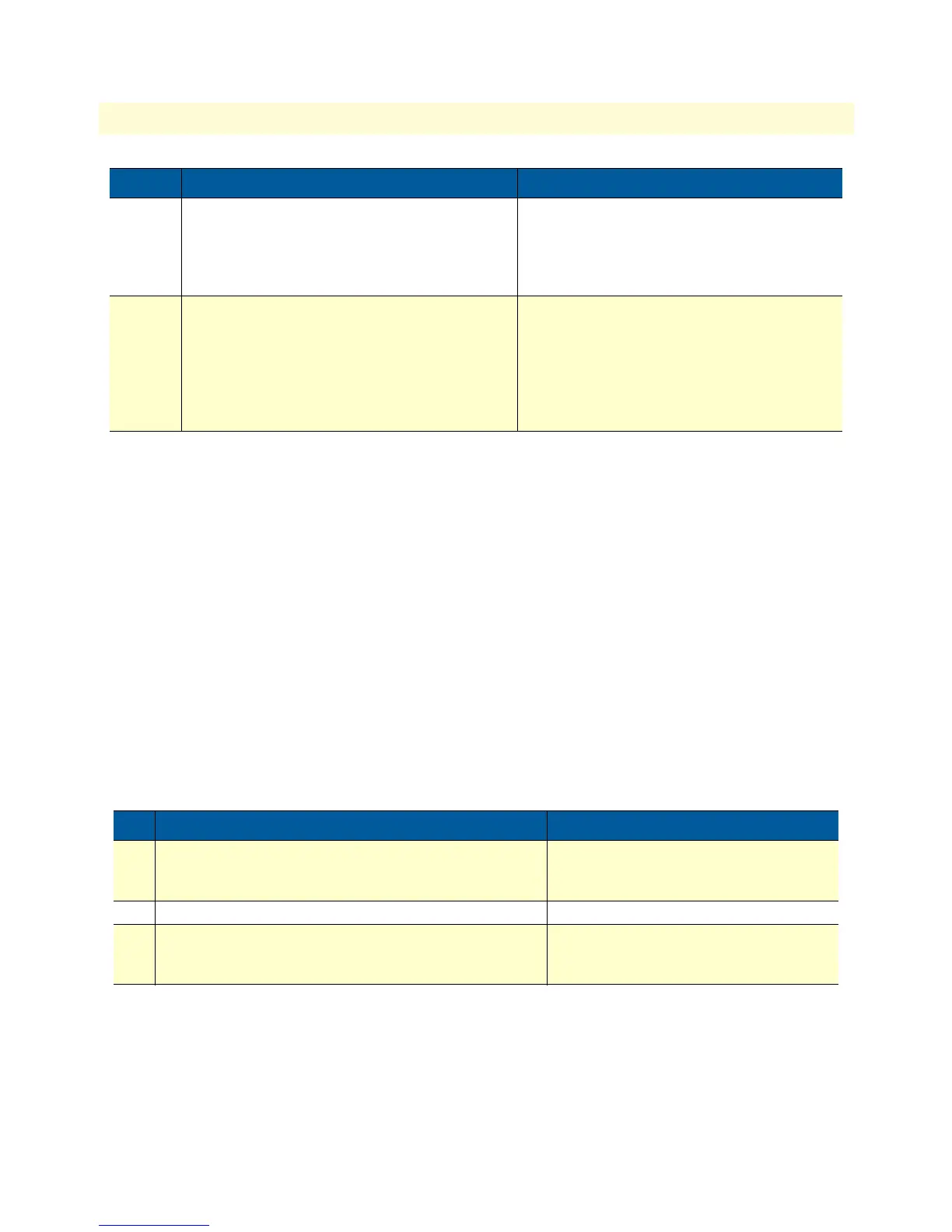
node(pf-dhcps)[name]#[no] bootfile boot-
file-name
Defines the bootfile the client shall use when
starting. Usually this is used in conjunction with
the next-server command.
Basic DHCP information (‘Boot file name’)
11
(optional)
node(pf-dhcps)[name]#[no] next-server
next-server-ip-address
Defines the address of the next server in the
boot process. This could be a server different
from the DHCP-server which provides configu-
ration files for the clients to be downloaded.
Basic DHCP information (‘Next server IP
address’)
Step Command Purpose
1 [name](ctx-ip)[router]#dhcp-server use profile
<profile name>
Chooses a DHCP profile.
profile: Name of the DHCP profile to
choose.
2 node(ctx-ip)[router]#[no] dhcp-server Enables/disables DHCP-server
3 node(ctx-ip)[router]#dhcp-server clear-lease
{ all | ip-address }
Removes all or a specific lease from the
server’s database, which in turn marks the
IP address(es) as available again.
Step Command Purpose



 To Next Page