76700 -29/94-
14. 0-O100
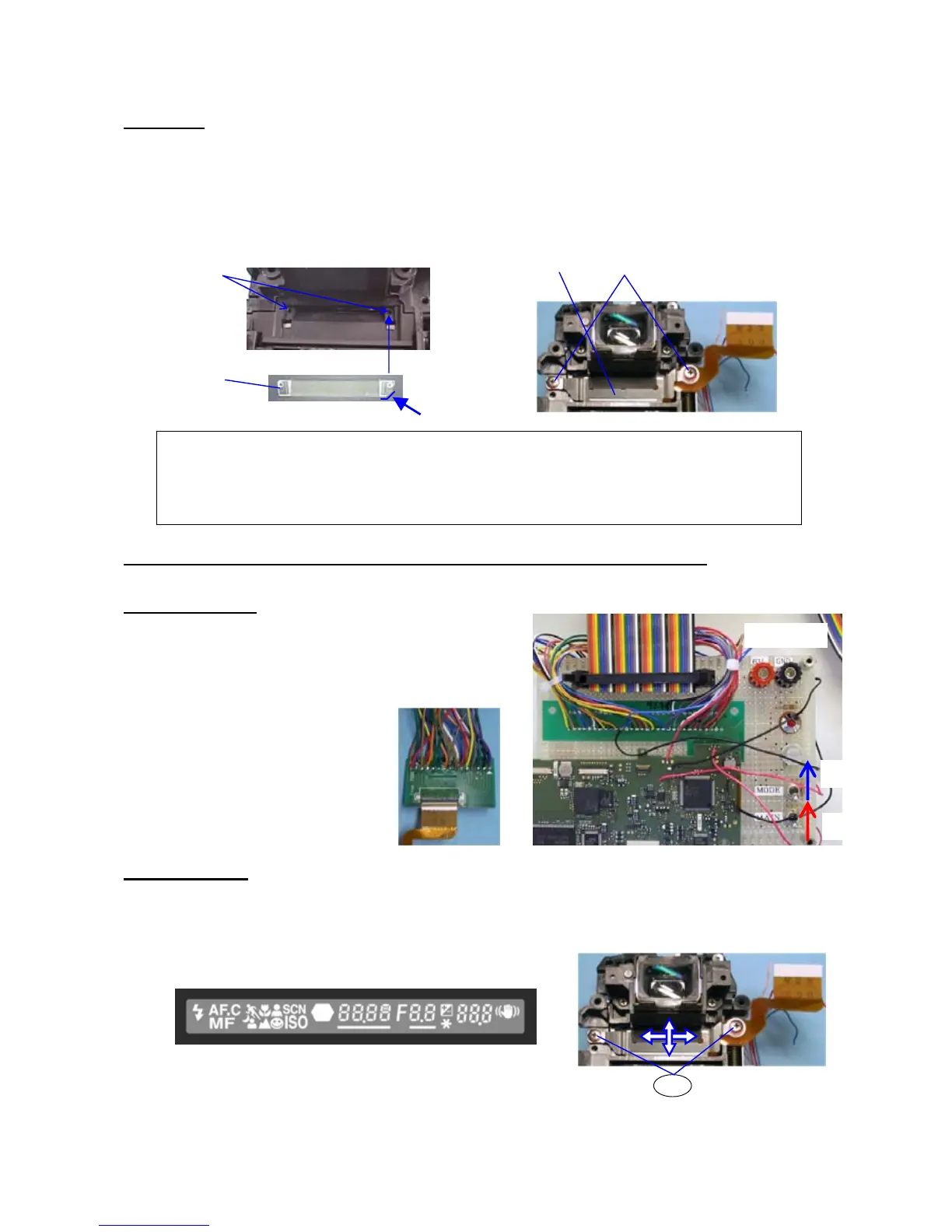
① Apply small quantity of diabond (black) to the shown in figure
② M2 prism --- There should be no dust
③ 0-O100
④ Fix it with TY-CNL-F1.7x3.0(x 2)
* Install screws while pressing the plate of 0-O100
15. [Adjustment] Adjustment of the position of viewfinder indication (0-O100)
Preparation: Power supply (8V, 3A), DC cord
15-1 Preparation:
① Connect the flex borad of 0-O100 to the jig
As shown figure
② Apply 6.0 V to the jig
③ Turn the main SW ON
④ Turn the mode SW ON
* Indication of O100 display
15-2 Adjustment
① [Confirmation] Check whether the position of the display is straight.
② [Adjustment] Loosen the screw and change the position.
After adjustment is done, apply screw lock.
①
【Caution】
1. Remove the screw lock which is stick to the screw
2. Unscrew (x2) while pressing the plate of 0-O100
①
②
④
③
② DC6V
④ MODE
③ MAIN
②
SL



 To Next Page