27
3. Save the desired setting:
a) When the setting matches the desired
Layout Number, press and hold Button 8 for
two seconds to save.
b) Turn off the wheelchair to exit the
Switchbox Layout Selection mode.
c) Turn the wheelchair back on and confirm
the switchbox operates as desired. If not,
repeat the process.
• If the wheelchair is fitted with multiple switch-
boxes, the process above must be completed
using each switchbox that changes are desired
on.
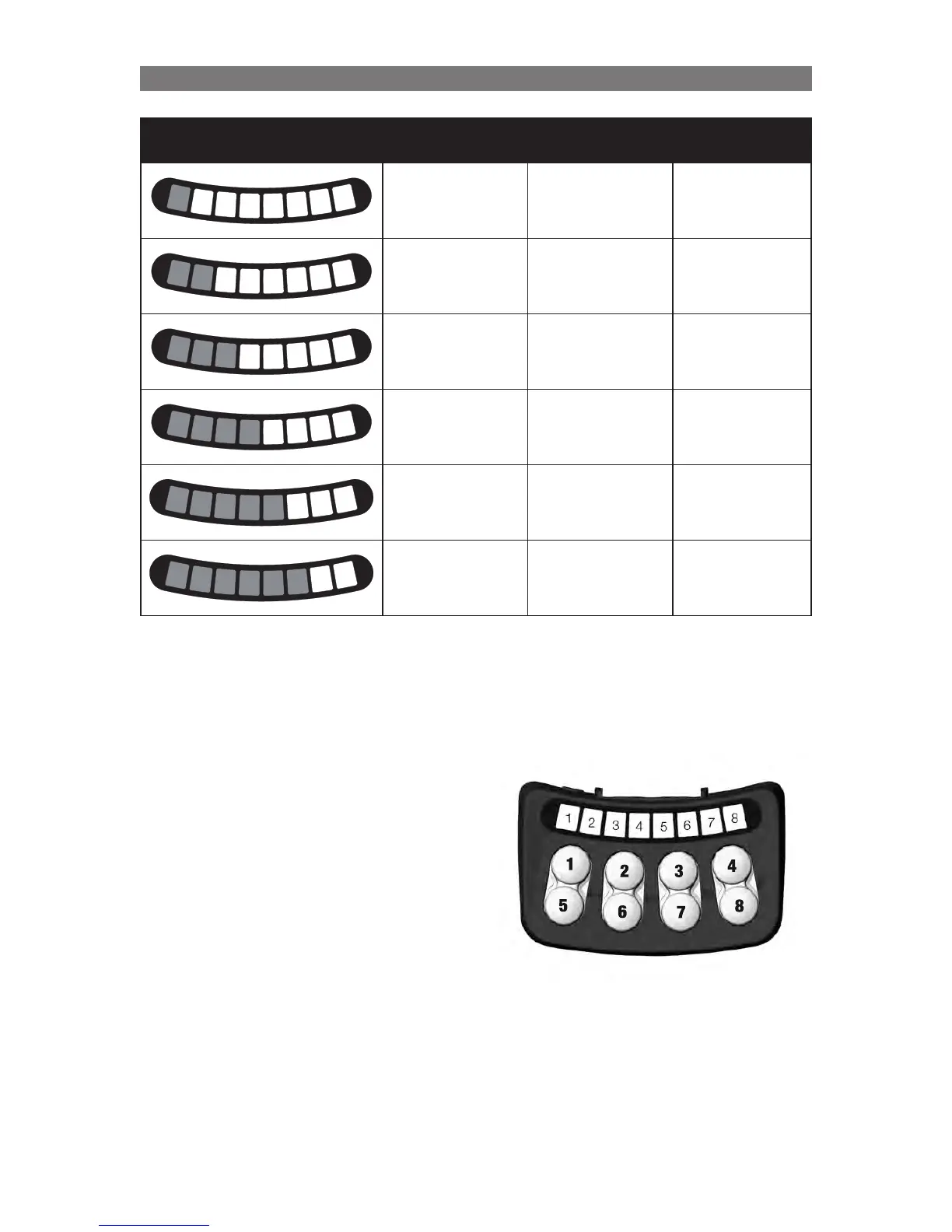
Number of lit LEDs Solid Green Solid Red Solid Yellow
1
2
3
4
5
6
7
8
Layout 1 Layout 7 Layout 13
1
2
3
4
5
6
7
8
Layout 2 Layout 8 Layout 14
1
2
3
4
5
6
7
8
Layout 3 Layout 9 Layout 15
1
2
3
4
5
6
7
8
Layout 4 Layout 10 Layout 16
1
2
3
4
5
6
7
8
Layout 5 Layout 11 Layout 17
1
2
3
4
5
6
7
8
Layout 6 Layout 12 Layout 18
Programming Configuring using the ICS Switchbox



 To Next Page