32
45° Tilt calibration C400/C500 Corpus
This feature is available from version v.24 of ICS config.file for C400/C500 Corpus, released June 2010.
This calibration method is only valid on C400/C500 Corpus with 45° tilt installed.
If the seat frame doesn’t reach the rubber pads or if the seat frame goes to hard on them when fully untilted,
there is a need for tilt calibration. This is accomplished by fine tuning the untilted position as described
below.
1. Turn off the wheelchair.
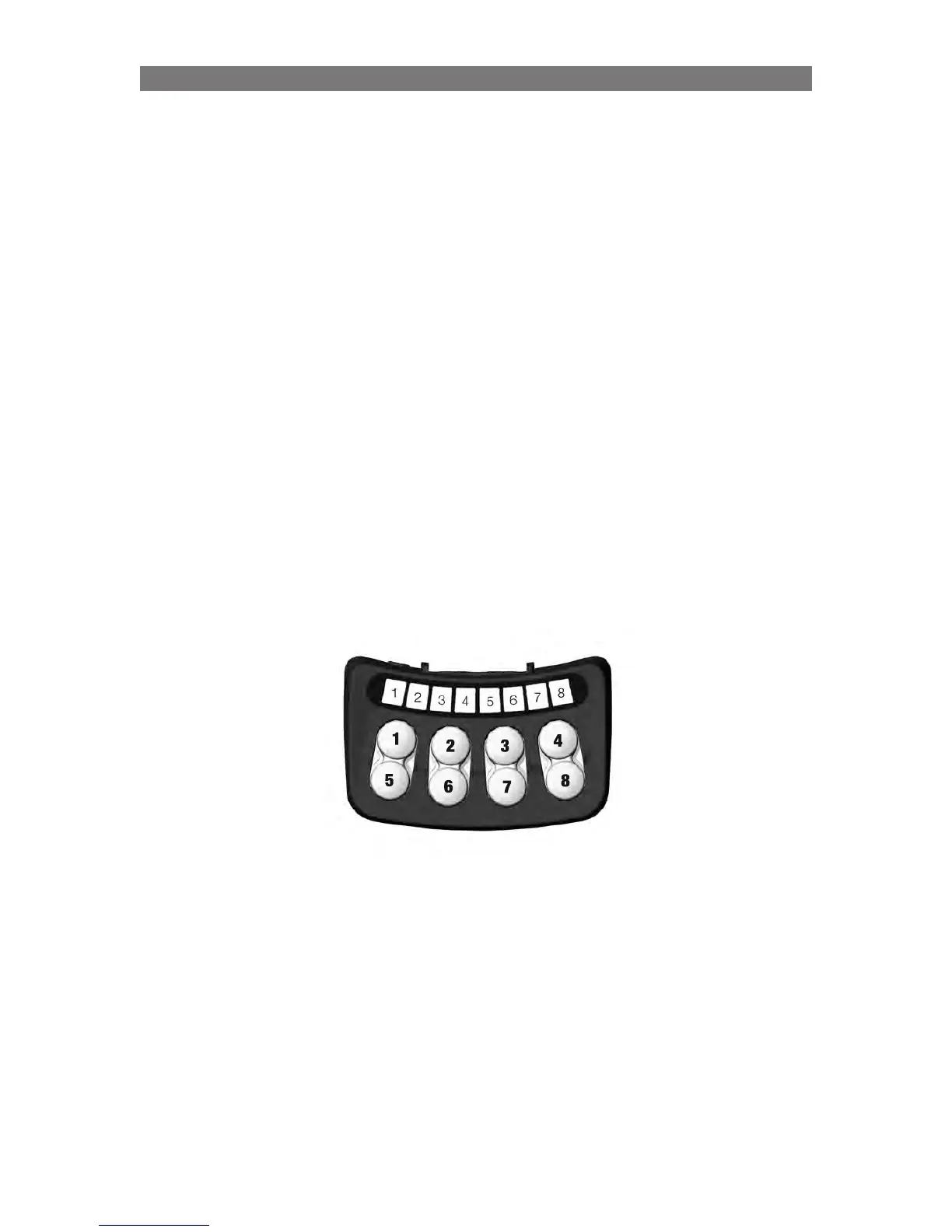
2. The system needs to be started up with a combination of pressed buttons: Press and hold Button 5, 6
and 3 on the ICS Switchbox, while holding these buttons, turn on the wheelchair with the Power Button
on the Control Panel (or Input Device).
Once all LEDs on the ICS Switchbox turn green, release Buttons 5, 6 and 3.
LED #7 and #8 will toggle RED to signify Actuator Calibration mode.
3. To move the tilt into it’s current untilted position, press and hold Button 2 until the tilt stops moving or
the seat frame touches the rubber pads.
If the tilt needs to go down a little more, press and hold button 3 until desired position is reached.
If the tilt needs to go down a little less, press and hold button 7 until desired position is reached.
4. Verify the new untilted position by operating the tilt with button 2 and 6 and if more adjustment is
needed go back to step 3.
Programming Corpus II - Specific Attributes



 To Next Page