31
Programming Corpus II - Specific Attributes
Corpus II - Specific Attributes
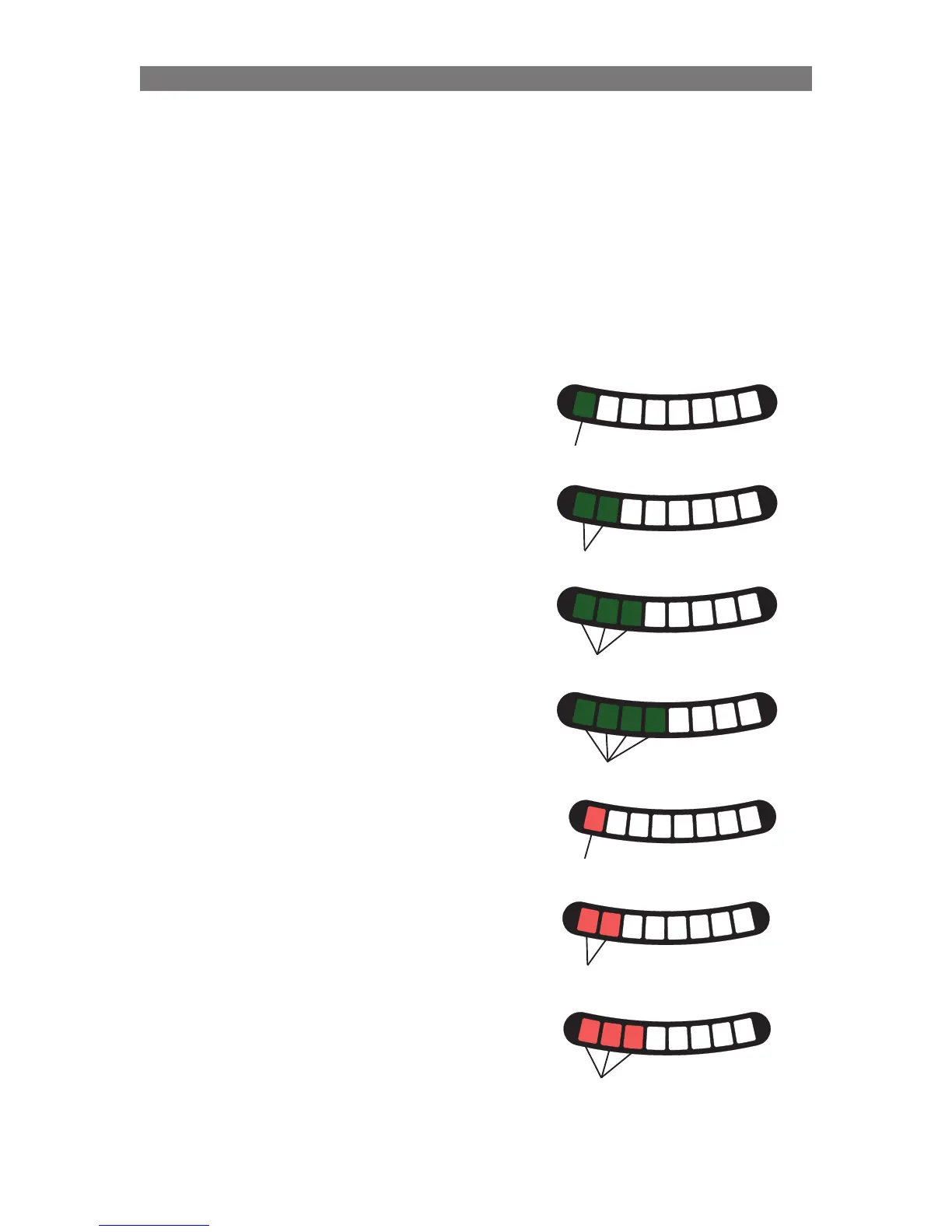
Setting Legrest Angle for Speed Reduction
When the Corpus Seat is mounted on a rear-wheel drive chassis (e.g. C350, Street) it is necessary to
specify the legrest angle that positions the footplates near the front casters. This legrest angle will limit the
speed of the wheelchair to approximately 1/4 of the maximum driving speed. The speed is reduced at this
position to prevent the casters from striking the footplates at high speeds.
NOTE: If this setting is incorrect, it may be possible for the casters to collide with the footplates when the
chair is driving at full speed. This may result in damage to the casters and/or footplates and could cause
personal injury.
1
2
3
4
5
6
7
8
3°
Solid Green
1
2
3
4
5
6
7
8
6°
Solid Green
1
2
3
4
5
6
7
8
9°
Solid Green
1
2
3
4
5
6
7
8
12°
Solid Green
1
2
3
4
5
6
7
8
15°
Solid Red
1
2
3
4
5
6
7
8
18°
Solid Red
1
2
3
4
5
6
7
8
21°
Solid Red
To change the Legrest Angle for Speed
Reduction value:
To enter the Legrest Angle for Speed Reduction
Selection mode, the system needs to be started up
with a combination of pressed buttons: Press and
hold Button 1, 2 and 7 on the ICS Switchbox, while
holding these buttons, turn on the wheelchair with
the Power Button on the Joystick (or Input Device).
Once all LEDs on the ICS Switchbox turn green,
continue to hold Buttons 1, 2 and 7 for five seconds.
• LED #7 flashes RED and LED #8 flashes
GREEN to signify Legrest Angle Selection
mode has been entered.
Release Buttons 1, 2 and 7.
The current parameter value is represented with
LEDs 1, 2, 3, 4, 5 on the ICS Switchbox.
Press Button 1 or Button 5 to change the value of
the legrest angle that limits the driving speed.
After the appropriate value is displayed with the
LEDs, press and hold Button 8 for two seconds to
save the setting, this will also exit the programming
mode. Turn the wheelchair off and back on to
continue normal usage.
The angle values shown in the table above represent
the angle that the legrest must be elevated greater
than to allow full speed driving of the chassis. For
example, if the three LED setting is selected and
the legrest angle is raised less than 9°, the chair will
drive at at reduced speed speed.
When the legrest is limiting the drive speed, the
switchbox icon for the legrest function will be
illuminated with a solid yellow LED – unless LED
Indication Level 1 or 2 is programmed.
The R-net Joystick also displays a solid turtle in its
LCD when the wheelchair speed is limited.



 To Next Page