6060
Tranportation (WC19) Mode Hook Position
The Transportation Mode (WC19 mode) moves the seat positioning mechanism to a location that docks
the seating system with the chassis using hooks that extend from the rear of the seat frame. If the seating
system is NOT fitted with Power Tilt, the position the seat hooks move to when the Transportation Mode is
assumed needs to be adjusted. Also, because of manufacturing variations, it is sometimes necessary for
the hooks on a seating system with Power Tilt to be adjusted.
To determine if the position of the hooks needs adjustment, put the wheelchair into the Transportation
Mode and slowly move the seating system to the dock position using brief presses of Button 5. While
moving the seat to the dock position, check the alignment of the hooks with the loops on the chassis. If
the hooks are not centered around the chassis loops when the seat elevator reaches its fully position, the
position of the hooks needs to be adjusted.
Adjusting Hook Position on K450:
1.
Enter the Transportation Hook Adjustment mode:
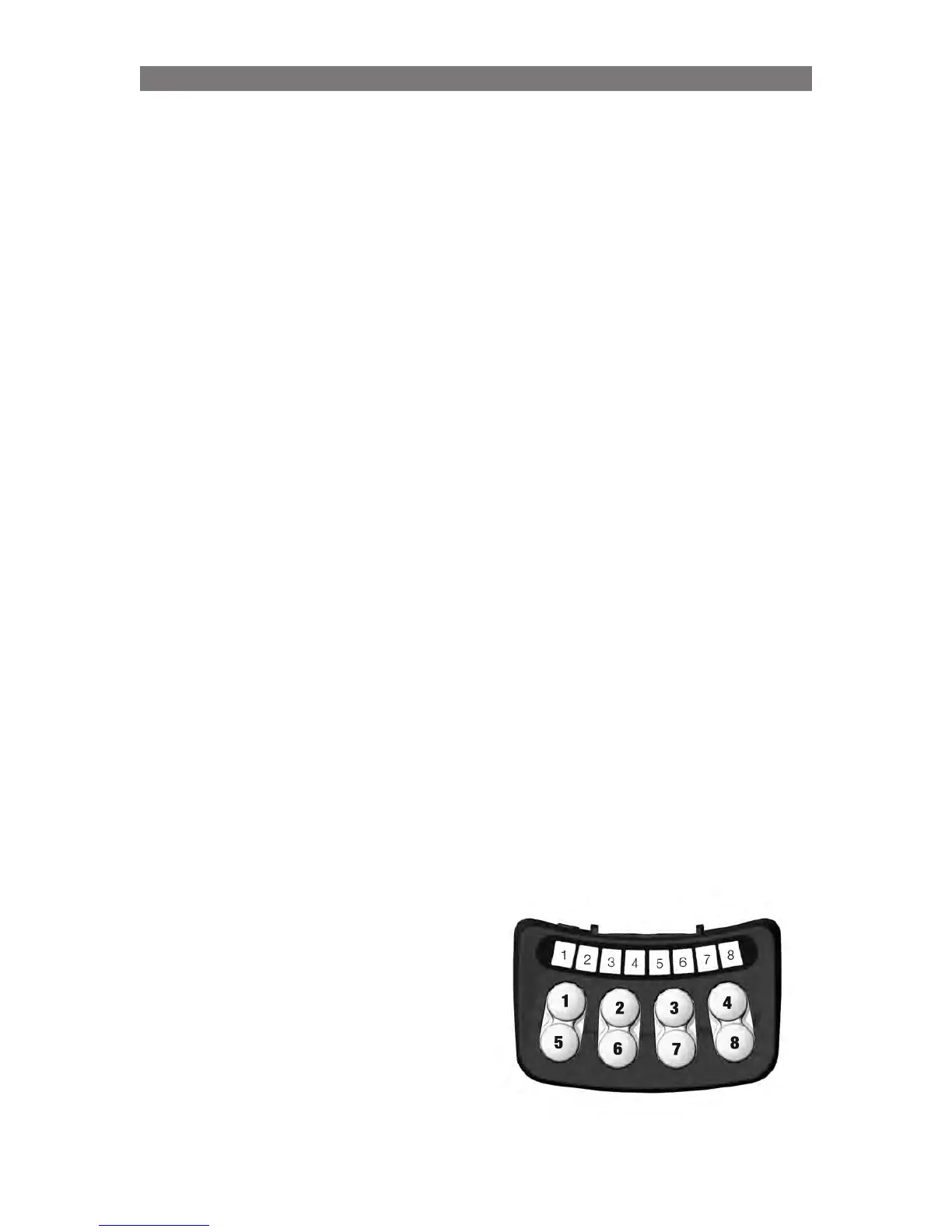
a) With wheelchair off, press and hold Buttons 6 & 8 on the ICS Switchbox.
b) While holding these buttons, turn on the wheelchair with the Joystick (or Input Device).
c) Once the ICS Switchbox LEDs show in a green toggling pattern, release the buttons.
d) Next, press and hold Button 4 for approximately five seconds, the LEDs on the switchbox will
change and the seating system will start to move. Release Button 4.
2. The switchbox buttons will now control the seating system in a special manner:
a) Buttons 1/5 will move the seat elevator up/down.
b) Buttons 2/6 will move the hooks backward/forward in relation to the chassis loops.
c) Buttons 3/7 will move the hooks up/down in relation to the chassis loops.
d) Button 4 will operate the Transportation Mode sequence.
e) Button 8 will save the current position of the hooks – this is the position the seating system will
move to when the transportation position is reached.
3. Fine-Tune the position of the hooks:
a) Use Button 4 to move the hooks near the chassis loops.
b) Once the hooks are near, release Button 4.
c) Use Buttons 2/6 and 3/7 to fine-tune the hook position in relation to the chassis loops. A properly
positioned hook will be centered around the loop and apply slight pressure on the loop when the
seat elevator is as low as possible.
NOTE: When adjusting the hook position, avoid moving the hooks to a position where they press too hard
on the chassis or chassis loops. If this occurs, immediately stop pressing Buttons 2/6 or 3/7 and use Button
1 to raise the elevator and reduce the hook pressure.
d) While adjusting the hooks, it is possible to
save your progress using Button 8.
e) Once the hooks are in a satisfactory position,
store the final position using Button 8.
f) Turn the wheelchair off and back on to return
to the normal operating mode.
g) Check the operation of the Transportation
Mode and confirm proper positioning of the hook
If the hooks do not correctly align with the chassis
loops, begin from Step 1 again.
Programming K450 - Specific Attributes



 To Next Page