67
67
Chapter 3 – Diagnostics & Troubleshooting
Diagnostic LED Indications
In addition to the LED indications the ICS Switchbox provides the user, there are several “diagnostic level”
LED indications that are useful to a technician when troubleshooting the seating functions on a wheelchair
with ICS.
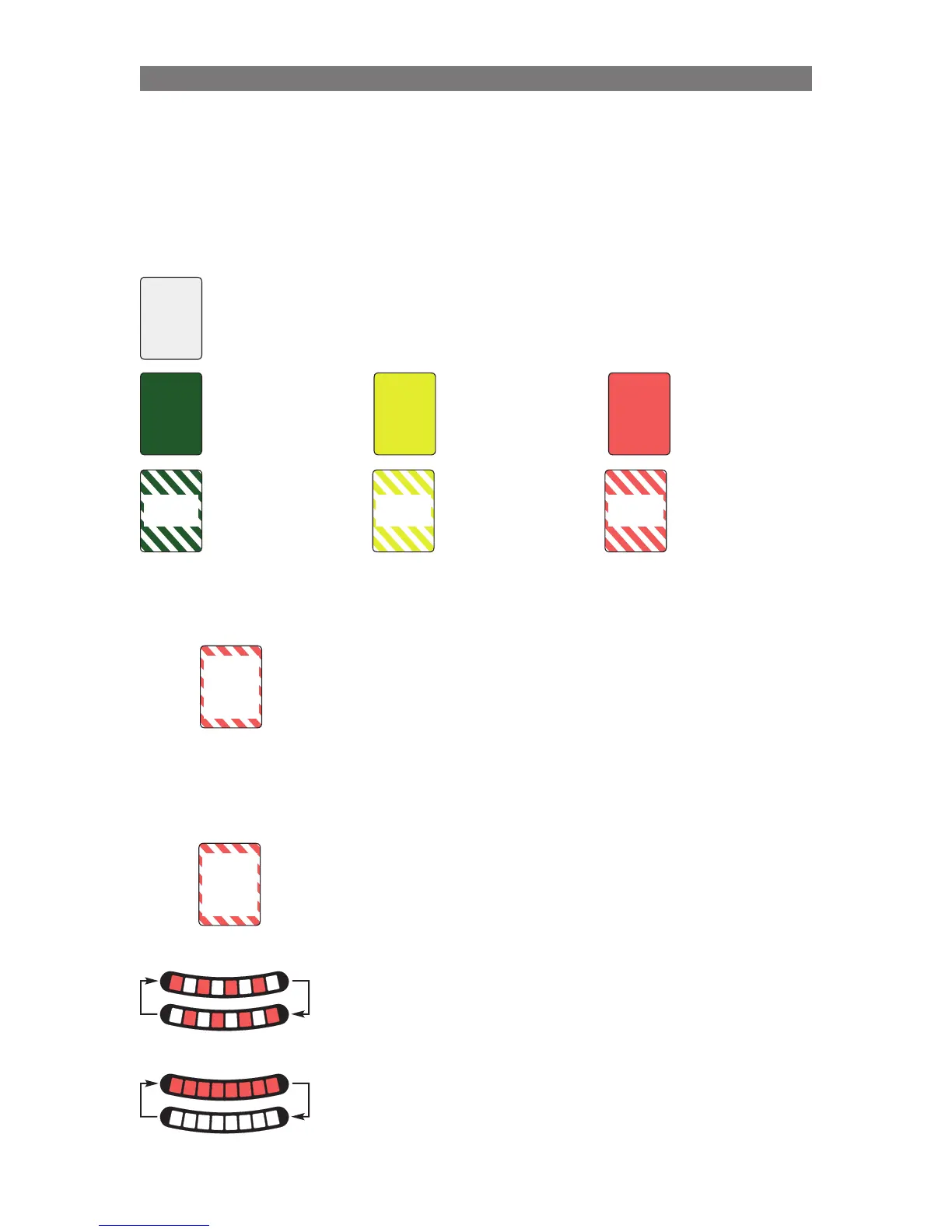
Overview of the “user level” indications:
“Diagnostic Level” indications:
The Brief Red Flash indication is a red flash that occurs for 5 seconds, then
the switchbox returns to its previous indication state.
This is the same indication the user gets when an actuator end-of-travel
is reached. It also serves as a Diagnostic indication if the brief red flash is
occurring when the actuator is NOT at the end of travel (maybe the seat
function is binding, or maybe the actuator needs to be replaced due to
wear.)
The Brief Red Flash also occurs when there is a problem with the actuator
sensor. If the actuator is using a softpot, this could indicate the softpot or
softpot cable is worn and needs to be replaced.
The Constant Red Flash always occurs, it never stops.
When an icon on the Switchbox gives a constant red flash this signifies that
the seating system expects that actuator to be connected, but is unable to
communicate with it.
This could be caused by a bus communication wire between the actuator
and the hub/master module being damaged.
This can also be caused by incorrect programming (ie. “Recline Installed”,
but not connected.)
1
2
3
4
5
6
7
8
1
2
3
4
5
6
7
8
When ALL of the Switchbox LEDs flash red (all on, then all off), the ICS
system is giving a notification that there is a Switchbox Layout setting error.
This is a rare error, but if it occurs (using Wheelchair Builder) choose
another Layout Number for the switchbox that is flashing and write the ICS
settings again.
All Red Flash
1
2
3
4
5
6
7
8
1
2
3
4
5
6
7
8
When the Switchbox LEDs toggle red, the ICS system is requesting that
the wheelchair be turned off and back on. This display is given after a
new device is connected to the system (plug-n-play) and after certain
programming steps are completed.
Red Toggling
Seat Function not
available.
NO
LED
Function available
Full Drive Speed
allowed
SOLID
GREEN
Function available
Drive Speed limited
by this function
SOLID
YELLOW
Function available
Drive Inhibited by
this function
SOLID
RED
Memory Mode
FLASHING
GREEN
Memory Mode
FLASHING
YELLOW
End-of-Travel
reached
Current Limit
reached
FLASHING
RED
Brief Red
Flashing
(5sec)
Constant
Red
Flashing
(always)
Diagnostics & Troubleshooting Diagnostic LED Indications



 To Next Page