Mechanical Instructions
EN 13Q528.1A LA 4.
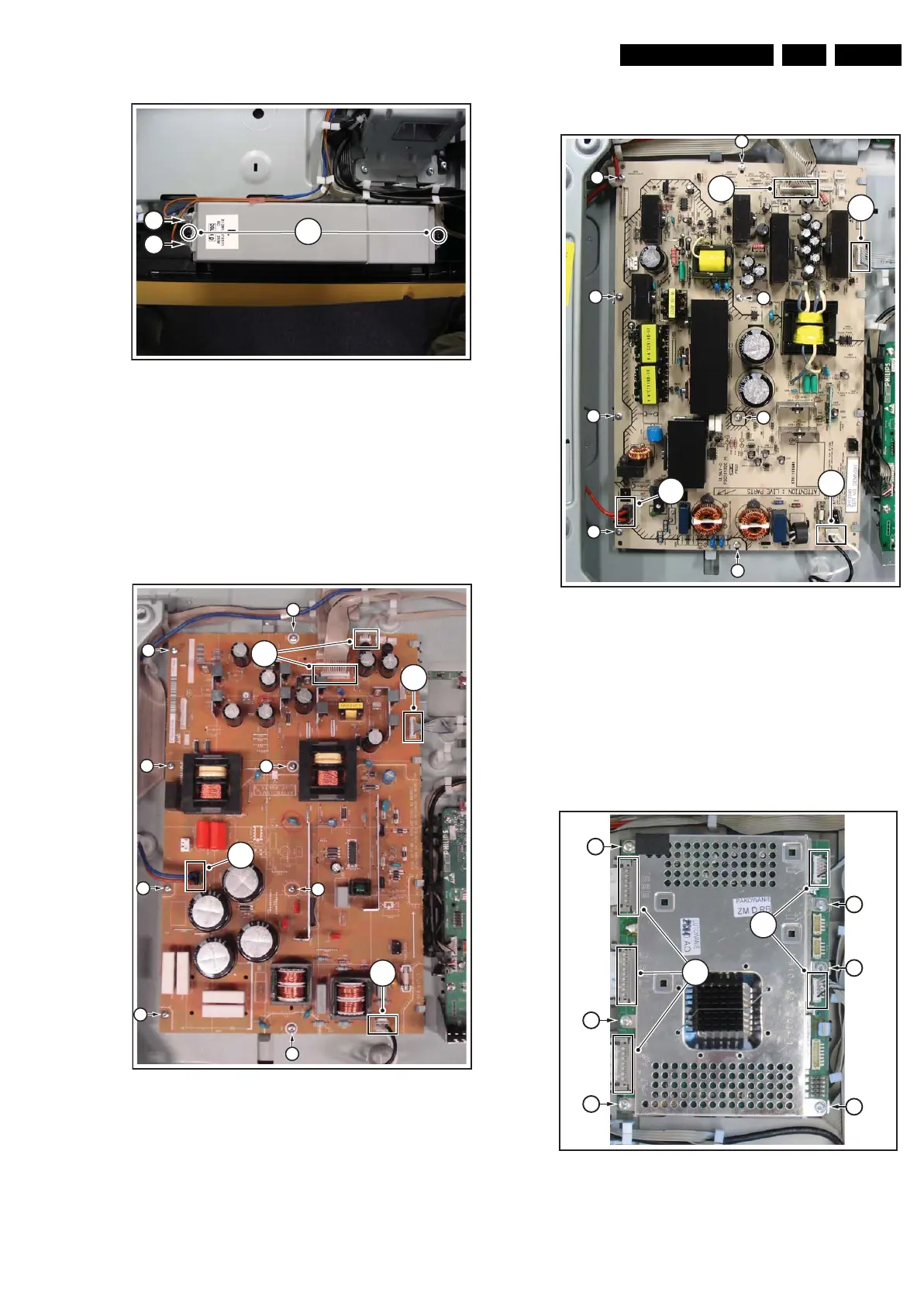
Figure 4-14 Speakers
4.3.6 Display Supply Panel - 42" sets
Refer to figure “Display Supply Panel - 42" sets” for details.
1. Remove the fixation screws [1].
2. Unplug connectors [2].
3. Take the board out.
During re-assembly, refer to figure “Cable dressing 42" sets”
earlier in this chapter for the correct cable dressing!
Figure 4-15 Display Supply Panel - 42" sets
4.3.7 Display Supply Panel - 47" and 52" sets
Refer to figure “Display Supply Panel - 47" sets” for details.
1. Remove the fixation screws [1].
2. Unplug connectors [2].
3. Take the board out.
During re-assembly, refer to figure “Cable dressing 47" sets”
earlier in this chapter for the correct cable dressing!
Figure 4-16 Display Supply Panel - 47"sets
4.3.8 Dynamic Frame Insertion panel (DFI)
Refer to next figures for details.
1. Unplug the LVDS connectors [1].
Caution: be careful, as these are very fragile connectors!
2. Unplug the other connectors [2].
3. Remove the screws [3].
The DFI panel can now be taken out of the set.
Figure 4-17 DFI panel removal
H_16770_089.eps
130707
2
1
1
H_16770_091.eps
220307
2
2
2
2
1
1
1
1
1
1
1
1
H_16770_090.eps
220307
2
2
2
2
1
1
1
1
1
1
1
1
H_16801_128.eps
310807
3
3
3
3
3
3
1
2










 To Next Page