Mechanical Instructions
EN 14 Q528.1A LA4.
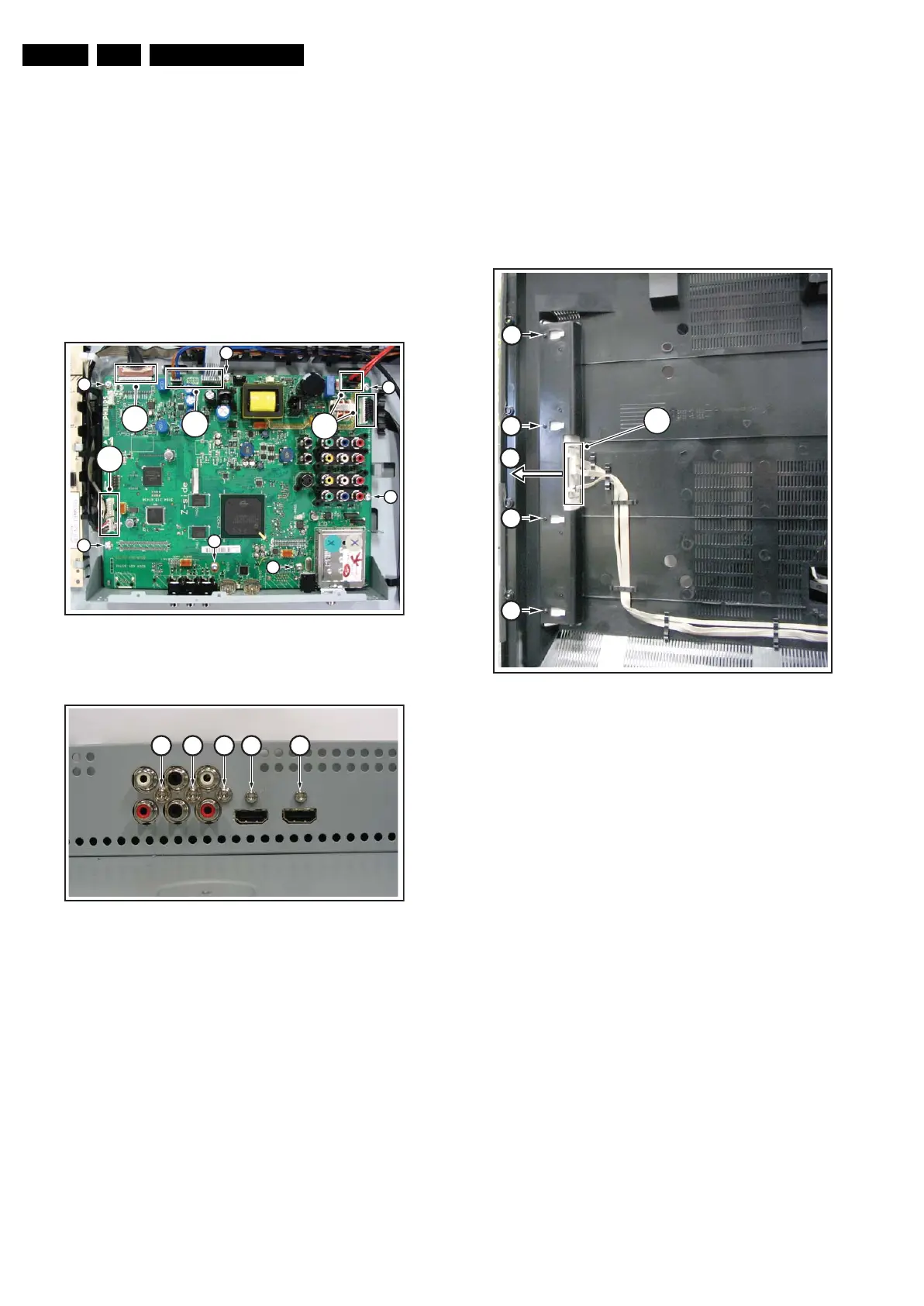
4.3.9 Small Signal Board (SSB)
Caution: it is mandatory to remount all different screws at their
original position during re-assembly. Failure to do so may result
in damaging the SSB.
Refer to figures “Small Signal Board -1-” and “Small Signal
Board -2-” for details.
1. Remove the tapping screws [1].
2. Unplug the connectors [2].
3. Unplug the LVDS connector [3]. Caution: be careful, as
this is a very fragile connector!
4. Remove the parker screws [4].
5. Remove the tapping screws [5].
6. Carefully lift the SSB at the top and take it out of the set.
Figure 4-18 Small Signal Board -1-
Figure 4-19 Small Signal Board -2-
4.3.10 AmbiLight Unit
The AmbiLight Units are located in the back cover. Refer to
figure “AmbiLight Unit” for details.
1. Remove the screws [1].
2. Unplug the connectors [2].
3. Slide the unit sideways and take it out of the backcover.
When defective, replace the whole unit.
Figure 4-20 AmbiLight Unit
4.3.11 LCD Panel
Refer to figures “LCD Panel -1-” and “LCD Panel -2-” for details.
1. Remove the vertical brackets [1] by removing the screws
[2].
1. Unplug the connectors [3].
2. Unplug the LVDS connector [4] from the LCD panel.
Important: Be careful, as this is a very fragile connector!
3. Unplug the connectors [5] from the speakers.
4. Remove fixation screw [6] from the side I/O panel.
5. Unplug connector from LED I/R panel as earlier described
[7].
6. Remove fixation screws [8] and lift the complete central
sub-frame [6] from the set.
7. Lift the central sub-frame from the set. Refer to figure
Central Sub-frame lift for details.
8. Lift the LCD panel from the front cabinet.
H_16770_092.eps
220307
2
2
3
2
1
1
1
1
1
1
1
H_16770_093.eps
130707
4 4 4 5 5
H_16770_094.eps
240707
2
1
1
1
1
3




 To Next Page