Mechanical Instructions
EN 17Q528.1A LA 4.
4.4 Assy/Panel Removal Aurea Styling
Note: Pictures in this section are taken from European chassis
(only difference: use of another Small Signal Board).
4.4.1 Rear Cover
Warning: Disconnect the mains power cord before you remove
the rear cover.
Note: it is not necessary to remove the stand while removing
the rear cover.
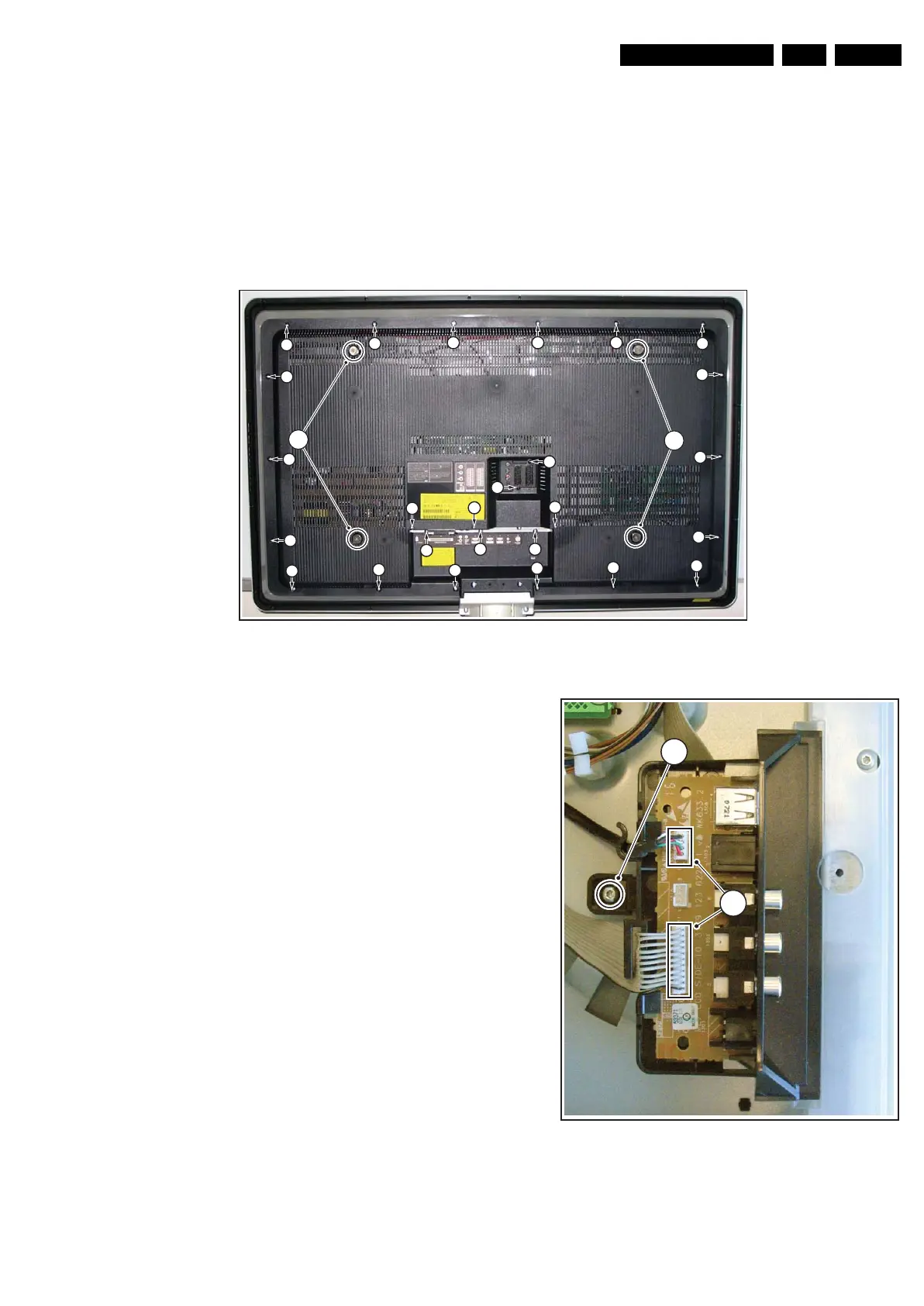
Refer to next figures for details.
Figure 4-24 Rear Cover Removal
1. Place the TV set upside down on a table top, using the
foam bars (see part “Foam Bars”).
Caution: do not put pressure on the display, but let the
monitor lean on the cabinet!
2. Remove the mushrooms [1].
3. Remove the screws [2].
4. Lift the rear cover from the TV.
4.4.2 Side I/O Board
Refer to next figure for details.
1. Unplug both connectors [1] and remove the screw [2].
2. Lift out the whole unit.
When defective, replace the whole unit.
Figure 4-25 Side I/O Board
H_16801_103.eps
270807
2
2
2 22
2
2
2
2
2
2
2
2
2
2
2
2
2 2
2
2
2
2
2
2
2
1
1
H_16801_104.eps
270807
2
1










 To Next Page