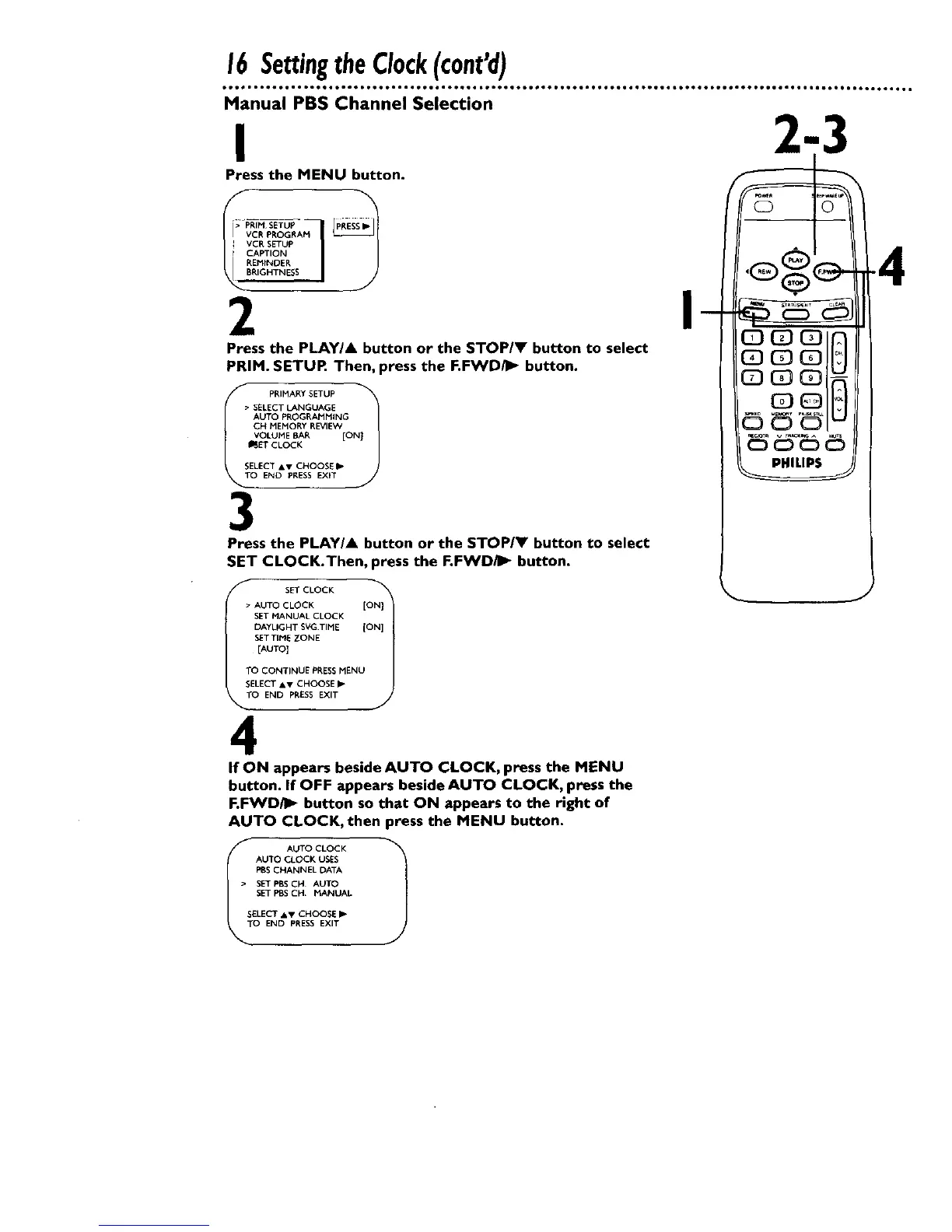
Manual PBS Channel Selection
I
Press the MENU button.
r>_PRI_ SETUP J
RIGHTNESS
2
Press the PLAYIA button or the STOP/Y button to select
PRIM. SETUR Then, press the F.FWD_- button.
IT PRIMARY SETUP
SELECT LANGUAGE
AUTO PROGRAMMING
CH MEMORY REVIE_/
VOLUME BAR [ON}
I_ET CLOCK
SELECT &V CHOOSE I_
0 END PRESS EXIT
3
Press the PLAY/A button or the STOP/V button to select
SET CLOCK.Then, press the F.FWD/I_ button.
n
SET CLOCK
• AUTO CLOCK ION}:!
SET MANUAL CLOCK
DAYLIGHT SVGTIME {ON]
SETTIME ZONE
[AUTO]
TO CONTINUE PRESSMENU
SELECT &v CHOOSE I_-
TO END PRESS EXIT
4
If ON appears beside AUTO CLOCK, press the MENU
button. If OFF appears beside AUTO CLOCK, press the
F.FWD/_ button so that ON appears to the right of
AUTO CLOCK, then press the MENU button.
_O AUTO CLOCK 1
AUTO CLOCK USES
PBS CHANNEL DATA
• SET PBS CH AUTO
SET PBSCH MANUAL
SELECT AV CHOOSE I_"
END PRESS EXIT










 To Next Page