34
Rerecording (Tape Duplication)
1
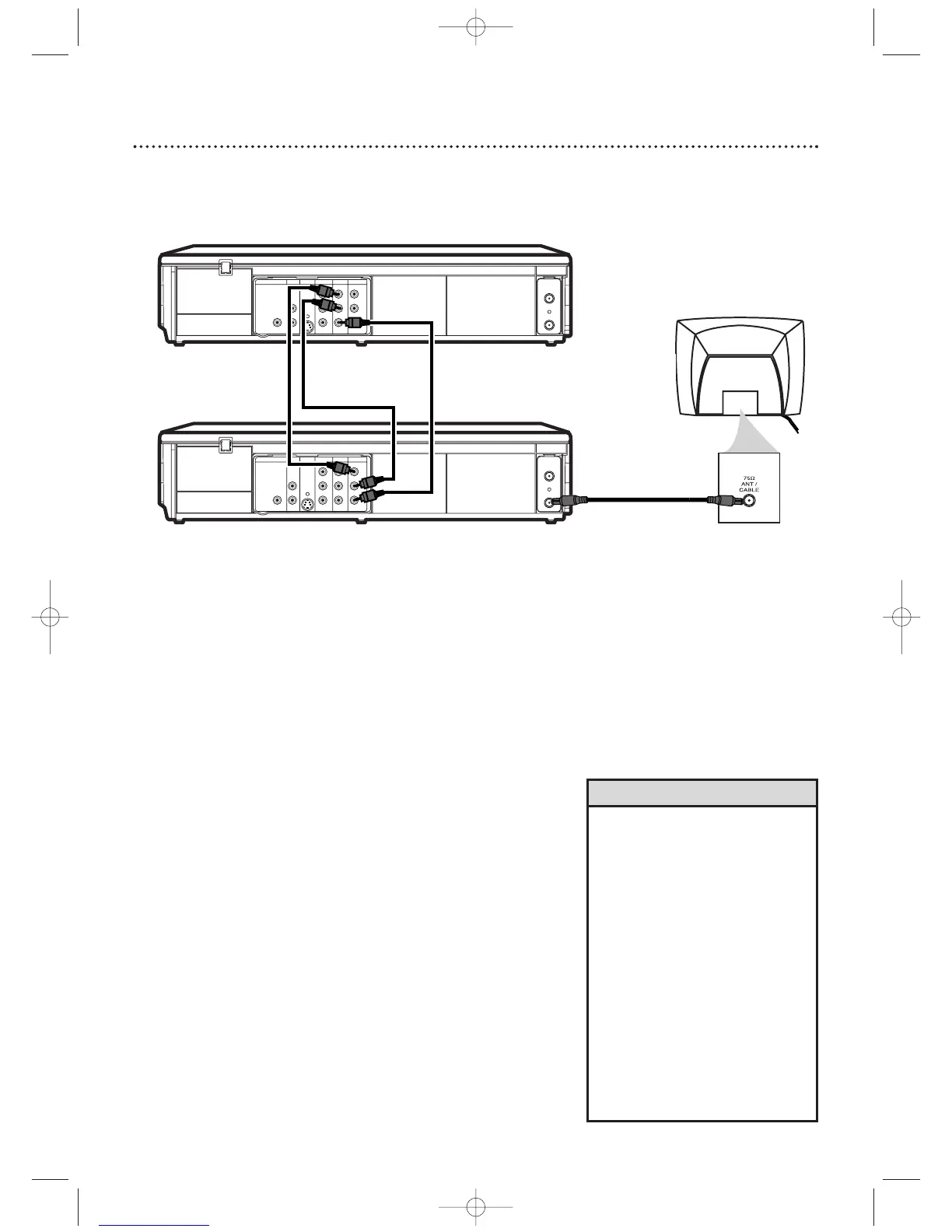
Make the connections shown above.
2
DVD/VCR 1 will play your tape. Put a prerecorded tape
into the cassette compartment of DVD/VCR 1.
Press VCR to put the unit in VCR mode if necessary.
3
DVD/VCR 2 will record your tape. Insert a blank tape in
the cassette compartment of DVD/VCR 2.
Press VCR
to put the unit in VCR mode if necessary.
4
Turn on the TV and set it to channel 03 or 04 (the
RF output channel of DVD/VCR 2).To determine the
DVD/VCR’s output channel, see step 4 on page 7.
5
Point the remote control at DVD/VCR 2. Press
Number buttons 0, 0, 1 or 0, 0, 2. (See Helpful Hints on
the right.)
6
Press SPEED to select SP or SLP at DVD/VCR 2.
7
Press PLAY B (VCR) on the front of DVD/VCR 1
and RECORD I on the front of DVD/VCR 2 at the
same time.
To stop recording, press STOP/EJECT C A (VCR) on
DVD/VCR 1, then press STOP/EJECT C A (VCR) on
DVD/VCR 2.
DVD/VCR 1
Playing unit
DVD/VCR 2
Recording unit
1. Audio cables from AUDIO OUT jacks (red and white)
of DVD/VCR 1 to AUDIO IN jacks of DVD/VCR 2
3. RF coaxial cable from the ANT-OUT
(Antenna Out) jack of DVD/VCR 2
to the TV’s ANTENNA IN jack
• If you use the AUDIO and VIDEO
IN jacks on the back of DVD/VCR
2, press Number buttons 0, 0,
1 at
step 5. L
1 will appear on the TV
screen.
• If you use the AUDIO and VIDEO In
jacks on the front of DVD/VCR 2,
press Number buttons 0, 0, 2 at
step 5. L2 will appear on the TV
screen.
• Unauthorized recording of
copyrighted television programs,
video tapes, or other materials may
infringe on the rights of copyright
owners and violate copyright laws.
• If a program has copyright
protection, it may not be recorded
clearly.
Helpful Hints
These instructions show you how to copy videotapes.The illustration uses two DVD/VCRs. Other VCRs or
Camcorders may operate differently.
2. Video cable from yellow VIDEO
OUT jack of DVD/VCR 1 to
VIDEO IN jack of DVD/VCR 2












 To Next Page