29
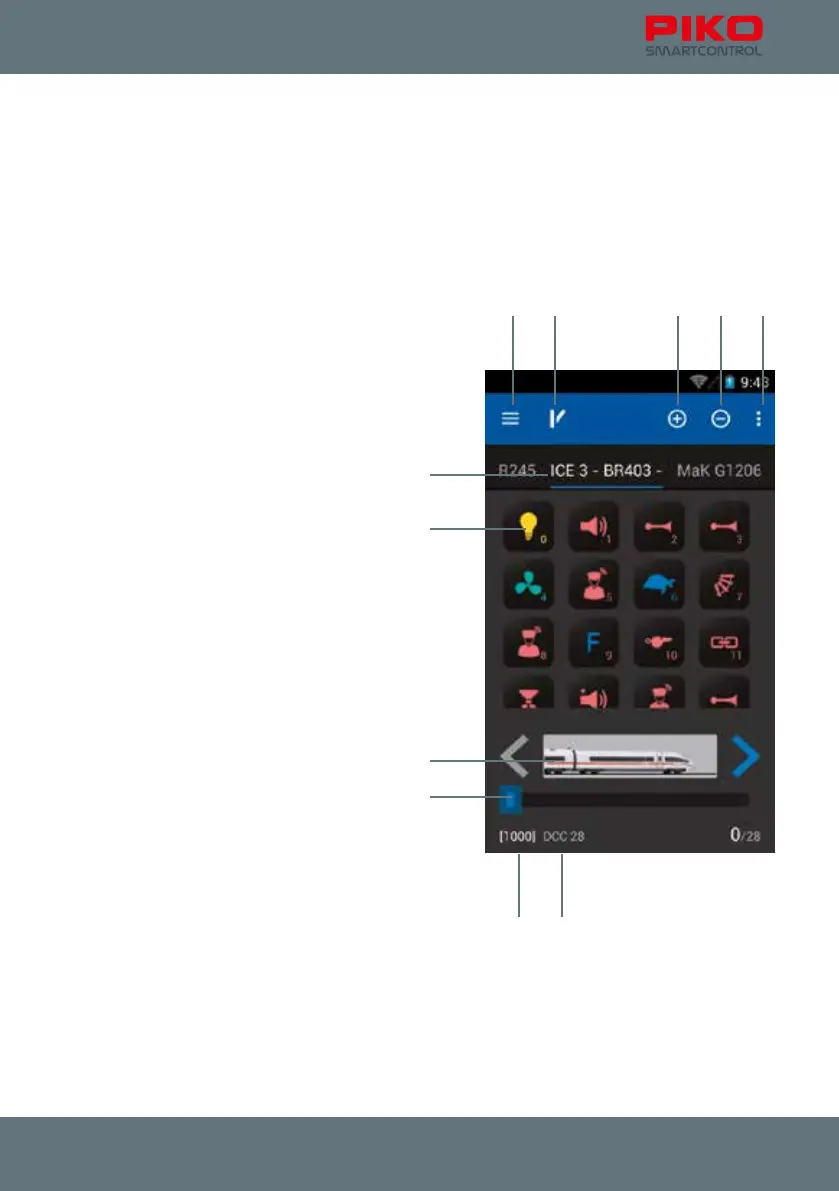
4.2 The control panel
This is the revolutionary feature of the PIKO SmartControl
®
System:
By a simple touch with a nger you can easily activate functions, switch between different locos,
change the speed, see the names and the actual state of the functions, program, edit, switch to
accessories and much more!
The intuitive nature of the Google Android operating system and the easily recognizable function
symbols make it possible to control a model railroad layout in the simplest and intuitive way.
Symbols
1 Main Menu button top left
2 Switch panel symbol top left, switch
3 „Plus“-Symbol
4 „Minus“-Symbol
5 Menu button top right
6 Control panel / loco overview
(active loco is underlined)
7 Available functions of a loco
8 Loco picture and driving direction
9 Current speed (driving Steps)
10 Loco address (square brackets bottom left)
11 DCC format (next to square bracket)
Basic function
Simply brilliant – brilliantly simple! This is the slogan of the new PIKO SmartControl
®
System.
And now you can experience that, too: Choose a loco, change the speed or activate any functions –
simply by touching the display.
If you decided to buy one of the PIKO Premium Train Sets you just need to put a loco on the track,
conrm the automatic RailComPlus registration and you can experience how simple it can be to control
a digital layout. Just try it!
1 2 3 4 5
6
7
8
10 11
9



 To Next Page