System
16
3.1 Installing the PIKO SmartBox
®
If you like to, you can permanently mount your PIKO SmartBox
®
after choosing a place that fullls the
aforementioned requirements.
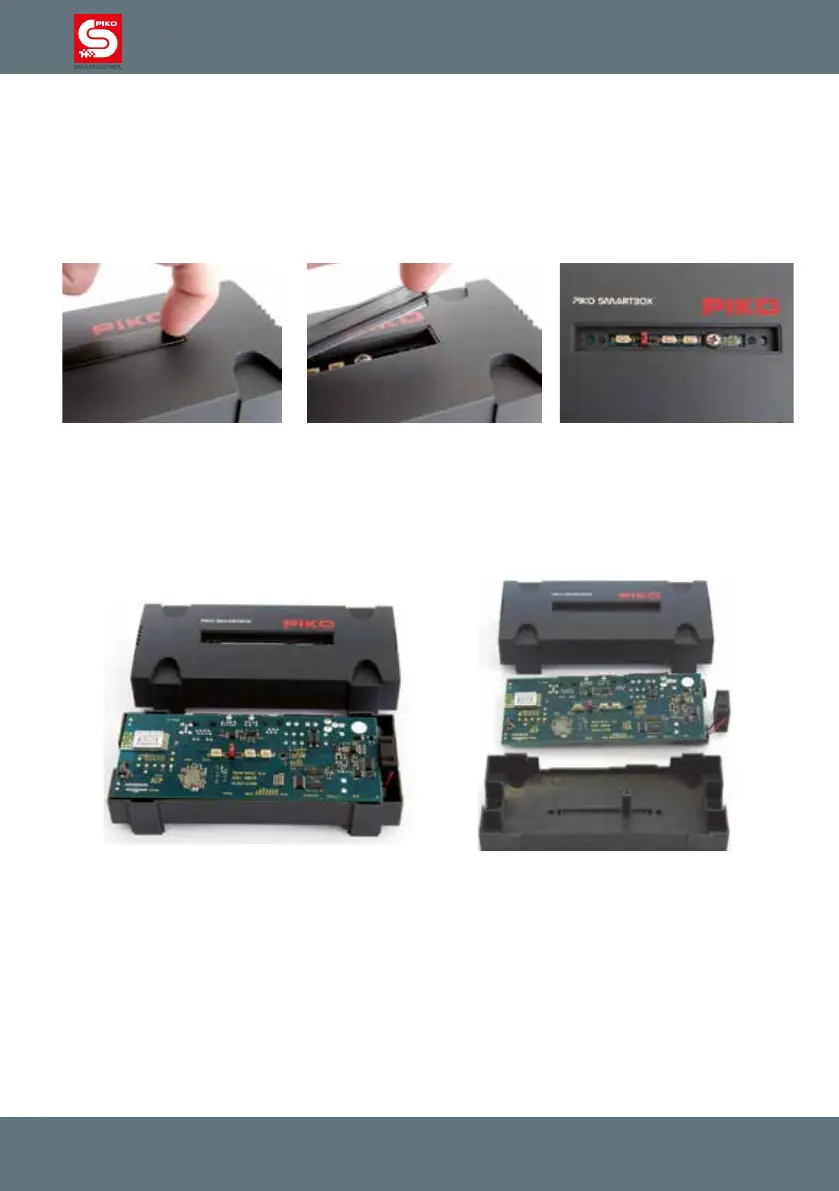
Remove the small cover plate on top of the unit (using your ngernails) and remove the crosshead
screw underneath.
After the screw has been removed you can lift the upper part of the housing.
Next carefully remove the mainboard of the PIKO SmartBox
®
by lifting it up. The best way to do that is
to use the two handling areas on the left and right side.
Please take care for the fan which is placed in the bottom part of the PIKO SmartBox
®
housing. It has a
loose t, so you easily can pull it out without any use of force.
Now place the mainboard carefully onto a soft and non-conductive surface, such as a plastic plate.
After that you can see two holes on the bottom which can be used to x the lower housing to a table.
Attention! To avoid any possibility of short circuits cover the screw heads with electrical tape.
Reassemble in reverse order. Please take care not to bend or damage anything.
Any use of force should be avoided, otherwise the highly sensitive electronics may be damaged.



 To Next Page