System
34
4.2.3 “create consist”
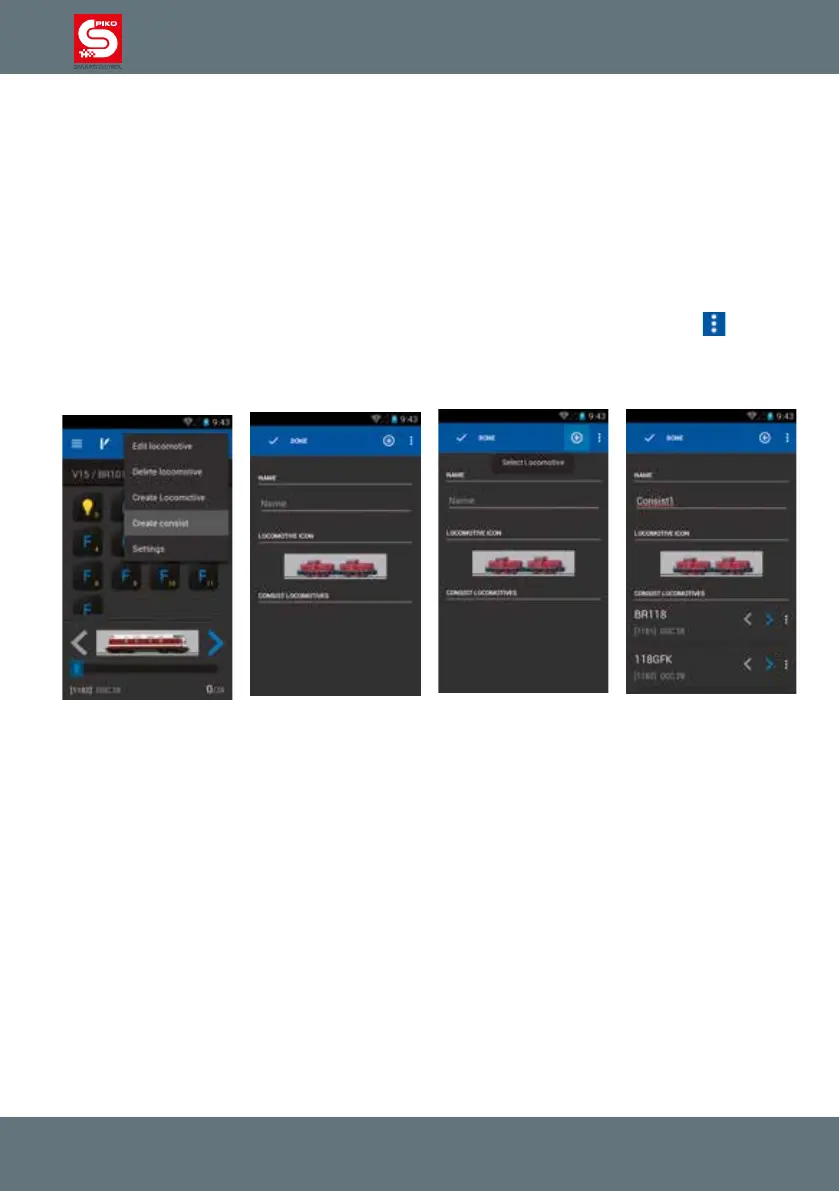
With the help of this menu you can „virtually“ create consists, including up to four locomotives.
After choosing “create consist” you will be redirected to a new menu.
First of all you can enter a name for the new consist. According to the consist-type you also can choose
whether it’s a diesel, steam or electric consist by touching the picture. It will show you the overview of
available locomotive pictures.
To add locos to the consist, please press the “plus”-symbol in the upper right corner of the screen.
It will show you the locomotive list where all automatically registered and manually added locomotives
are stored.
After adding a locomotive to the consist you can change the driving direction or edit this locomotive
again, by pressing the small menu-symbol at the end of the line (behind locomotive name:
)
Please note:
After adding a locomotive to the consist it will not show up in the locomotive list again when adding a
second or third locomotive to this consist.
4.2.4 Controlling a locomotive
You can change the speed by turning the analog knob or by moving the speed-bar on the display. No
matter how you adjust the speed the analog knob and the display will always stay in synch by either
automatically moving the knob or adjusting the display value.
Activating functions
Touching a function will activate or deactivate the function.
Depending how the function is congured (momentary / permanent / inverted) the function will remain
active or will turn off again once you remove your nger.
Change of driving direction
There are two ways you can change the driving direction:
Changing driving direction via the display:
You change the direction via the left and right arrows on the locomotive’s picture independently of the
locomotive’s current speed. The loco will decelerate, stop, switch direction and accelerate to the same
speed as before.
Please take care when doing this, in case the loco might end up pushing cars at high speed. This may
cause derailments.



 To Next Page