System
68
9. PIKO SmartController
®
Accessories
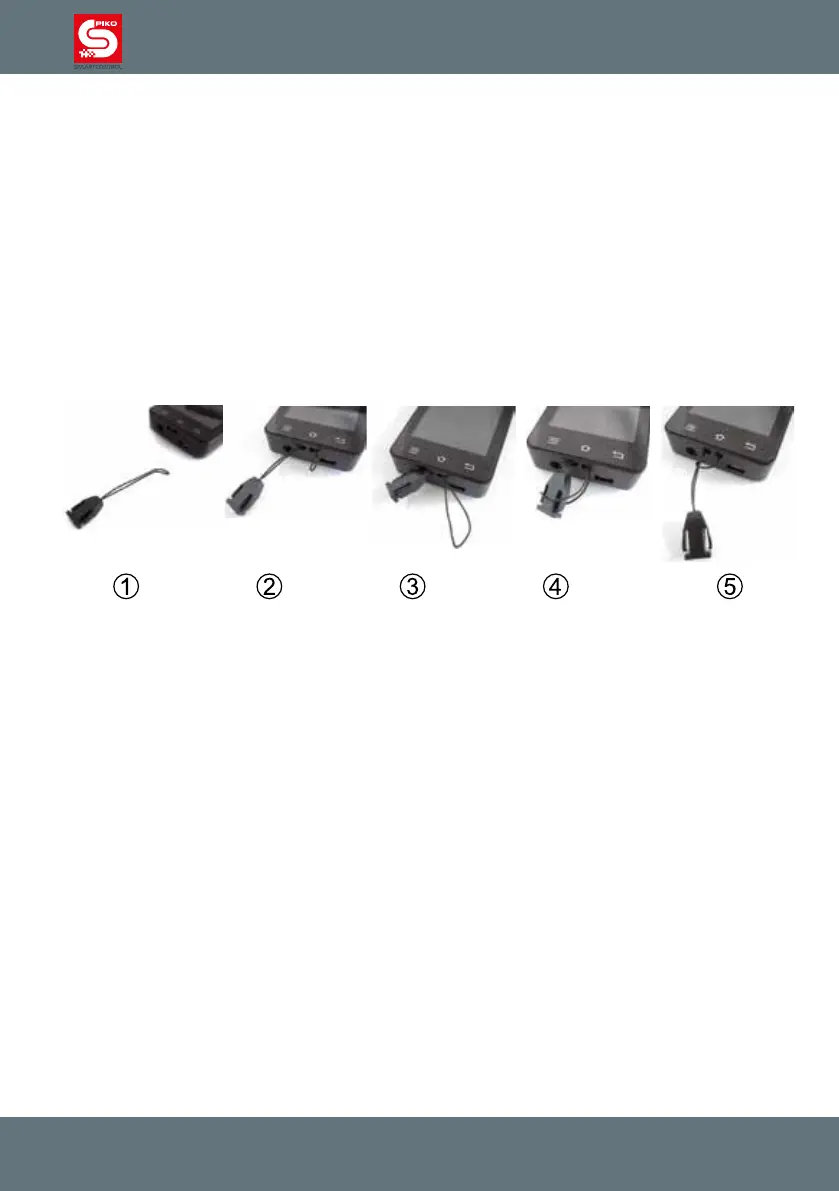
9.1 Attaching the lanyard
1st step: Remove the clip from the lanyard and press the small loop together. Bend the top a little so
that it is easier to insert.
2nd step: Insert the string into the intended opening on the device and try to loop it back out. In case
this proves difcult we suggest you use tweezers to loop it back out.
3rd step: Pull the string out
4th step: Open the loop and put the clip through it
5th step: Pull on the clip to close the loop. Now you may attach the lanyard string to the clip.
9.2 Changing the battery of the PIKO SmartController
®
If at some point battery capacity has degraded or the battery is dead, it is possible to replace the
battery.
Follow the steps below:
1. Switch the device off. Ensure it is completely turned off.
2. Put the device on a soft surface with the display towards the bottom. Ensure that the surface is free
from sharp objects to avoid any damage to the display.
3. Remove the three screws on the cover
4. Carefully lift of the cover. ATTENTION: A wire connects the cover to the main circuit board* Handle
with care!
5. Now you can carefully remove the battery carefully and unplug it from the main circuit board.
6. Plug in the new battery. Place it into the device. Make sure you do not to damage the wire.
7. Place the cover into the housing bottom side rst and then close the cover. Remember the wire!
Make sure to not bend, twist or damage it when closing the cover.
8. Before tightening the screws ensure the cover can close properly without any pressure. If there is a
problem, please check the wire’s position and try again.



 To Next Page