31
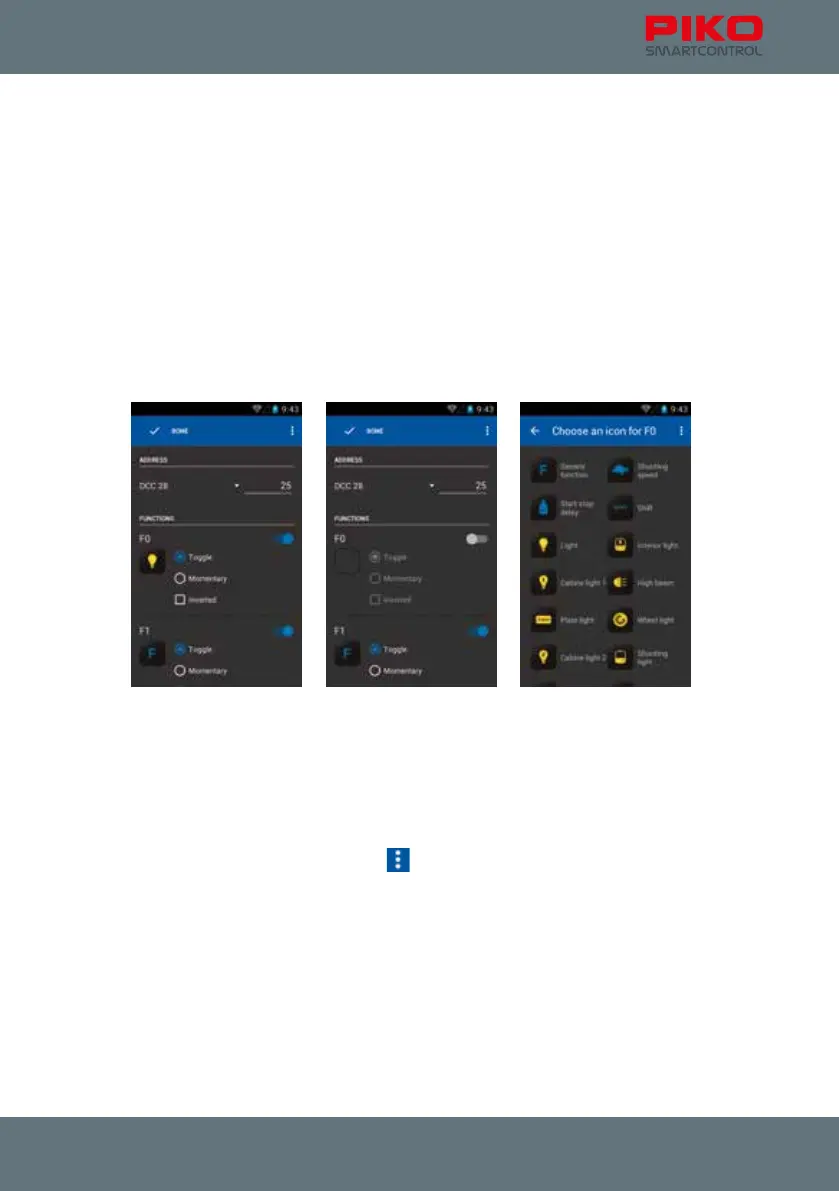
For the available functions you can congure the following:
• The symbol – just touch it to change it
• The way the function will operate: permanent, momentary or inverted
A permanent function will remain active after touching it once.
A momentary function will only remain active as long as the button is pressed.
Inverted functions are on by default. That means, if a permanent function is marked with “inverted” it
will remain activated until the button is touched once. It will be off as long as the button is touched.
Activate / deactivate a function
The blue slide-button next to a function can activate or deactivate this function. If the function is off,
the button will be grey. In this situation the function will not be shown in the control panel, unless you
changed some options in the settings menu.
Function symbols
You can choose a suitable icon for each function. Just touch the function symbol („F“) and a list with all
available icons will open up.
Notice:
Please note that all changes will be stored automatically if you leave this menu with the back button,
except if you choose “discard changes” with the
-button. So please take care when changing any
setups!



 To Next Page