75
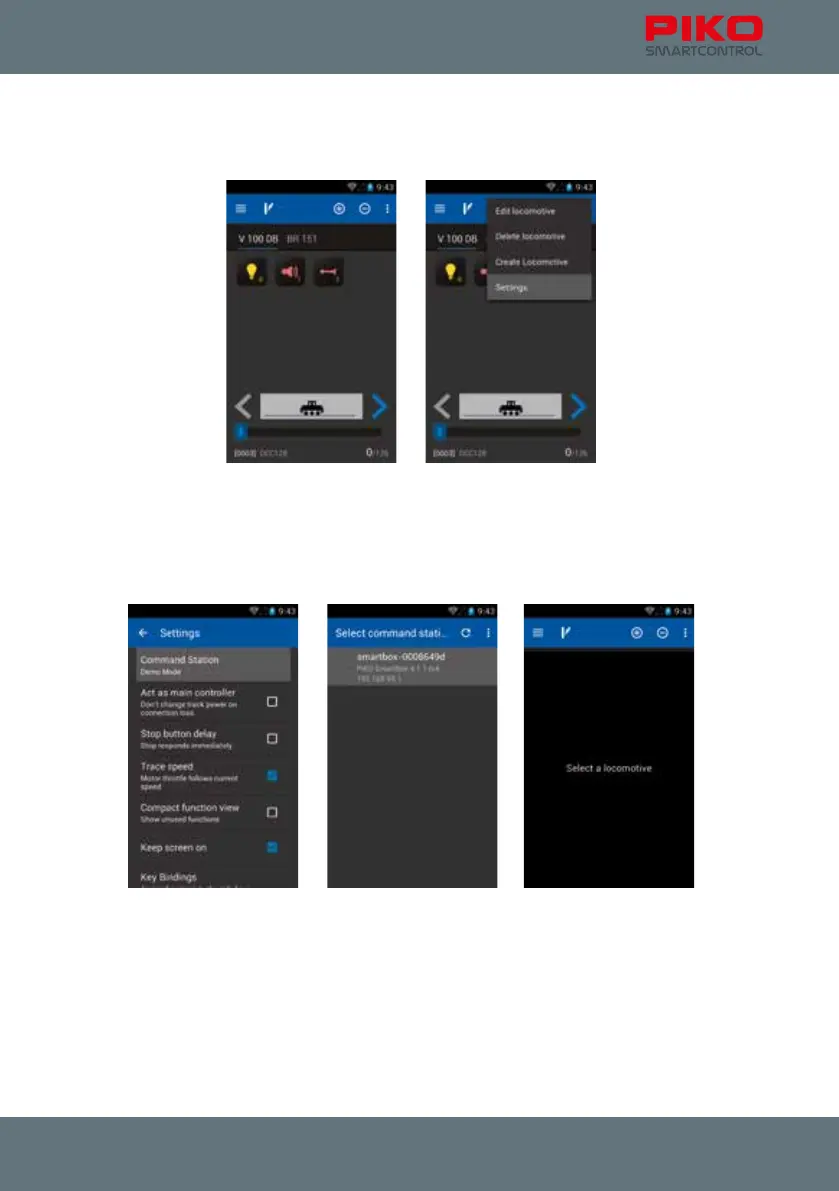
1. start the SmartControl
®
app
2. press the menu-button (top right or hardware-button)
3. choose “settings”
4. go to “command station”
5. in case your WiFi is OK you should see your correct PIKO SmartBox
®
here. Choose it by touching on
it.
6. Now the app should redirect you to the settings menu now. Press “undo” once and you should be
redirected to the control panel. Now you can control your layout again.
I installed a new app. Now the PIKO SmartControl
®
app doesn’t work anymore.
Please understand that we cannot ensure all combinations of software/hardware and apps to work.
Due to the immense number of apps it may happen that some of them don’t work properly.
If you are sure that the last installed app caused a problem, please uninstall it rst. If this doesn’t help
you can do a factory reset.



 To Next Page