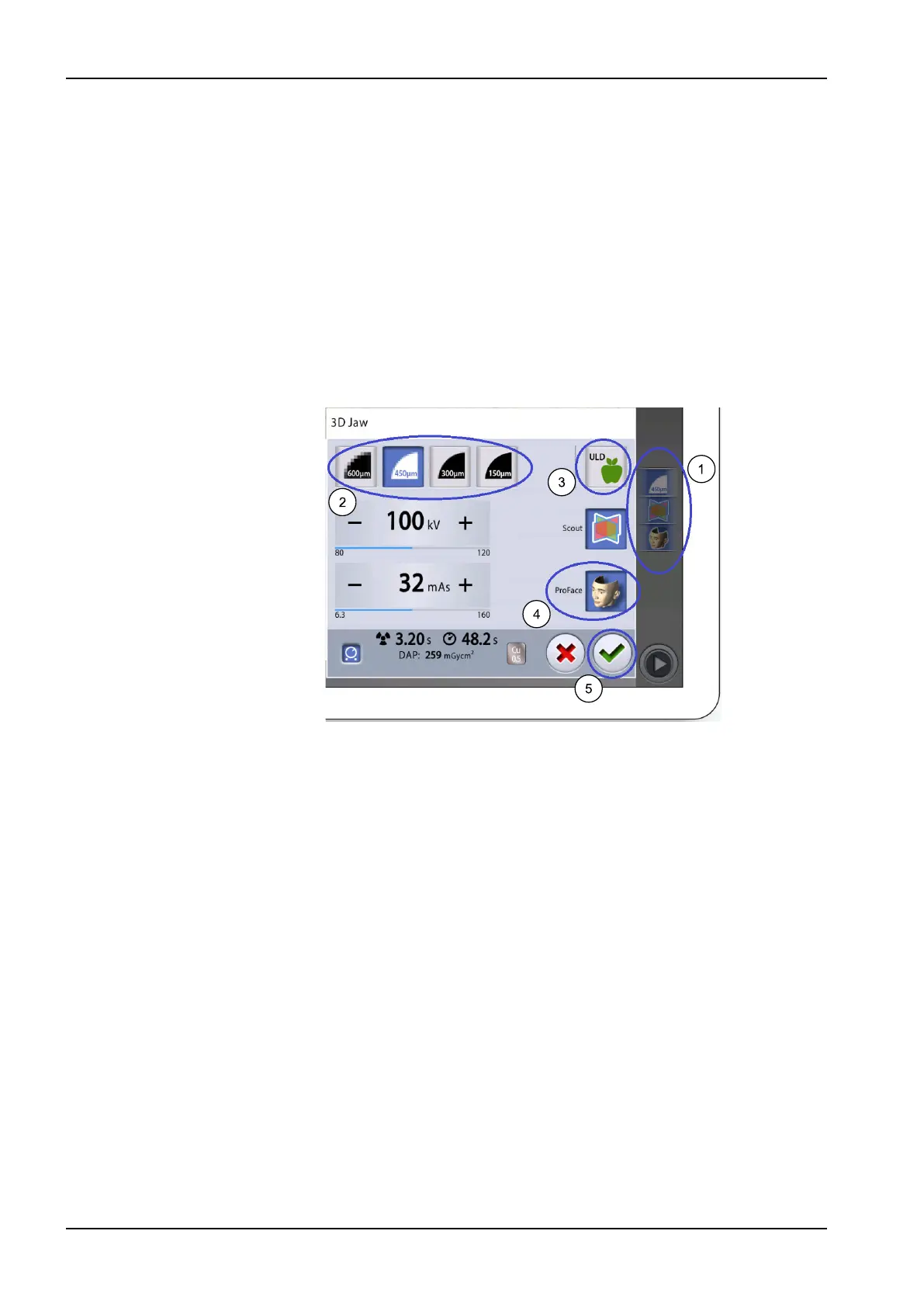
11.7 Selecting image resolution, Ultra Low Dose (ULD) and ProFace
Steps
1. Select field (1) to open a pop-up window.
2. Select the image resolution you wish to use (2). The voxel size options
are 600 / 450, 300, 200, 150 and 75 micrometres, depending on the
selected program.
3. Select the ULD (Ultra Low Dose) button (3) if you want to take an
exposure with a very low dose. The voxel size buttons turn green and
show a small apple.
4. Select the ProFace (optional feature) button (4) to add the 3D photo to
the exposure.
5. Select the green check mark button (5).
NOTE
The available options depend on the selected program.
NOTE
The exposure values will automatically change according to the selected
patient size, image resolution and ULD setting. The preset exposure
values are shown in section "Adjusting exposure values for current
exposure" on page 60.
11.8 Adjusting exposure values for current exposure
About this task
NOTE
Always try to minimise the radiation dose to the patient.
The exposure values have been preset at the factory for each patient size,
image resolution and ULD (Ultra Low Dose) setting. The preset exposure
values are average values and they are only meant to guide the user.
The preset exposure values are shown in the following tables.
11 3D exposure
60 Planmeca Viso User's manual












 To Next Page