Legend Pro™ System User Manual Version 7
Proprietary Information of Pollogen a company of Lumenis 39
11.4 VoluDerm ™ Treatment Application
11.4.1 Select VO Treatment Applicator
Select the VoluDerm ™ (VO) Application on the home screen to start the VO treatment.
11.4.2 VoluDerm ™ treatment level
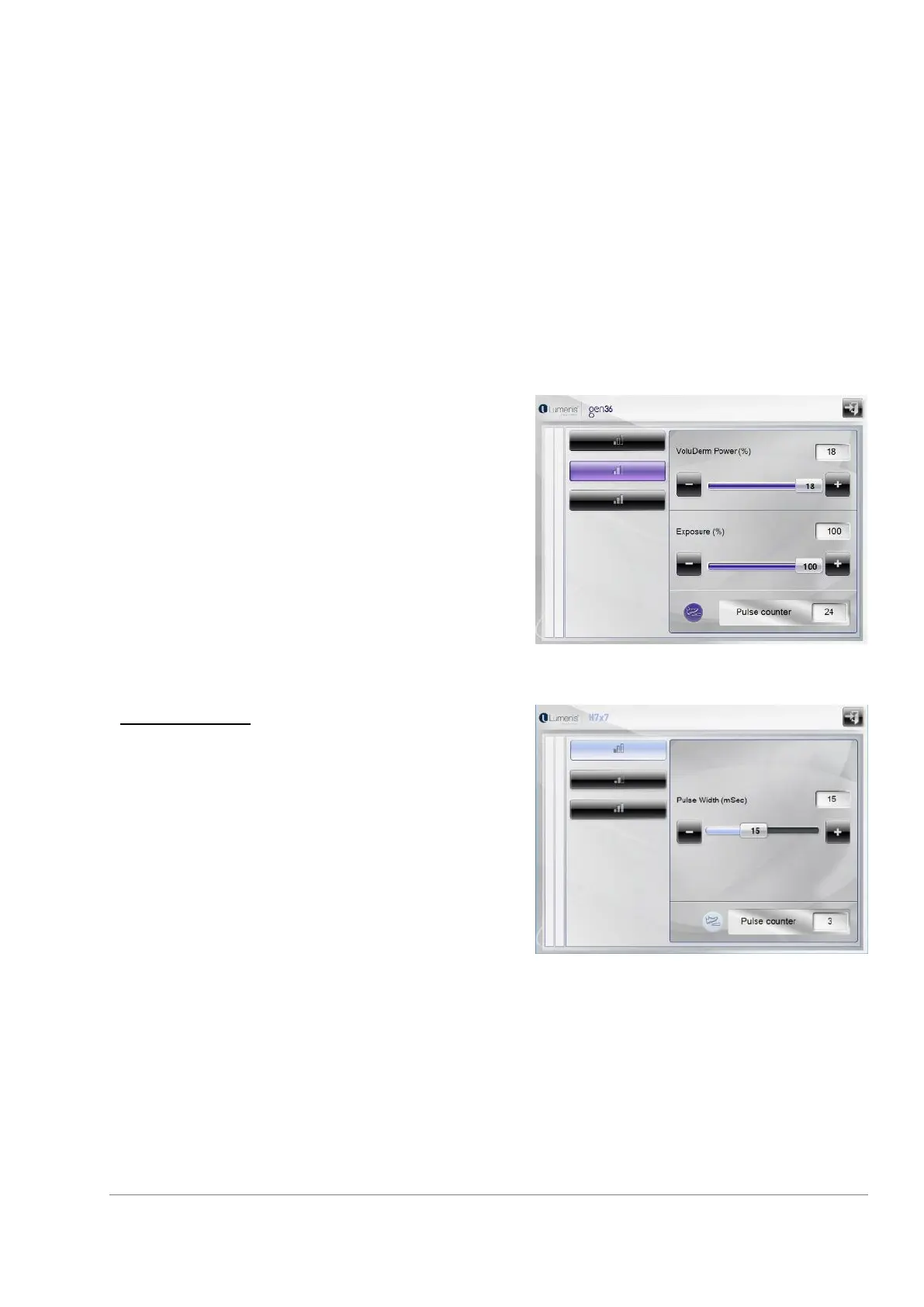
VoluDerm ™ application enables 3 treatment levels: Low,
Medium, High. Programs are distinguished by their
configuration settings (default parameters and range of
parameters values). In each program, changes can be
made to the following parameters: VoluDerm ™ power
(%) and Exposure (%).
(Applicator VO with gen 36 is used as an example in
below screens)
To change each parameter move the slider, right to
increase or left to decrease, or press on the “+“or “-”
button accordingly.
TriFractional H7X7
TriFractional operation mode enables 3 treatment levels:
Low, Medium, and High.
Programs are distinguished by their configuration
settings (default parameters and range of parameters
values). In each program, adjustments can be made to
the Pulse Width parameter.
To adjustment each parameter move the slider, right to
increase or left to decrease, or press on the “+“or “-”
button accordingly.



 To Next Page