PowerFleet
®
VAC4 and VAC4S Hardware User’s Guide
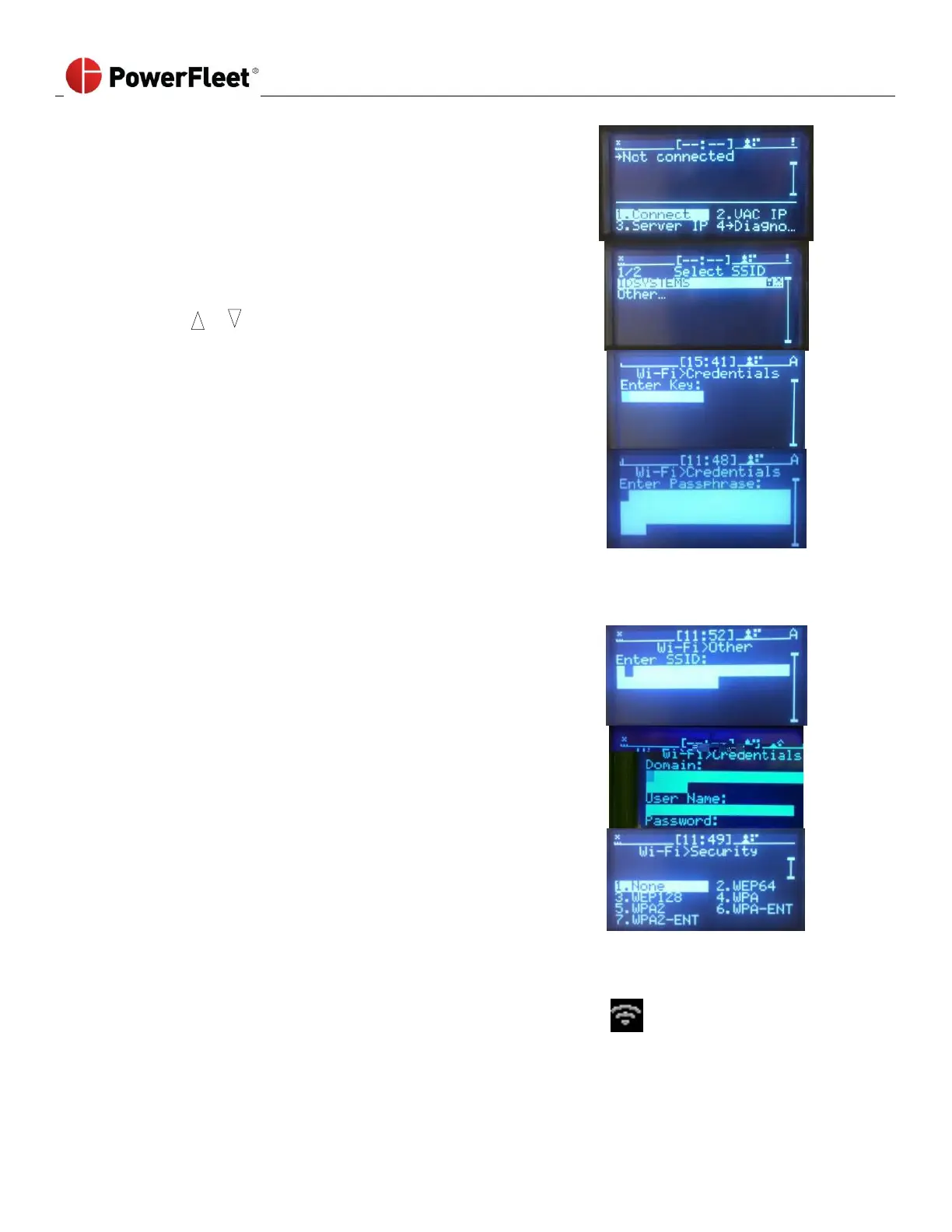
7. From the VAC menu screen, select CONNECT.
8. Connect to the facility’s wireless network.
a. If the VAC display lists the desired SSID, use the up and
down scroll arrows keys to select the desired SSID from
the list.
9. Enter the Key for Wi-Fi Credentials.
i. Press ENTER.
ii. Enter the credentials for the selected SSID in
the locations provided. Use the navigation
arrows to skip to different areas of the text
entry boxes.
Note: For WEP credentials, 10 or 26 HEX (0-9;A-F) characters must be entered (ASCII entry not permitted).
iii. Press ENTER.
iv. The VAC will automatically attempt to connect to the selected SSID using the credentials provided.
b. If the VAC display does not list the desired SSID, select
OTHER. Press ENTER.
i. Using the VAC keypad, manually enter the SSID.
ii. Select the security method that corresponds
with the SSID.
iii. Enter the credentials for the SSID.
Note: For WEP credentials, 10 or 26 HEX (0-9; A-F) characters must be entered (ASCII entry not permitted).
iv. The VAC will automatically attempt to connect to the SSID using the credentials provided.
Note: To successfully connect, the VAC must be within wireless communication range of the SSID.
10. Once connected, the VAC screen displays the Wi-Fi status indicator.
11. For instruction on how to broadcast the VAC’s Wi-Fi credentials to nearby VACs that have not been configured,
refer to the next section: Wirelessly receiving credentials from a nearby Wi-Fi-configured VAC.



 To Next Page