EasyManua.ls Logo

PowerFleet VAC4 - Changing the VAC Data Transmission Settings

Default Icon
100 pages
Print Icon
To Next Page IconTo Next Page
To Previous Page IconTo Previous Page
Loading...
PowerFleet
®
VAC4 and VAC4S Hardware User’s Guide
085-00000700 Rev K
support@powerfleet.com
Page 51 of 103
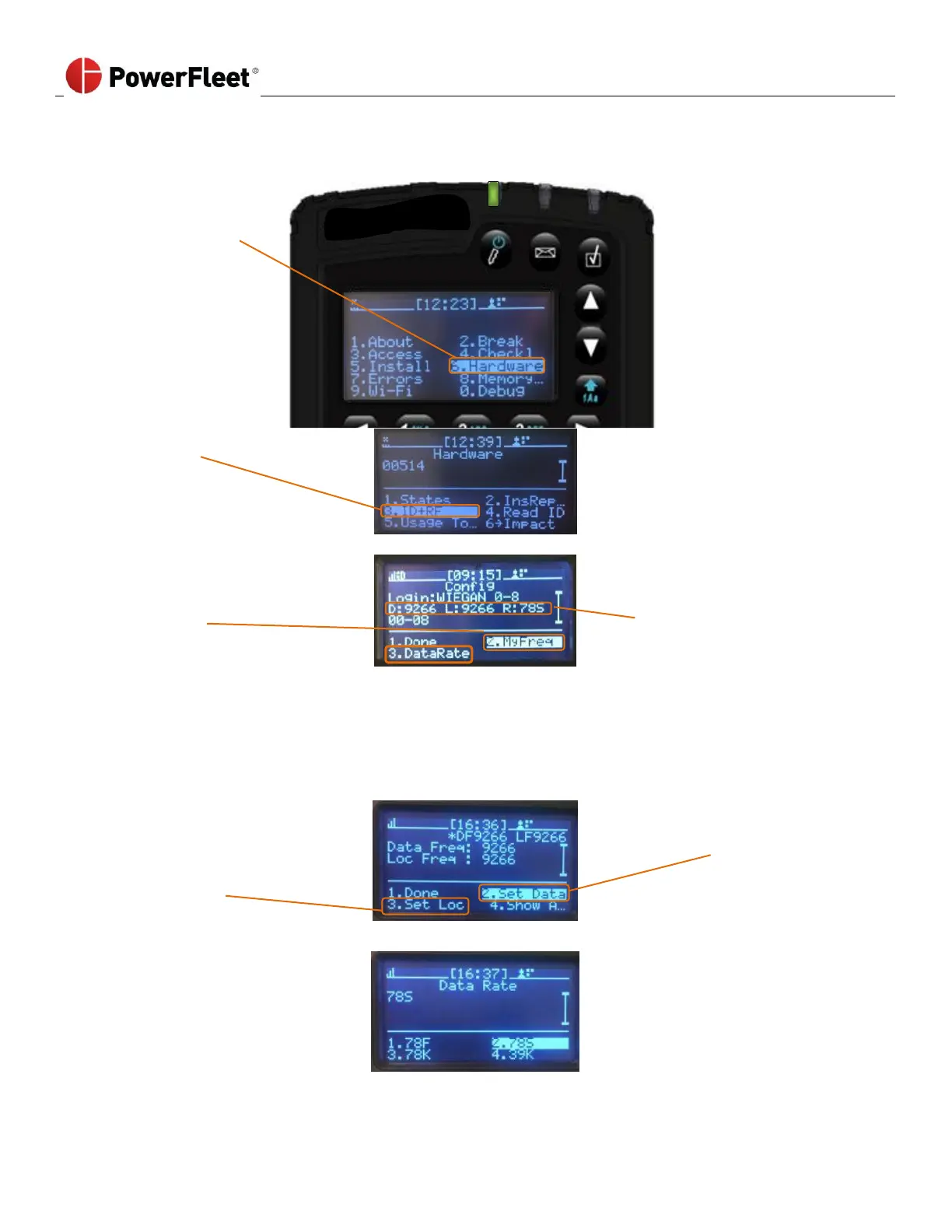
Changing the VAC Data Transmission Settings
Maintenance operator must perform the following:
1. Log into the vehicle.
2. Select HARDWARE.
3. On the “Hardware”
sub-menu,
select ID+RF.
4. On the “ID+RF” sub-
menu, to change the
RF communication
frequency,
select MyFreq.
D
Data Frequency,
iRF VAC data
transmission
L
Location Frequency, iRF
uses to determine VAC
location
R
Data Rate, iRF data
speed setting
Maintenance operator must perform the following:
1. Change VAC location
frequency by
selecting
SET LOC and picking
the desired
frequency
Change VAC data
frequency by selecting
SET DATA and picking
the desired frequency.
2. On the “ID+RF
sub-menu,
select DataRate to
change the VAC
transmission data
rate.

Table of Contents

Related product manuals