PowerFleet
®
VAC4 and VAC4S Hardware User’s Guide
VAC Interface: LCD, Keypad, ID Reader and LEDs
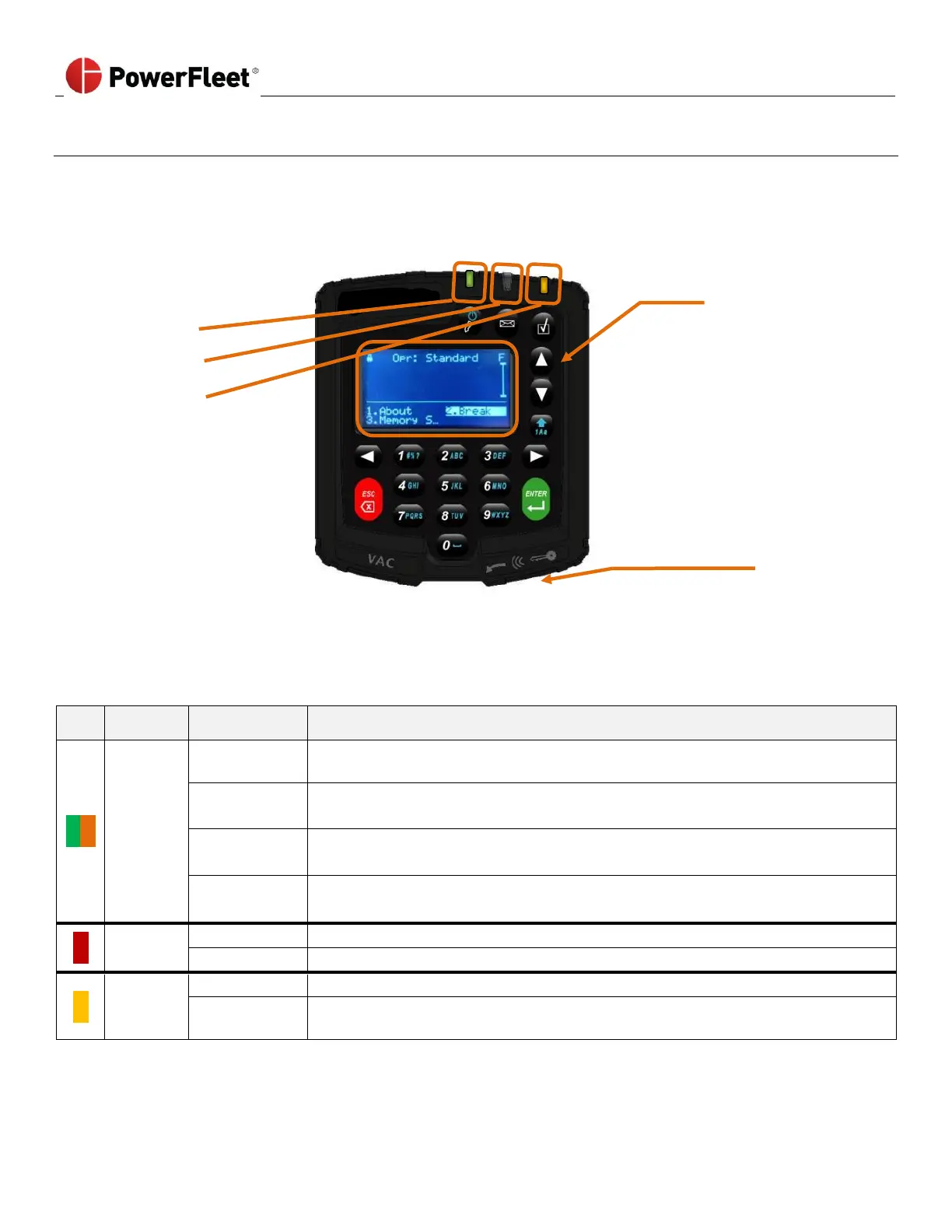
The VAC incorporates a 20-key keypad that is easy to read and operate. The graphical LCD screen remains backlit for
15 seconds after any key is pressed on the keypad. The VAC integrates an electronic identification reader for vehicle
access control. Operators use individual access identification “keys” to the vehicle. (i.e., iButton fobs, prox cards, etc.).
Vehicle keys may still be required, depending on wiring and can be safely left in the vehicle.
• Numbers for PIN entry and
menu selection
• Letters for configuration
inputs
• ARROW keys for scrolling
• ENTER and ESC key - menu
navigation
• VAC menu screens
displays: menu
options
• Touch ID to log on or log off and assign a Temporary User
Status Indicators
When the VAC is powered, the VAC has three integrated LEDs for operator and supervisor status indication.
No one logged in and the vehicle is in Registered ID or Any ID mode
(operators must log in to operate the vehicle).
No one logged in and the vehicle is in ID Optional mode
(Anyone can use the vehicle without logging in).
An operator is logged in
(The vehicle should NOT be left unattended in this state).
The vehicle is locked or about to be locked for certain operator levels
(This occurs due to a vehicle impact or other event).
There are no incomplete tasks, no unread text messages, and no active errors.
The vehicle has an unread message, task or an active diagnostic error.
No one logged in and/or the vehicle is compliant for all configured checklists.
There is a checklist that needs to be completed.
Note: When the Access, Message, and Checklist LEDs blink in sequence, the VAC is in ‘programming’ mode and cannot
be used by operators. Call PowerFleet’s Support if this condition persists for more than twenty-five minutes.



 To Next Page